Cluster Versions Help Guide
Any brick mapping files you have received from the brick provider must be converted into uploadable .csv files. This is the case for all country/provider combinations where the brick mapping is based on postal codes.
Each country/provider combination has specific requirements. The format is established in the initial cluster version (Version 1.0).
Review the mappings for each country and provider before uploading the mapping to Network MDM.
Important: Custom cluster versions will be supported in version 26R3.0 (December 2026). For details, see the Veeva Network MDM 26R3.0 Release Notes.
Before you begin
Brick versions can be created for existing country/brick provider configurations.
If you do not yet use the Cluster Management feature, or if this is a new country or brick provider, contact Veeva Support.
For details, see Managing cluster data.
Third party agreement
A third party agreement (TPA) must be signed with the brick provider so you can share the data with Veeva.
Supported brick files
You can upload the following files to create a custom cluster version:
-
mapping files based on postal code
Creating custom cluster versions from shape files based on geolocation are not supported at this time. To add a new brick version for a shape file, contact Veeva Support.
Process
To add a version for an existing country/brick provider in your Network MDM instance:
-
Receive the mapping file from the brick provider. The mapping must be based on postal codes.
-
Convert the file to a .csv file with the information that is required for the brick mapping.
-
Use the details in the Help Guide to ensure the file contains the columns and format required for that country/brick provider.
-
Upload the mapping file to create the new version.
General requirements for all mapping files
The following requirements must be strictly followed to successfully upload the file:
-
File format - .csv
Header row - None
-
Delimiter - Comma (,).
-
Text qualifier - Required around all field values (for example, double quotes (")) since some data, such as brick names can include commas (,).
-
Uniqueness - No duplicate rows allowed.
-
File encoding - UTF-8 (without Byte Order Marks" (BOM))
-
Linebreaks - UNIX LF
-
Extra characters - No hidden or non-printable characters
The following sections contain specific details for each country/data provider.
Australia - IQVIA
Mapping logic
Each address is mapped to a brick using its postal code, which returns the corresponding brick code and brick name.
Columns expected in the mapping file
| Column 1 (lookup field) |
Column 2 | Column 3 | Column 4 |
| 4 digit postal code (format = ‘9999’) |
brick code | brick level (autofill with “BRICK”) |
brick name |
Example of expected mapping file
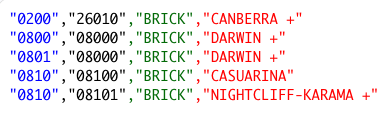
Things to check before uploading the file
-
Postal codes - Must have 4 digits and retain leading zeros.
Belgium - IQVIA
Mapping logic
Each address is mapped to a brick using its postal code, which returns the corresponding brick code and brick name.
Columns expected in the mapping file
| Column 1 (lookup field) |
Column 2 | Column 3 | Column 4 |
| 4 digit postal code (format = ‘9999’) |
brick code | brick level (autofill with “R147”) |
brick name |
Example of expected mapping file
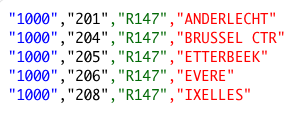
Canada - IQVIA
Mapping logic
Each address is mapped to a brick using its 3 digit postal code, which returns the corresponding brick code and brick name.
Columns expected in the mapping file
| Column 1 (lookup field) | Column 2 | Column 3 | Column 4 |
| First 3 digits of the postal code (format = ‘XXX XXX’) |
brick code | brick level (autofill with “BRICK”) |
brick name |
Example of expected mapping file
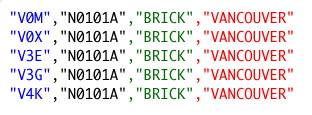
Things to check
-
Postal codes - Split any postal code ranges from the original mapping file (for example, V4N - V4P) into separate rows.
Czech Republic - IQVIA
Mapping logic
Each address is mapped to a brick using its postal code, which returns the corresponding brick code and brick name.
Columns expected in the mapping file
| Column 1 (lookup field) |
Column 2 | Column 3 | Column 4 |
| 5-digit postal code (format = ‘999 99’) |
brick code | brick level (autofill with “BRICK”) |
brick name |
Example of expected mapping file
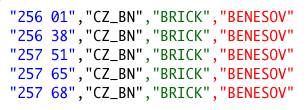
Things to check
-
Postal code - The provider's brick book might list postal codes in the following format: ‘99999’. Ensure the postal code in the mapping file uses the following format: ‘999 99’. There must be a blank between the first 3 digits and the last 2 digits.
Denmark - Signum
Mapping logic
Each address is mapped to a brick using its postal code, which returns the corresponding brick code and brick name.
Columns expected in the mapping file
| Column 1 (lookup field) |
Column 2 | Column 3 | Column 4 |
| 4 digit postal code (format = ‘9999’) |
brick code | brick level (autofill with “BRICK”) |
brick name |
Example of expected mapping file
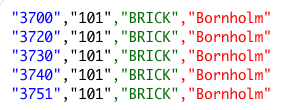
Finland - IQVIA
Mapping logic
Each address is mapped to a brick using its postal code, which returns the corresponding brick code and brick name.
Columns expected in the mapping file
| Column 1 (lookup field) |
Column 2 | Column 3 | Column 4 |
| 5-digit postal code (format = ‘99999’) |
brick code | brick level (autofill with “BRICK”) |
brick name |
Example of expected mapping file
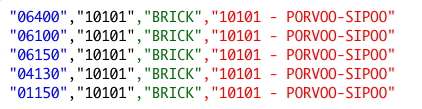
Things to check
-
Postal codes - Must have 5 digits and retain leading zeros.
Finland - Signum
Mapping logic
Each address is mapped to a brick using its postal code, which returns the corresponding brick code and brick name.
Columns expected in the mapping file
| Column 1 (lookup field) |
Column 2 | Column 3 | Column 4 |
| 5-digit postal code (format = ‘99999’) |
brick code | brick level (autofill with “BRICK”) |
brick name |
Example of expected mapping file
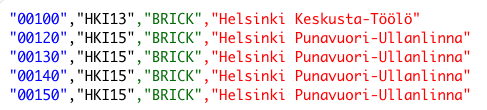
Things to check
-
Postal codes - Must have 5 digits and retain leading zeros.
Germany - Insight Health
Mapping logic
Each address is mapped to a brick using its postal code, which returns the brick code and brick name.
If the first lookup returns multiple results, a second lookup runs using postal code and locality.
If the second lookup finds no match, the non-unique result from the first lookup is used instead.
Columns expected in the mapping file
| Column 1 (primary lookup field) |
Column 2 | Column 3 | Column 4 | Column 5 (secondary lookup field) |
| 5-digit postal code (format = ‘99999’) |
brick code | brick level (autofill with “RPI_2620”) |
brick name | locality (all lowercase letters) |
Example of expected mapping file

Things to check
-
Postal codes - Must have 5 digits and retain leading zeros.
-
Locality (column 5) - Names must be lowercase.
-
Using aliases - To account for different spelling variations of the locality name, you can define aliases in the mapping file.
Example
There are two rows with different spelling variations for the locality name; the locality name is only relevant for the mapping if the postal code does not uniquely map to one brick.

Germany - IQVIA
Mapping logic
Each address is mapped to a brick using its postal code, which returns the brick code and brick name.
If the first lookup returns multiple results, a second lookup runs using postal code and locality.
If the second lookup finds no match, the non-unique result from the first lookup is used instead.
Columns expected in the mapping file
| Column 1 (primary lookup field) |
Column 2 | Column 3 | Column 4 | Column 5 (secondary lookup field) |
| 5-digit postal code (format = ‘99999’) |
brick code | brick level (autofill with “LANDSCAPE”) |
brick name | locality (all lowercase letters) |
Example of expected mapping file
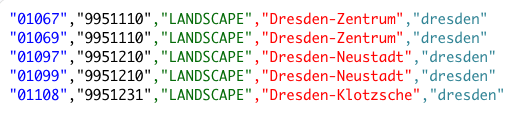
Things to check
-
Postal codes - Must have 5 digits and retain leading zeros.
-
Locality (column 5) - Names must be lowercase.
-
Using aliases - To account for different spelling variations of the locality name, you can define aliases in the mapping file.
Example
There are two rows with different spelling variations for the locality name; the locality name is only relevant for the mapping if the postal code does not uniquely map to one brick.

Greece - IQVIA
Mapping logic
Each address is mapped to a brick using its postal code, which returns the corresponding brick code and brick name.
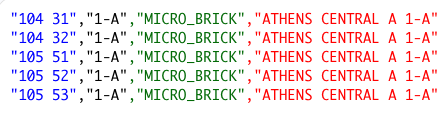
Columns expected in the mapping file
| Column 1 (lookup field) |
Column 2 | Column 3 | Column 4 |
| 5-digit postal code (format = ‘999 99’) |
brick code | brick level (autofill with “MICRO_BRICK”) |
brick name |
Example of expected mapping file
Things to check
-
Postal code - The provider's brick book might list postal codes in the following format: ‘99999’. Ensure the postal code in the mapping file uses the following format: ‘999 99’. There must be a blank between the first 3 digits and the last 2 digits.
-
Mappings - Add distinct mappings for postal codes “41500” and “26500” which might be on separate sheets.
Hungary - IQVIA
Mapping logic
Each address is mapped to a brick using its postal code, which returns the corresponding brick code and brick name.
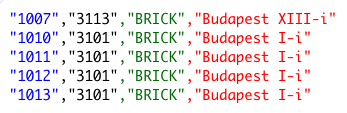
Columns expected in the mapping file
| Column 1 (lookup field) |
Column 2 | Column 3 | Column 4 |
| 4 digit postal code (format = ‘9999’) |
brick code | brick level (autofill with “BRICK”) |
brick name |
Example of expected mapping file
Mexico - IQVIA
Mapping logic
Each address is mapped to a brick using its postal code, which returns the corresponding brick code and brick name.
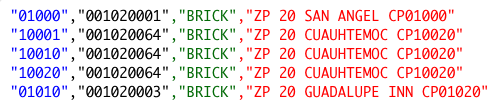
Columns expected in the mapping file
| Column 1 (lookup field) |
Column 2 | Column 3 | Column 4 |
| 5-digit postal code (format = ‘99999’) |
brick code | brick level (autofill with “BRICK”) |
brick name |
Example of expected mapping file
Netherlands - FarmInform
Mapping logic
Each address is mapped to a brick using its 4 digit postal code, which returns the corresponding brick code and brick name.
Columns expected in the mapping file
| Column 1 (lookup field) |
Column 2 | Column 3 | Column 4 |
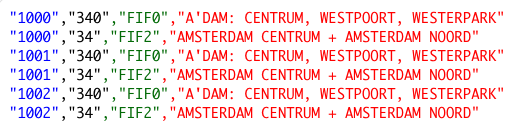
| first 4 digits on the postal code (format = ‘9999’) |
brick code | brick level “FIF0” and “FIF2” |
brick name |
Example of expected mapping file
Things to check
-
Postal codes - Postal codes in the Netherlands have this format: ‘9999 XX’, but the mapping file must include only the first 4 digits.
-
Brick structure - There are two brick levels: “FIF0” and “FIF2”. The mapping file must include two rows for each postal code; one with the “FIF0” brick code and brick name and one with the “FIF2” brick code and brick name.
Netherlands - IQVIA
Mapping logic
Each address is mapped to a brick using its 4 digit postal code, which returns the corresponding brick code and brick name.
Columns expected in the mapping file
| Column 1 (lookup field) |
Column 2 | Column 3 | Column 4 |
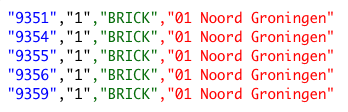
| first 4 digits on the postal code (format = ‘9999’) |
brick code | brick level (autofill with “BRICK”) |
brick name |
Example of expected mapping file
Things to check
-
Postal codes - Postal codes in the Netherlands have this format: ‘9999 XX’, but the mapping file must include only the first 4 digits.
Norway - Farmastat
Mapping logic
Each address is mapped to a brick using its postal code, which returns the corresponding brick code and brick name.
Columns expected in the mapping file
| Column 1 (lookup field) |
Column 2 | Column 3 | Column 4 |
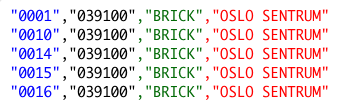
| 4 digit postal code (format = ‘9999’) |
brick code | brick level (autofill with “BRICK”) |
brick name |
Example of expected mapping file
Things to check
-
Postal codes - Must have 4 digits and retain leading zeros.
Norway - IQVIA
Mapping logic
Each address is mapped to a brick using its postal code, which returns the corresponding brick code and brick name.
Columns expected in the mapping file
| Column 1 (lookup field) |
Column 2 | Column 3 | Column 4 |
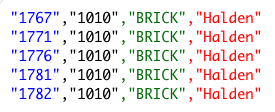
| 4 digit postal code (format = ‘9999’) |
brick code | brick level (autofill with “BRICK”) |
brick name |
Example of expected mapping file
Things to check
-
Postal codes - Must have 4 digits and retain leading zeros.
Norway - Signum
Mapping logic
Each address is mapped to a brick using its postal code, which returns the corresponding brick code and brick name.
Columns expected in the mapping file
| Column 1 (lookup field) |
Column 2 | Column 3 | Column 4 |
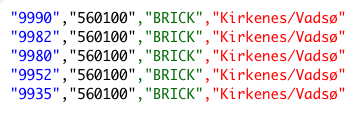
| 4 digit postal code (format = ‘9999’) |
brick code | brick level (autofill with “BRICK”) |
brick name |
Example of expected mapping file
Things to check
-
Postal codes - Must have 4 digits and retain leading zeros.
Poland - IQVIA
Mapping logic
Each address is mapped to a brick using its postal code, which returns the corresponding brick code and brick name.
Columns expected in the mapping file
| Column 1 (lookup field) |
Column 2 | Column 3 | Column 4 |
| 5-digit postal code (format = ‘99-999’) |
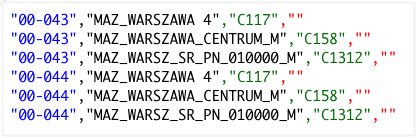
brick code | brick level “C117”, “C158” and “C1312” |
brick name (leave empty if not available) |
Example of expected mapping file
Things to check
The brick structure has three brick levels:
-
“C117”
-
“C158”
-
“C1312”
The mapping file must include three rows for each postal code; one for each brick level.
Portugal - HMR
Mapping logic
Each address is mapped to a brick using its postal code, which returns the corresponding brick code and brick name.
Columns expected in the mapping file
| Column 1 (lookup field) |
Column 2 | Column 3 | Column 4 |
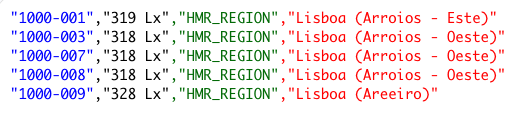
| 9 digit postal code (format = ‘9999-999’) |
brick code | brick level (autofill with “HMR_REGION”) |
brick name |
Example of expected mapping file
Things to check
-
Postal codes - In the provider's brick book, postal codes might be in the format ‘9999999’.
In the mapping file, include the dash (-) so the format is ‘9999-999’.
Romania - IQVIA
Mapping logic
Each address is mapped to a brick using its postal code, which returns the corresponding brick code and brick name.
Columns expected in the mapping file
| Column 1 (lookup field) |
Column 2 | Column 3 | Column 4 |
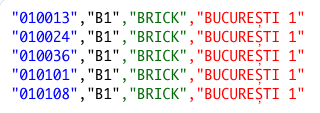
| 6-digit postal code (format = ‘999999’) |
brick code | brick level (autofill with “BRICK”) |
brick name |
Example of expected mapping file
Russia - IQVIA
Mapping logic
Each address is mapped to a brick using its postal code, which returns the corresponding brick code and brick name.
Columns expected in the mapping file
| Column 1 (lookup field) |
Column 2 | Column 3 | Column 4 |
| 6-digit postal code (format = ‘999999’) |
brick code | brick level “BRICK_L0” and “BRICK_L3” |
brick name |
Example of expected mapping file

Things to check
-
Brick structure - There are two brick levels: “L0” and “L3”. The mapping file must include two rows for each postal code; one with the “L0” brick code and brick name and one with the “L3” brick code and brick name.
Slovakia - IQVIA
Mapping logic
Each address is mapped to a brick using its postal code, which returns the corresponding brick code and brick name.
Columns expected in the mapping file
| Column 1 (lookup field) |
Column 2 | Column 3 | Column 4 |
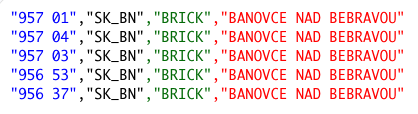
| 5-digit postal code (format = ‘999 99’) |
brick code | brick level (autofill with “BRICK”) |
brick name |
Example of expected mapping file
Things to check
-
Postal code - The provider's brick book might list postal codes in the following format: ‘99999’. Ensure the postal code in the mapping file uses the following format: ‘999 99’. There must be a blank between the first 3 digits and the last 2 digits.
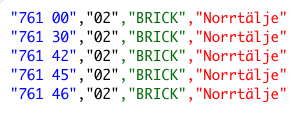
Sweden - IQVIA
Mapping logic
Each address is mapped to a brick using its postal code, which returns the corresponding brick code and brick name.
Columns expected in the mapping file
| Column 1 (lookup field) |
Column 2 | Column 3 | Column 4 |
| 5-digit postal code (format = ‘999 99’) |
brick code | brick level (autofill with “BRICK”) |
brick name |
Example of expected mapping file
Things to check
-
Postal code - The provider's brick book might list postal codes in the following format: ‘99999’. Ensure the postal code in the mapping file uses the following format: ‘999 99’. There must be a blank between the first 3 digits and the last 2 digits.
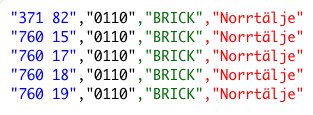
Sweden - Signum
Mapping logic
Each address is mapped to a brick using its postal code, which returns the corresponding brick code and brick name.
Columns expected in the mapping file
| Column 1 (lookup field) |
Column 2 | Column 3 | Column 4 |
| 5-digit postal code (format = ‘999 99’) |
brick code | brick level (autofill with “BRICK”) |
brick name |
Example of expected mapping file
Things to check
-
Postal code - The provider's brick book might list postal codes in the following format: ‘99999’. Ensure the postal code in the mapping file uses the following format: ‘999 99’. There must be a blank between the first 3 digits and the last 2 digits.
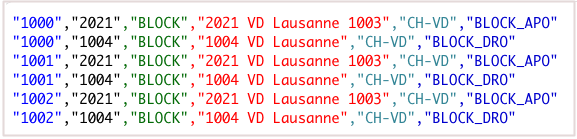
Switzerland - IQVIA
Mapping logic
Each address is mapped to a brick using its postal code and its admin area code (“Kanton”), which returns the corresponding brick code and brick name.
The brick type “BLOCK_DRO” is mapped when the parent HCO type is “Drugstore (OTC Only)” (11_13); the brick type “BLOCK_APO” is mapped to all other addresses.
Columns expected in the mapping file
| Column 1 (primary lookup field) |
Column 2 | Column 3 | Column 4 | Column 5 (secondary lookup field) |
| 4 digit postal code (format = ‘9999’) |
brick code | brick level (autofill with "BLOCK" |
brick name | admin area code (“Kanton”) (format = ‘CH-XX’) |
Example of expected mapping file
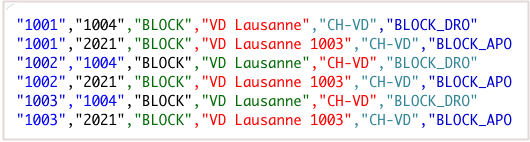
Switzerland - SM Service Marketing
Mapping logic
Each address is mapped to a brick using its postal code and its admin area code (“Kanton”), which returns the corresponding brick code and brick name.
The brick type “BLOCK_DRO” is mapped when the parent HCO type is “Drugstore (OTC Only)” (11_13); the brick type “BLOCK_APO” is mapped to all other addresses.
Columns expected in the mapping file
| Column 1 (primary lookup field) |
Column 2 | Column 3 | Column 4 |
| 4 digit postal code (format = ‘9999’) |
brick code | Brick level (autofill with "BLOCK") brick type “BLOCK_APO” or “BLOCK_DRO” |
brick name |
Example of expected mapping file
United Kingdom - IQVIA
Mapping logic
Each address is mapped to a brick using the first part of its postal code, which returns the corresponding brick code and brick name.
If the parent HCO type is any kind of pharmacy (HCO type matches “11_*” or “11:*”) and if the brick level is “POSTCODE”, then a pharmacy-specific brick is returned.
Columns expected in the mapping file
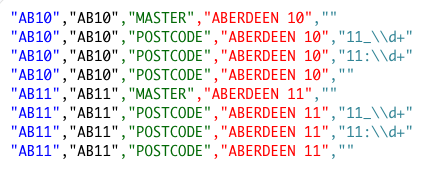
| Column 1 (lookup field) | Column 2 | Column 3 | Column 4 | Column 5 |
| First part of postal code (known as “Outward Code”) |
brick code | brick level - “MASTER” and “POSTCODE” | brick name | HCO type filter for pharmacies (for “POSTCODE” only) |
Example of expected mapping file
Things to check
-
Brick structure - There are two brick levels: “MASTER” and “POSTCODE”.
The “POSTCODE” level depends on the parent HCO type (pharmacy-specific bricks). This means for each postal code, the mapping file needs to include four rows:
-
“MASTER” brick
-
“POSTCODE” brick if HCO type is “11:*”
-
“POSTCODE” brick if HCO type is “11_*”
-
“POSTCODE” brick for all other HCO/HCP types
-
The HCO Type filter must be specified as a regular expression (“11_\\d+” or “11:\\d+”)