Data model
Data model field tags
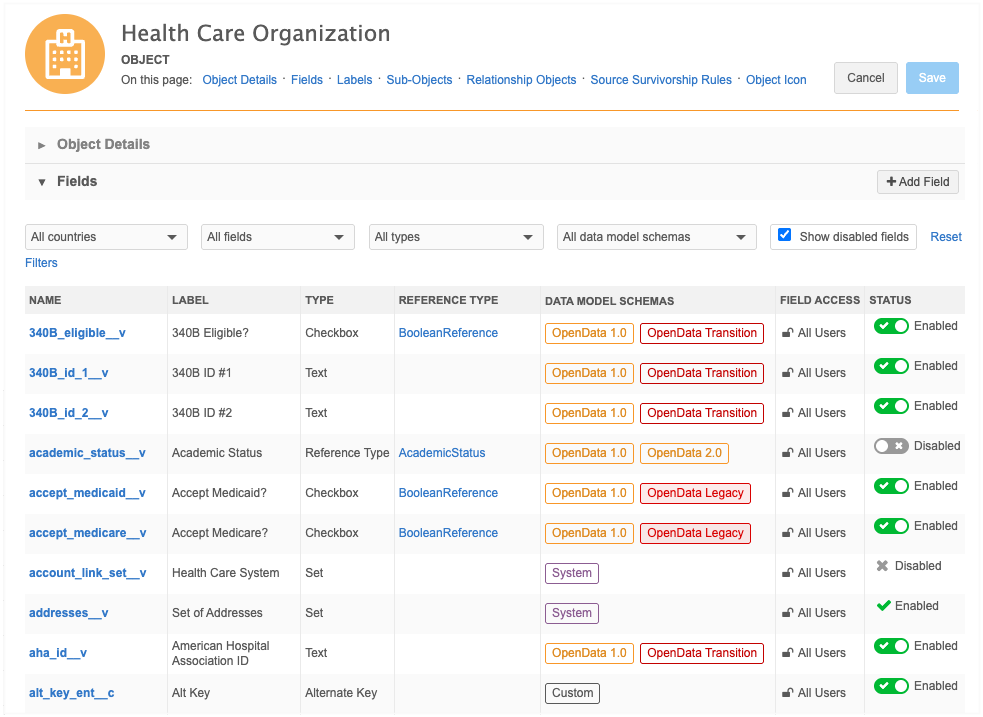
Network supports multiple data model schemas including OpenData 1.0, OpenData 2.0, CDA, IQVIA OneKey, and custom. Administrators and Data Managers can now easily identify the fields associated to each schema. A tag displays for each field on an object configuration to identify the data model, ownership, and management of the field.
Highlights
-
Understand the differences between fields that seem similar. For example, the
hcp_status_reason__vandhcp_reason_status__vfields -
OpenData 2.0 contains a subset of OpenData 1.0 fields. The fields that are not included in OpenData 2.0 will become locally managed in the future. The tags identify those fields so you can understand the impact to your business.
-
Export the fields to get a data model report of the OpenData - Transition and OpenData - Legacy fields.
-
Quickly filter CDA or OpenData 2.0 fields so that you can enable the list of fields selectively.
Available tags
The following tags can display. Multiple tags can be applied to each field.
| Tag Label | Definition | Example |
|---|---|---|
| CDA | Fields in the Common Data Architecture data model. All fields with the _cda__v suffix and the veevaid__v field. |
hcp_type_cda__v, city_cda__v |
| Custom |
Fields that are completely managed by customers; all __c fields and some __v fields. The tag is applied to all new custom fields. |
primary_neurology__c, city_cda__v |
| IQVIA OneKey | IQVIA OneKey ID fields and fields defined in the DCR Routing Criteria section on the IQVIA third-party system configuration. | onekey_id__v |
| OpenData 1.0 | Non-system OpenData fields that were released before version 26R1. | hcp_type__v |
| OpenData 2.0 | All fields in the OpenData 2.0 data model. | hcp_type_local__v |
| OpenData Legacy | Fields identified by Veeva OpenData that will become locally managed in version 27R1.0. | language__v |
| OpenData Transition |
Fields identified by Veeva OpenData that will become locally managed in 2033. |
phone_1__v, healthcare_provider_id__v |
| Network |
Fields used for specific Network MDM features. |
candidate_record__v, key_hco_network_alias__v |
| System | Fields that are managed and updated by Network MDM. System fields are read-only. | created_date__v, is_veeva_mastered__v |
| System - OpenData | System-like fields delivered to customers from Veeva OpenData. System fields are read-only. | data_privacy_opt_out__v |
Object considerations
Field tags can vary for the same field depending on its associated object.
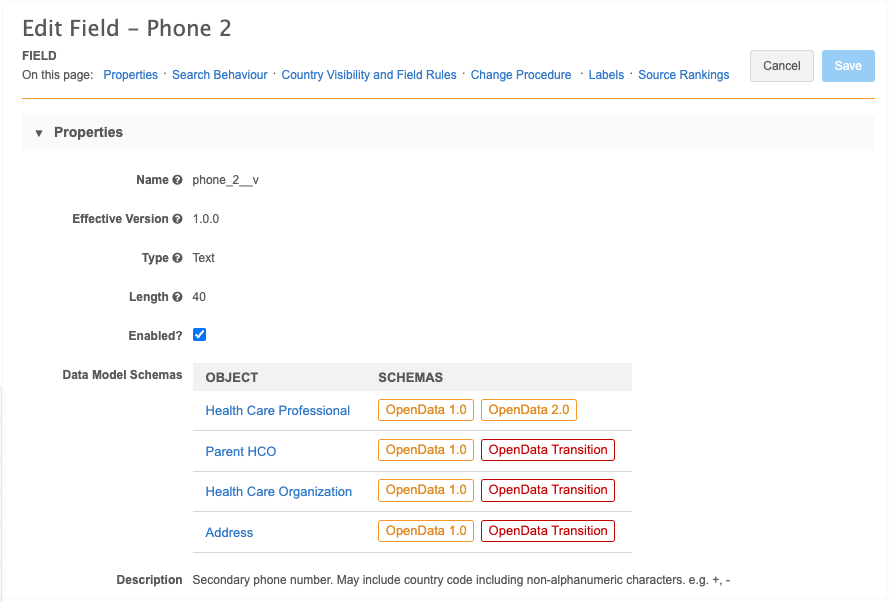
To view these specific tags, click a field to open its configuration. The Data Model Schema section lists each associated object and its tags.
Example - Phone 2 field
The phone_2__v field for HCPs is included in the OpenData 2.0 data model. For HCO, Address, and ParentHCO objects, it is an OpenData Transition field and will become locally managed in 2033.
Country considerations
OpenData Legacy and OpenData Transition tags do not display for Network MDM instances in China.
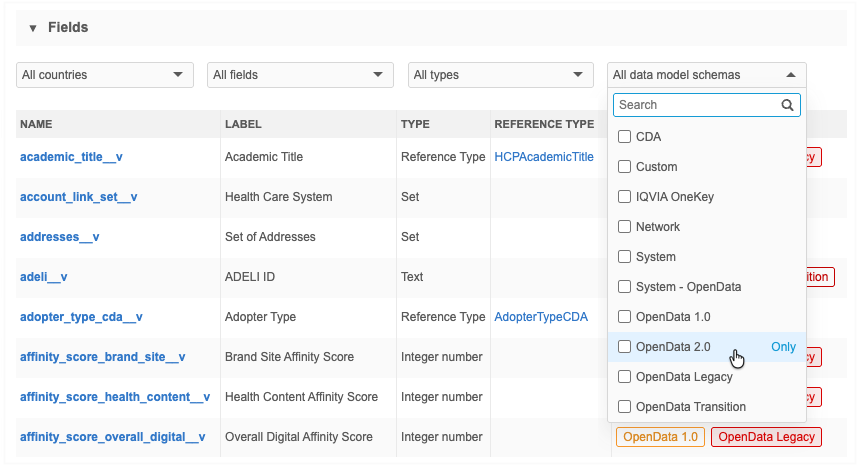
Filter fields on schema
By default, all data model schemas display for fields on an object configuration. To filter the list for a specific filter, choose the tag in the list.
The filter condition is OR, so all selected tags display.
Data model export
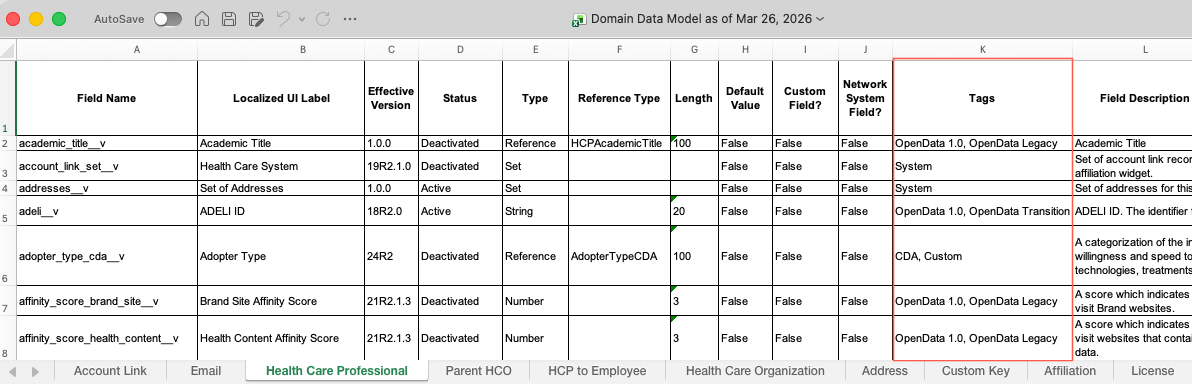
Field tags are included in the data model export.
A Tags column now displays the data model schema for each field.
Network MDM API
To support field tags, updates are made to the Retrieve Fields Metadata API.
These updates are supported in v38.0 and higher.
Retrieve fields
When the details parameter is used with the full value, the response includes a new field called tagIds. It lists the tags for each object associated with the field.
Sample request
https://my.veevanetwork.com/api/v38.0/metadata/fields?details=full
Sample response
{
  "fieldId": "record_state__v",
  "type": {...},
  "labels": {...},
  ...
  "primary": false,
  "tagIds": {
    "ADDRESS": [
      "system_vod",
      "system",
      "iqvia_ok"
    ],
    "HCO": [
      "system_vod",
      "system",
      "iqvia_ok"
    ],
    "HCP": [
      "system_vod",
      "system",
      "iqvia_ok"
    ],
    ...
  }
},
Retrieve fieldTags API
Integration users can use this new API to return the list of active tags available for data model fields.
Sample request
GET https://my.veevanetwork.com/api/v38.0/metadata/fieldTags
Sample response
{
  "fieldTags": [
    {
      "id": "cda",
      "color": "orange",
      "labels": {
        "en": "CDA"
      }
    },
    {
      "id": "custom",
      "color": "grey",
      "labels": {
        "en": "Custom"
      }
    },
    ...
  ]
}
Field label updates
The following field labels have been updated to more accurately reflect their purpose.
| Field | Previous Label (EN) | New Label (EN) | Object |
|---|---|---|---|
| cbsa__v | CBSA | Metropolitan (CBSA) | Address |
| hcp_type_cda__v | Type (CDA) | HCP Type (CDA) | HCP |
| is_primary_relationship__v | Primary Relationship? | Data Provider Primary Relationship | Parent HCO |
| va_dod_affiliated__v | Affiliated with VA_DOD? | Veterans Affairs - Department of Defense | HCO |
The labels are changed by default in your Network MDM instance.
Primary Affiliation updates
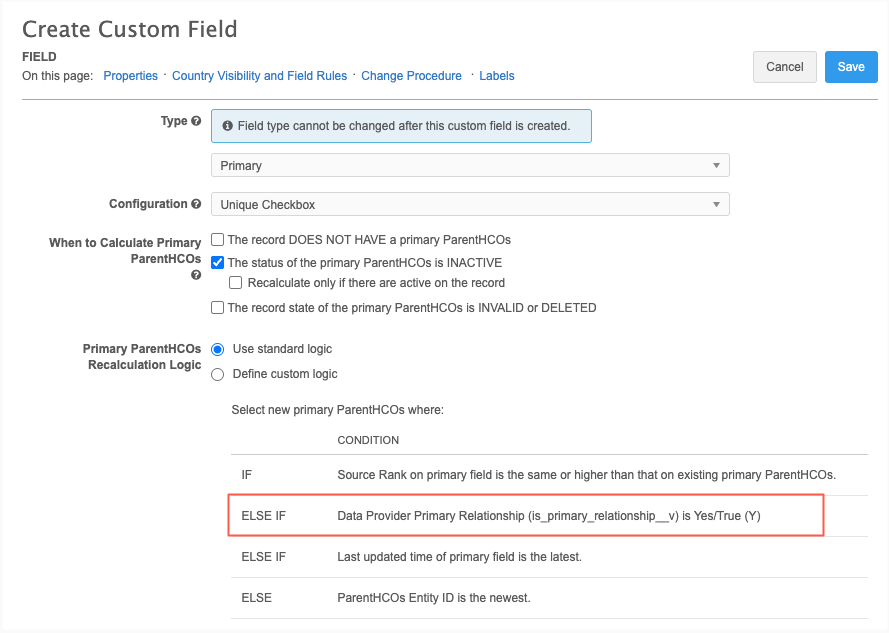
The Unique Checkbox primary calculation standard logic is updated to consider the is_primary_relationship__v field when the value is Yes/True. Veeva OpenData and third-party data sources populate this field value. The updated logic ensures that the master data relationships are prioritized.
This enhancement is enabled by default.
Primary ParentHCO Recalculation Logic
The primary calculation logic runs when a new primary is defined, or recalculated, depending on the options chosen in the Unique Checkbox configuration.
The requirement to consider the Primary Relationship field is added as the second (2) criteria in the standard logic.
Network MDM recalculates primary using the following conditions (in this order) to match against any existing primary.
-
Source rank - The rank on the primary field is the same or higher than the existing primary Parent HCOs (rank of 1 is highest).
-
Primary Relationship - Primary Relationship (is_primary_relationship__v) is Yes/True.
-
Date and time - Last updated time of primary field is the latest.
-
Network ID - Parent HCOs Entity ID is the newest.
Tiebreakers
-
If multiple parent HCOs have the Primary Relationship field value as True, Network sets the parent HCO with the newest Network ID as the primary affiliation.
-
If a Veeva or third-party managed parent HCO and a customer-managed parent HCO both have the Primary Relationship field value as True, the parent HCO that is mastered is set to primary. Mastered affiliations are prioritized over customer-managed affiliations.
Impact to existing primary affiliation configurations
There is no impact to existing primary affiliations until the current primary no longer qualifies and the primary is recalculated.
For details about Unique Checkbox configurations, see Unique Checkbox primary fields in the Veeva Network MDM Online Help.
Cluster management
Customers can enrich addresses for additional providers and countries by adding cluster codes.
The following enhancements are available in this release.
Country support
Cluster codes are now available from IQVIA® for the following countries:
- Finland
- Norway
- Romania
- Sweden
Important: A TPA must be signed with IQVIA before this data can be used in the Cluster Management feature.
For more information, see the topic called Managing cluster data
Updated cluster codes
Updated cluster codes from IQVIA are available for the following countries:
-
Australia - Version 2.0
-
Spain - Version 5.0
To update addresses with the latest cluster codes:
-
In the Admin console, click Data Model > Cluster Management.
-
Select the country / IQVIA cluster configuration.
-
In the Cluster Management Details section, expand the Cluster Version field and choose the latest version.
-
Save your changes.
-
Click Refresh Addresses to run a data maintenance job to ensure that all addresses for the country have the latest cluster codes.
The new cluster version is available by default if you have the IQVIA country/provider combination enabled in your Network MDM instance.
Malaysian addresses
Malaysian addresses are reformatted to ensure that the complete address data is sent to downstream systems like Veeva CRM and Vault.
This enhancement is enabled by default in your Network MDM instance.
Supported addresses
Malaysian addresses are reformatted if they have been processed by Network MDM's third-party address cleansing service if the Address Verification Status field value is any of the following:
-
V (Verified)
-
A (Ambiguous)
-
P (Partially Verified)
-
U (Unverified)
-
NS (Not Supported)
-
DS (Data Steward Approved)
It applies to all addresses regardless of ownership (locally managed, Veeva OpenData, and third-party managed).
Address formatting
Addresses are reformatted during source subscription jobs, on the Profile page, or in data change requests.
Malaysian addresses are reformatted with the following rule.
| Address field | Details |
|---|---|
| Address line 1 | Includes: Suite number (sub_building__v) building (building__v), street number (premise__v), street name (thoroughfare__v)
Each entry is separated by a comma (,). Cannot exceed 80 characters. Otherwise, the values in the |
| Address line 2 | Includes: Dependent locality (dependent_locality__v)
Can include the The number of characters cannot exceed 100. Otherwise, the value will be truncated. |
| Address line 3 | empty |
Reference code country visibility
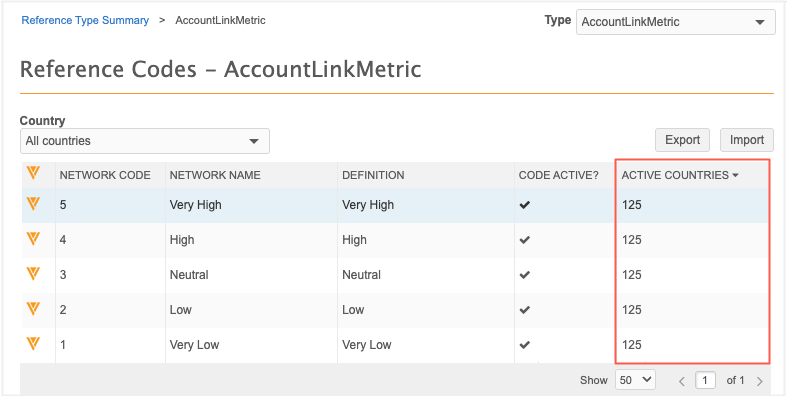
The Reference Codes page now displays the exact number of active countries for each code. This replaces the previous checkmark icon, providing a clearer view of country coverage at a glance. As always, Administrators and Data Managers can click the code to view the full list of active countries.
This enhancement is enabled by default in your Network MDM instance.