OpenData 2.0 data model
Veeva OpenData is introducing the OpenData 2.0 data model. This update streamlines your data by refining the existing fields and new fields into a unified global standard that maintains localized accuracy. The significantly smaller number of fields reduces complexity, simplifies data management, and makes integrations with Vault CRM more efficient.
The data model contains the following fields:
-
a subset of OpenData 1.0 fields
-
a subset of Common Data Architecture (CDA) fields
-
several new fields
For details, see OpenData 2.0 fields.
Key dates
-
Availability in Network MDM - The OpenData 2.0 data model is now available in your Network MDM instance.
-
Data provided by OpenData - Veeva OpenData will begin loading data into the new fields by June 1, 2026.
-
Transition of OpenData 1.0 fields - The OpenData 2.0 data model contains only a subset of the OpenData 1.0 fields. Any fields excluded from OpenData 2.0 will transition to being customer managed (gray).
-
Phase 1 - Fields identified as OpenData - Legacy will become gray in Network MDM version 27R1.0 (Spring 2027).
-
Phase 2 - Fields identified as OpenData - Transition will become gray in 2033.
When the fields become gray, the existing data will not be removed, but OpenData will stop providing updates and will no longer accept Data Change Requests (DCRs) for them.
Tip: To identify the OpenData - Legacy and OpenData - Transition fields, see the Data model schema tags assigned to each field in the Customer Master data domain (Data Model).
-
For more information, follow the OpenData communities on Veeva Connect.
-
OpenData - APAC (available by invitation only)
Enable the OpenData 2.0 data model
The data model is enabled by default in new Network MDM instances.
Impact to existing Network MDM instances
There is no impact to existing instances.
-
The new OpenData 2.0 fields are disabled by default.
-
There are no changes to existing fields.
-
Existing field mappings for your Veeva CRM and Vault CRM integrations are not affected.
You can enable the OpenData 2.0 data model when you are ready to begin using the new fields.
For details, see Enable the OpenData 2.0 settings.
Country support
OpenData 2.0 is available for most countries/regions supported by Veeva OpenData.
These countries are not supported:
-
Belarus
-
Burkina Faso
-
China
-
Ethiopia
-
Hong Kong
-
Iraq
-
Japan
-
Macao
-
Madagascar
-
Mali
-
Sierra Leone
- Russia
-
Tajikistan
-
Turkmenistan
-
Uzbekistan
-
ZZ (All Other Countries)
Supported objects
-
HCOs
-
HCPs
-
Addresses
-
Parent HCOs
-
Licenses (including Identifiers)
Use OpenData 2.0 in Network MDM
To take full advantage of the OpenData 2.0 data model in Network MDM, there are two steps:
-
Enable the OpenData 2.0 settings
-
Populate the OpenData 2.0 fields
Enable the OpenData 2.0 settings
Administrators can enable the two feature settings (Settings > General Settings).

-
Enable OpenData 2.0 Data Model
Enables all OpenData 2.0 fields for HCOs, HCPs, Addresses, Parent HCOs, Licenses, and Identifiers.
Note: Important: Required for existing Network MDM instances only.
The OpenData 2.0 data model is enabled by default for new instances.The setting cannot be turned off after it has been enabled. Individual fields can be turned on or off in the data model.
Fields can also be enabled individually on the associated object.
-
Enable Calculations for CDA and OpenData 2.0
This feature automatically populates locally managed OpenData 2.0 field values. For details, see the section below.
Previously, this setting was called Enable CDA Sync and applied to the CDA data model only. If the feature was enabled for CDA, it remains enabled in your Network MDM instance and the three OpenData 2.0 fields will start to be automatically populated in your instance.
Important: This setting does not need to be enabled in your instance to get data from Veeva OpenData in OpenData 2.0 fields.
-
Enable OpenData Identifier Sync (Optional) - This setting is for Identifier data only. Choose to receive Identifier data from Veeva OpenData. This will set the fields to be OpenData-managed. If this setting is not enabled, Identifiers remain locally managed.
Populate OpenData 2.0 fields
After the OpenData 2.0 settings are enabled, the next step is to populate records in your Network MDM instance with OpenData 2.0 field values
The methods for populating the fields depends on how they're managed.
| Field Management | Method Used to Populate Fields |
|---|---|
| Veeva-managed |
Field values are pushed to your Network MDM instance through your OpenData subscriptions or ad hoc downloads as usual. To populate field values:
The next time the subscription runs, you will receive updates for all the Veeva-managed OpenData 2.0 fields that you have enabled. |
| Calculated |
Calculated fields are mapped to an OpenData 1.0 field. The OpenData 2.0 calculation process populates the calculated field with the value of its mapped field. The calculation process runs when records are updated through data update jobs and DCRs. Note: The Enable Calculations for CDA and OpenData 2.0 setting must be enabled. |
Calculated fields in the OpenData 2.0 data model
Three new fields are calculated by the OpenData 2.0 calculation process in your Network MDM instance.
These are custom fields, but they have the __v suffix.
| OpenData 2.0 Field Name | Field Label (EN) | Object | Mapped Field | Object |
|---|---|---|---|---|
| postal_code_full_us__v | Postal Code Full US |
Address | postal_code__v | Address |
| street_address_1__v | Street Address 1 | HCO, HCP | address_line_1__v | Address |
| street_address_2__v | Street Address 2 | HCO, HCP | address_line_2__v | Address |
Special logic is applied to manage these fields for locally managed and third-party managed records using the OpenData 2.0 calculation process.
Postal Code Full US
To optimize local accuracy, the new postal code field, postal_code_full_us__v , supports nine-digit codes for the US. When the OpenData 1.0 postal_code__v field is updated for a gray addresses, the full code is populated in the postal_code_full_us__v field on US addresses only.
Street Address 1 and Street Address 2
The Street Address fields are added to HCPs and HCOs so you can quickly see the details without scrolling to the address.
To simplify data management and ensure consistency with other denormalized address fields on HCPs/HCOs, these fields are read-only because they are populated from the Address Line fields from the first address on the record (primary_cda__v = Y). The Address Line fields are also locally managed on local (gray) and third-party records.
This is the same process used for the city_cda__v field for the CDA data model.
About the calculation process
The OpenData 2.0 calculation process automatically runs in your instance during data update jobs, for example, source subscriptions, data updater, DCRs, and merges.
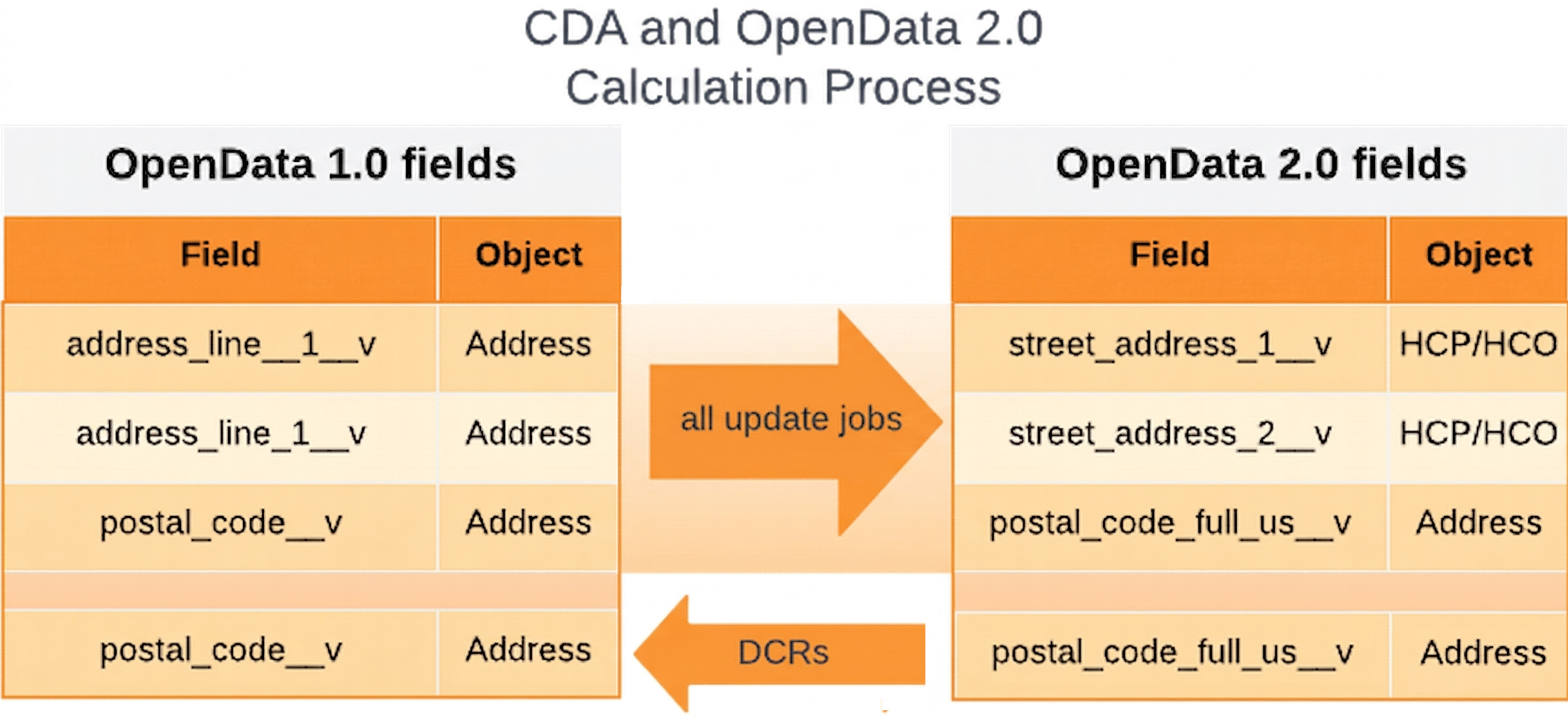
The process to populate the calculated fields is different for loading data and data change requests.
| Data Loading Behavior | DCR Behavior |
|---|---|
|
Load data into the mapped OpenData 1.0 fields using an import file.
The calculation process populates the values to the mapped OpenData 2.0 fields. Important: If OpenData 2.0 fields are included in the import files, the data will be overwritten when the OpenData 2.0 calculation runs. |
Submit changes to OpenData 2.0 fields.
The calculation process maps the values to the OpenData 1.0 fields for Data Stewards to process. Only the |
DCRs on OpenData 2.0 fields
Add and change requests can be submitted for OpenData 2.0 fields from the following applications:
-
Vault CRM
-
Network MDM - UI and API
Note: If the Enable Calculations for CDA and OpenData 2.0 setting is off, changes processed for the street_address_1__v, street_address_2__v, or postal_code_full_us__v fields will not update their mapped OpenData 1.0 fields. The values between the fields could become different.
OpenData 2.0 fields not supported for DCRs
Some existing CDA fields and new fields in the OpenData 2.0 data model are not supported for DCRs.
-
Multivalued reference fields
DCRs for multivalued reference fields will be supported in a future release.
-
Read-only fields
These field values are calculated from rules only.
The following fields are not supported.
| CDA Field | Object | Reason |
|---|---|---|
| all_degree_cda__v | HCP | Multivalued field |
| all_spec_cda__v | HCP | Multivalued field |
| all_spec_group_cda__v | HCP | Multivalued field |
| all_spec_local__v | HCP, HCO | Multivalued field |
| city_cda__v | Address | Read-only system field |
| country_cda__v | HCP, HCO, License, Identifier | Read-only system field |
| latitude_cda__v | Address | Read-only system field |
| longitude_cda__v | Address | Read-only system field |
| object_cat_type__v | License, Identifier | The field value cannot be changed after it is set. |
| postal_code_cda__v | Address | Read-only system field |
| spec_group_1_cda__v | HCP | Multivalued field |
| state_cda__v | Address License, Identifier | Read-only system field |
| veevaid__v | HCP, HCO | Read-only system field |
Routing DCRs
Network MDM uses the hcp_type__v and hco_type__v OpenData 1.0 fields to determine where DCRs are routed.
If changes are made to the hcp_type_local__v or hco_type_local__v OpenData 2.0 fields, the same value will be populated in the corresponding hcp_type__v and hco_type__v fields to ensure they are synced.
Considerations for custom HCP types
For add requests, if there is a custom HCP type on the OpenData 1.0 field that is not on the OpenData 2.0 field, the default HCP type will be used to route the DCR. For example, the default HCP type for US HCP records is Prescriber, so the DCR will be routed to Veeva OpenData.
Network MDM features for OpenData 2.0
To support OpenData 2.0, features are updated to include the fields.
Profile layouts
Existing profile layouts
OpenData 2.0 fields are not added to existing standard or custom profile layouts.
Administrators can add the fields if they choose.
New profile layouts
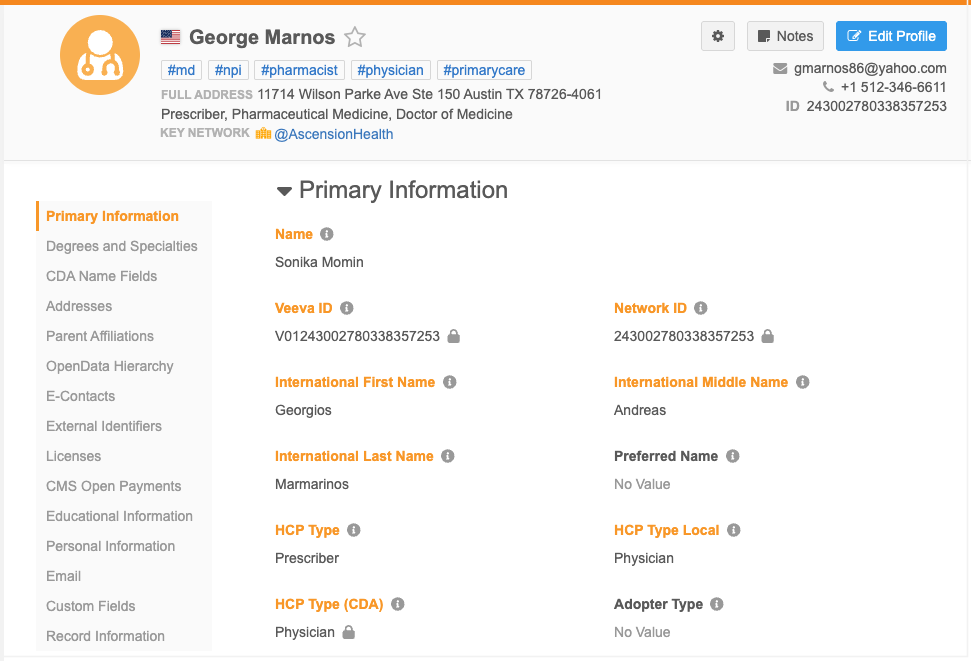
New profile layouts called GlobalStandard are created for HCPs and HCOs to support the OpenData 2.0 fields. They include all existing OpenData 1.0, CDA, and OpenData 2.0 fields. The OpenData 2.0 fields display throughout the record profile in the applicable sections.
These layouts are managed by Veeva and are read-only. They can be cloned so you can customize them for your business purposes.
Example - GlobalStandard HCP layout
Match considerations
The default match rules are not being updated for customer-managed OpenData 2.0 fields in this release. During the matching process, the mapped legacy fields will continue to be used for matching.
Administrators can choose to use OpenData 2.0 fields in match rules.
Important: Ensure the OpenData 2.0 fields are consistently populated on records before using them in match rules.
Network Address Inheritance
If the Network Address Inheritance feature is enabled in your instance, the OpenData 2.0 address fields can be copied from a parent address to a child address on locally managed records.
Note: The three fields(Street Address 1, Street Address 2, Postal Code Full US) that are calculated by the (Undefined variable: General.CDA and OpenData 2.0 Calculation) process are not supported.
The OpenData 2.0 fields must be added to the configuration (Data Model > Network Address Inheritance).
Data privacy
Health care providers can request that their personal data be restricted or blocked from processing. To support these requests, records can be flagged as opted-out and then also anonymized so the data is hidden from users and can no longer be updated.
Review a summary of the behavior for new OpenData 2.0 fields for opted out or anonymized records when they are exported to downstream systems.
| Field Name | Field Label (EN) | Object | HCP Opt Out Behavior | HCP Anonymize Behavior |
|---|---|---|---|---|
| all_spec_local__v | All Specialties Local | HCP, HCO | Blank | Blank |
| child_entity_type__v | Child Entity Type | ParentHCO | Retain | Retain |
| child_veevaid__v | Child Entity Veeva ID | ParentHCO | Retain | Retain |
| city_intl__v | City International |
Address | Blank | Blank |
| count_hcp__v | Number of Total Affiliated HCPs |
HCO | Blank | Retain |
| count_prescriber__v | Number of Affiliated Prescribers |
HCO | Blank | Retain |
| entity_object_type__v | Entity Object Type | Address | Retain | Retain |
| entity_veevaid__v | Entity Object Veeva ID | Address | Retain | Retain |
| first_name_intl__v | International First Name | HCP | Mask | Mask |
| grad_institution__v | Graduation Institution | HCP | Blank | Blank |
| hco_name_english__v | English Name | HCO | Mask | Retail |
| hco_name_intl__v | International HCO Name | HCO | Mask | Retain |
| hco_name_short__v | Short Name | HCO | Mask | Retain |
| hco_ownership__v | Ownership | HCO | Blank | Blank |
| hcp_reason_status__v | Status Reason | HCP | Retain | Blank |
| hcp_type_local__v | HCP Type Local | HCP | Retain | Blank |
| hospital_campus_name__v | Hospital Campus Name | Address | Retain | Retain |
| hospital_campus_veevaid__v | Hospital Campus Veeva ID | Address | Retain | Retain |
| job_title__v | Job Title | ParentHCO | Blank | Blank |
| last_name_intl__v | International Last Name | HCP | Mask | Mask |
| main_org_name__v | Main Org Name | HCO, HCP | Blank | Blank |
| main_org_veevaid__v | Main Org Veeva ID | HCO, HCP | Blank | Blank |
| middle_name_intl__v | International Middle Name | HCP | Mask | Mask |
| nhid_2__v | National Healthcare ID 2 | HCP | Blank | Blank |
| parent_veevaid__v | Parent Entity Veeva ID | ParentHCO | Retain | Retain |
| postal_code_full_us__v | Postal Code Full US |
Address | Blank | Blank |
| postal_code_intl__v | Postal Code International |
Address | Blank | Blank |
| primary_affl_name__v | Primary Affiliation Name | HCP | Blank | Blank |
| primary_affl_veevaid__v | Primary Affiliation Veeva ID | HCP | Blank | Blank |
| spec_1_local__v | Specialty Local | HCO, HCP | Blank | Blank |
| spec_2_local__v | Specialty Local 2 | HCO, HCP | Blank | Blank |
| street_address_1__v | Street Address 1 | HCO, HCP | Mask | Mask |
| street_address_1_intl__v | Street Address International 1 | Address | Mask | Mask |
| street_address_2__v | Street Address 2 | HCO, HCP | Blank | Blank |
| street_address_2_intl__v | Street Address 2 International | Address | Mask | Mask |
| sub_state_admin_unit__v | Region/County | Address | Blank | Blank |
| top_org_name__v | Top Org Name | HCO, HCP | Blank | Blank |
| top_org_veevaid__v | Top Org Veeva ID | HCO, HCP | Blank | Blank |
| type_of_hierarchy__v | Type of Hierarchy | HCO | Blank | Blank |
| type_of_relationship__v | Type of Relationship | ParentHCO | Blank | Blank |
Vault CRM - Network MDM integration
Vault CRM, Network MDM, and OpenData support the OpenData 2.0 data model, so you can view and manage OpenData 2.0 fields between these applications.
Supported integration features
-
Vault CRM Bridge
-
Data change requests