Common Data Architecture for Life Sciences (CDA)
The Common Data Architecture for Life Sciences (CDA) is a new industry standard for referring to HCPs, HCOs, clinical operations, and products and diseases.
All life sciences organizations can use CDA to communicate and collaborate more effectively with each other using these universal data components.
For more information about this open standard, see veeva.com/cda/.
Key highlights
-
CDA is freely available for all life sciences organizations to implement and use.
-
Vault CRM, Network, and OpenData have adopted the CDA HCP and HCO kernels.
-
The CDA kernels contain the following components: entities (HCPs, HCOs, Addresses), attributes, and picklists.
Note: The Segment object from the HCP and HCO kernels are not currently added to Network MDM.
-
For existing customers that integrate with Veeva CRM, there are no changes; CDA fields will be off by default.
-
OpenData will provide values for most CDA fields on the HCP, HCO, and Address objects on OpenData records.
-
For locally managed (gray) records and third-party managed records, Network MDM provides the ability to calculate CDA fields based on the legacy fields.
-
Data change requests can be submitted for CDA fields.
Country support
CDA is available for most countries supported by Veeva OpenData.
These countries are not supported:
-
China
-
Hong Kong
-
Japan
-
Macao
About the CDA in Network MDM
CDA is organized into kernels, which provide a standardized structure by grouping related entities, attributes and picklists.
Network MDM supports the following kernels:
-
HCP
-
HCO
The related Address entity is included in the HCP and HCO kernels.
For information, see CDA kernels.
Enable CDA in Network
To take full advantage of the CDA industry standard in Network MDM, there are three steps:
-
Enable CDA Data Model
-
Enable Calculations for CDA and OpenData 2.0
-
Populate the CDA fields
Enable the CDA data model
Important: Required for existing Network MDM instances only.
The CDA data model is enabled by default for new instances.
Administrators can enable CDA fields for their existing instance when they are ready to begin adopting this new standard.
To enable the fields:
-
Enable CDA Data Model - Enable all CDA data model fields for HCPs, HCOs, and Addresses.
This setting cannot be turned off after it has been enabled. Individual fields can be turned on or off in the data model.

Note: The Veeva ID field (
veevaid__v) is enabled by default in all Network MDM instances, even if the CDA data model is not enabled. -
Enable the HCO kernel - Required only if you enabled CDA before the HCO Kernel was available in Network 24R3 (December 2024).
-
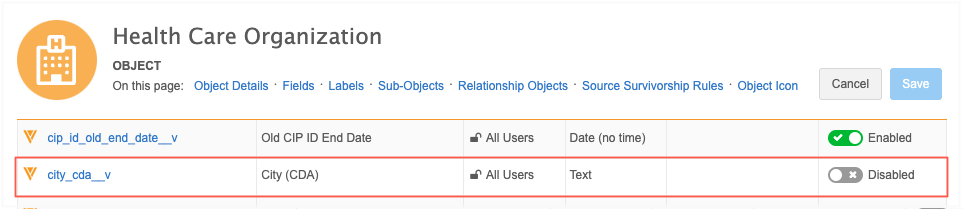
Enable the HCO CDA fields (Data Model > Customer Master > Health Care Organization).
-
Enable CDA calculations (sync)
Enable the feature so locally managed CDA fields can be populated.
-
Select Enable Calculations for CDA and OpenData 2.0 (Settings > General Settings).
This was previously called CDA Sync.
This setting does the following actions:
-
Syncs the calculated CDA fields with legacy fields in your Network MDM instance. This applies only to locally managed CDA fields on OpenData records and all calculated CDA fields on locally managed records.
-
Turns on the workflow process for the CDA data model.
Note: This setting does not need to be enabled in your instance to get data from Veeva OpenData in CDA fields.
Populate the CDA fields
After the CDA settings are enabled, complete the following tasks to add CDA field values.
-
Populate the Veeva-managed CDA fields - For each OpenData country, run the subscription with the Update all records setting on.
The next time the subscription runs, those CDA fields will be populated.
-
Resync locally managed records - To populate the calculated CDA fields on local records, run a Data Updater job or source subscription to touch or update the records.
This will trigger the CDA calculation (sync) process to populate the CDA fields with the values from the legacy fields.
For details, see Managing CDA fields.
Vault CRM - Network MDM integration
Vault CRM, Network MDM, and OpenData support the CDA HCP and HCO kernels, so you can view and manage CDA fields between these applications.
Supported integration features
-
Vault CRM Bridge
-
Data change requests
For information about CDA and Vault CRM, see Vault CRM: Data Model Updates for CDA.