CDA calculation process
The CDA calculation process adds values to the calculated CDA fields based on the mapped legacy fields values or by using the internal Network MDM rules defined for each country.
The process ensures that the Network MDM and Vault CRM CDA data models are in sync to make integration seamless.
Supported fields
The calculation process is applied to locally managed calculated fields on both OpenData and locally managed records.
Non-calculated fields are not updated using calculation process.
For the list of calculated HCP and HCO fields, see CDA kernels.
Enable CDA calculations
The Enable Calculations for CDA and OpenData 2.0 setting is not enabled by default in Network instances (Settings > General Settings).
-
New instances - The CDA data model is enabled by default. Choose Enable Enable Calculations for CDA and OpenData 2.0 to populate locally managed calculated CDA field values.
-
Existing instances - The Enable CDA Data Model setting is off by default. When you enable all fields or individual fields, also select Enable Calculations for CDA and OpenData 2.0 so the field values are populated.
About CDA calculation
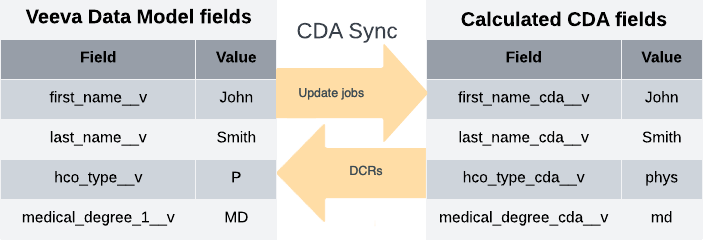
The calculation process runs in your Network MDM instance during data update jobs and data change requests to map the legacy field values to calculated CDA fields.
Example - Locally managed record
Update jobs
To update calculated fields, load data into the mapped legacy fields.
The CDA calculation process will map the legacy field values to the calculated CDA fields.
Important: Do not include calculated CDA fields in the import files; the data will be overwritten when the CDA calculation process runs.
Data change requests (DCRs)
Submit data change requests on calculated CDA fields
The CDA calculation process will map the values to the legacy fields for Data Stewards to process.
For details, see CDA DCRs.
CDA field calculations
The CDA calculation process uses internal rules to map the values between the calculated CDA fields and the legacy fields.
There are default rules and rules for specific countries or regions. The rules might calculate the field values or map the value from the corresponding legacy field.
Example
The following fields are calculated on locally managed records for HCPs, HCOs, and Addresses.
| CDA Field | US Mapping/Calculation Rule | EMEA Mapping/Calculation Rule |
|---|---|---|
| state_cda__v |
Use administrative_area__v from the first address of the HCP record.
- First address: |
Use administrative_area__v from the first address of the HCP record.
- First address: |
| city_cda__v |
Use locality__v from the first address of the HCP record.
- First address: primary_cda__v = Y
- Use first 40 characters |
Use locality__v from the first address of the HCP record.
|
| postal_code_cda__v |
Use postal_code__v from the first address of the HCP record.
- First address: primary_cda__v = Y
- Use first 5 characters |
Use postal_code__v from the first address of the HCP record.
- First address: primary_cda__v = Y
- Use first 20 characters |
Supported jobs
The CDA calculation process runs last in any update job to ensure that all processes are complete (for example, merges and NEX rules) before the value is calculated. This way, the legacy fields and the CDA fields have the same values.
This includes the following jobs:
-
Source subscriptions (including simulated jobs)
-
Data updater
-
Data maintenance jobs
-
Merge (winning and losing records are updated)
-
Unmerge (new record and the existing record of the unmerge are updated)
-
Data change requests
-
OpenData subscription and ad hoc jobs
Local addresses and fields only. CDA fields that are managed by OpenData are pushed to your Network MDM instance in the same way that legacy fields are.
After these jobs run, the CDA field values on the updated records will be calculated.
Supported records and fields
The CDA calculation process runs on locally managed records and locally managed fields in your Network MDM instance.
Fields
-
active fields (If the legacy field or the CDA field is not active, the CDA field value will not be calculated.)
Third party records
Calculated CDA fields are populated by Network MDM on third-party records. The calculated CDA fields must be locally managed; they cannot be managed by third-party data providers.
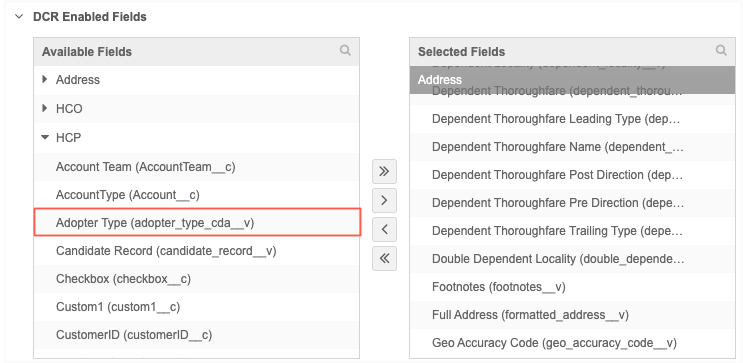
On a third-party data source configuration (Systems), calculated CDA fields are dimmed in the Available Fields panel. They cannot be moved to the Selected Fields panel to be managed by the third-party provider.
Backfill existing records
On existing locally managed records, CDA field values will be calculated when those records are touched or updated.