Data model
IQVIA fields
New fields have been added to support IQVIA® OneKey data.
Important: A third-party agreement (TPA) must be in place before IQVIA data can be loaded into Veeva Network MDM.
ID fields
The new ID fields are text type fields.
| Field Name | Label | Description | Object |
|---|---|---|---|
| onekey_id__v | OneKey ID | Unique IQVIA - OneKey ID | HCP, HCO, Address, License, ParentHCO |
| entity_onekey_id__v | OneKey ID of Owner | OneKey Entity ID | Address, License, ParentHCO |
| parent_hco_onekey_id__v | OneKey Parent Affiliation | Unique Parent HCO OneKey ID | ParentHCO |
| address_onekey_id__v | Address OneKey ID | Unique address OneKey ID for licenses | License |
These are customer managed fields. They will not be managed by Veeva OpenData.
Enable the fields
Administrators and Data Managers can enable the fields for existing instances.
Third-party system owner field
A new reference field is populated when IQVIA data is loaded.
| Field Name | Label | Description | Object |
|---|---|---|---|
| third_party_system_owner__v | Third Party System Owner |
The external data provider name owning the record. |
HCP, HCO, Address, License, ParentHCO |
The field uses the ThirdPartySystemOwner reference type. It includes one reference code: IQVIA.
Enable the field
This field is enabled by default for all new and existing instances.
Cluster management
Customers can enrich addresses for additional providers and countries by adding cluster codes.
The following enhancements are available in this release.
Country support
Cluster codes are now available from IQVIA® for the following countries:
- Finland
- Norway
- Romania
- Sweden
Important: A TPA must be signed with IQVIA before this data can be used in the Cluster Management feature.
For more information, see the topic called Managing cluster data.
Updated cluster codes
Updated cluster codes from IQVIA are available for the following countries:
-
Australia - Version 2.0
-
Spain - Version 5.0
To update addresses with the latest cluster codes:
-
In the Admin console, click Data Model > Cluster Management.
-
Select the country / IQVIA cluster configuration.
-
In the Cluster Management Details section, expand the Cluster Version field and choose the latest version.
-
Save your changes.
-
Click Refresh Addresses to run a data maintenance job to ensure that all addresses for the country have the latest cluster codes.
The new cluster version is available by default if you have the IQVIA country/provider combination enabled in your Network MDM instance.
Malaysian addresses
Malaysian addresses are reformatted to ensure that the complete address data is sent to downstream systems like Veeva CRM and Vault.
This enhancement is enabled by default in your Network MDM instance.
Supported addresses
Malaysian addresses are reformatted if they have been processed by Network MDM's third party address cleansing service if the Address Verification Status field value is any of the following:
-
V (Verified)
-
A (Ambiguous)
-
P (Partially Verified)
-
U (Unverified)
-
NS (Not Supported)
-
DS (Data Steward Approved)
It applies to all addresses regardless of ownership (locally managed, Veeva OpenData, and third party managed).
Address formatting
Addresses are reformatted during source subscription jobs, on the Profile page, or in data change requests.
Malaysian addresses are reformatted with the following rule.
| Address field | Details |
|---|---|
| Address line 1 | Includes: Suite number (sub_building__v) building (building__v), street number (premise__v), street name (thoroughfare__v)
Each entry is separated by a comma (,). Cannot exceed 80 characters. Otherwise, the values in the |
| Address line 2 | Includes: Dependent locality (dependent_locality__v)
Can include the The number of characters cannot exceed 100. Otherwise, the value will be truncated. |
| Address line 3 | empty |
Reference code country visibility
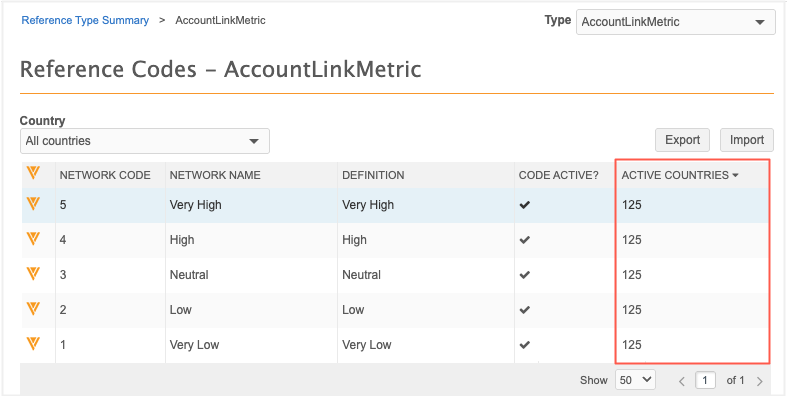
The Reference Codes page now displays the exact number of active countries for each code. This replaces the previous checkmark icon, providing a clearer view of country coverage at a glance. As always, Administrators and Data Managers can click the code to view the full list of active countries.
This enhancement is enabled by default in your Network MDM instance.