OpenData 2.0 data model
Supported countries
Hong Kong and Macao now support the OpenData 2.0 data model.
This enhancement is enabled by default if you have the OpenData 2.0 data model settings enabled in your Network MDM instance.
For details see OpenData 2.0 data model topic in the Veeva Network MDM Online Help.
Fields
The OpenData 2.0 fields are existing fields, so they are not managed by Veeva OpenData by default.
If you want the fields to be managed by Veeva OpenData, move them to the Managed by OpenData pane in your Hong Kong and Macao country subscriptions.
Important: Before enabling the fields for OpenData, migrate any local data that you have loaded to the fields for these countries.
To quickly find the OpenData 2.0 fields in the Customer Master domain (Data Model), filter each object using the country and OpenData 2.0 data model schema tag or export the data model and filter the file.
Reference data updates
Reference codes have been added for Hong Kong and Macao. See the Veeva Network MDM 26R3.0 Data Governance document for details.
Administrators and Data managers can view the reference codes in the Network MDM UI (Data Model > Reference Data).
Top and Main Org custom fields
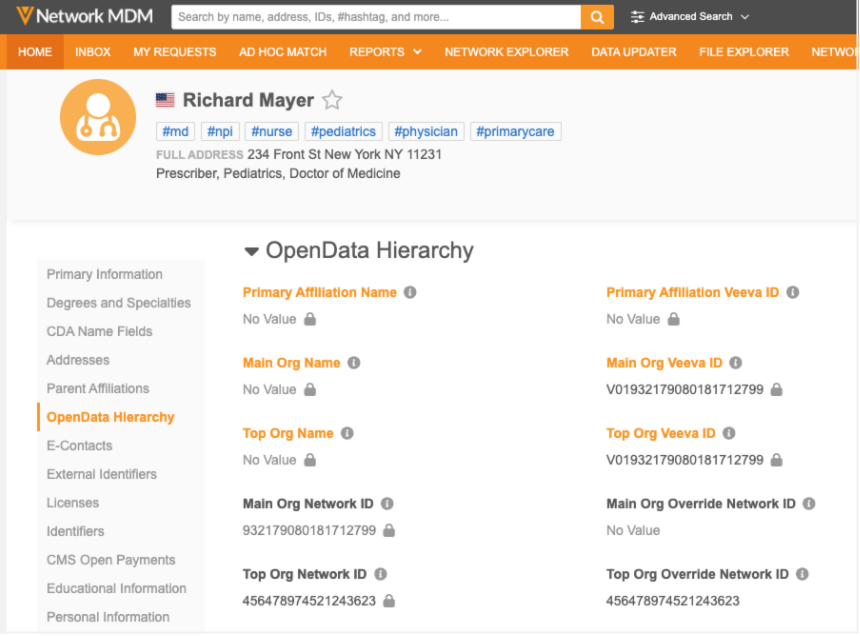
Network MDM now provides four new custom fields that store Main Org and Top Org data as Network IDs, so this data can be sent to Vault CRM. CRM users can view the Main Org and Top Org on HCP and HCO records and use it to search for and download related records.
If your Main Org or Top Org are different from what OpenData has set, you can override it with your own Network ID value.
Enable the fields
The four new fields are enabled by default in new Network MDM instances.
Existing customers can enable the fields for the HCP and HCO objects (Data Model).
Supported countries
The fields are added for countries that are supported for the OpenData 2.0 data model.
For a detailed list of countries, see the OpenData 2.0 data model topic in the Veeva Network Online Help.
Top/Main Org Veeva ID fields
OpenData provides values for Top Org and Main Org in the following OpenData 2.0 fields:
-
Main Org Veeva ID (
main_org_veevaid__v) -
Top Org Veeva ID (
top_org_veevaid__v)
These fields use the 21-digit Veeva ID that cannot be sent to Vault CRM. The fields are managed by OpenData and cannot be changed through data change requests.
New custom fields
Four fields have been added to the data model for HCP and HCO objects.
These are customer-managed fields that use the 18-digit Network ID.
| Field Name | Field Label | Details |
|---|---|---|
main_org_network_vid__v
|
Main Org Network ID |
This field is read-only because it is calculated from one of the following fields: - Main Org Veeva ID ( - Main Org Override Network ID ( This is the value sent to Vault CRM. |
main_org_override_vid__c
|
Main Org Override Network ID |
Add your custom value to this field to override the calculated Main Org Network ID field. This field can be updated through change requests and data loading. |
top_org_network_vid__v
|
Top Org Network ID |
This field is read-only because it is calculated from one of the following fields: - Top Org Veeva ID ( - Top Org Override Network ID ( This is the value sent to Vault CRM. |
top_org_override_vid__c
|
Top Org Override Network ID |
Add your custom value to this field to override the calculated Top Org Network ID. This field can be updated through change requests and data loading. |
View the fields on record profiles
The fields are not added to profile layouts. To view the fields on record profiles, add them to your custom profile layouts. Standard profile layouts are read-only.
Overriding the OpenData Main Org or Top Org field value
If your Main Org or Top Org relationship differs from OpenData has set, use the Main Org Override Network ID and Top Org Override Network ID fields to define a different Network ID.
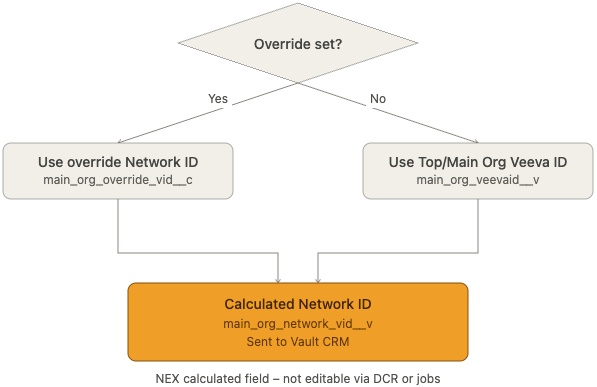
The value in the Main/Top Org Override Network ID field always takes priority over the Network ID calculated from the Main/Top Org Veeva ID field.
Calculating the Top/Main Org Network ID field
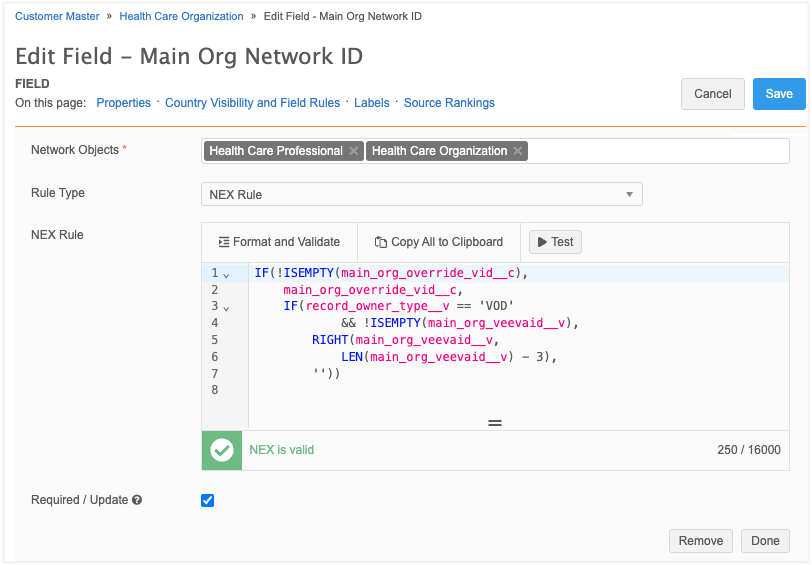
Network Expression (NEX) rules automatically calculate the Main Org Network ID and Top Org Network ID fields.
The field configuration includes the default NEX rule. You can change the rule to fit your own business logic.
Note: If the default NEX rule is changed, it cannot be restored.
Calculation process
The default NEX rule calculates the value of the Main/Top Org Network ID field using the following process:
-
If a value exists in the custom Top/Main Org Override field, populate that value in the Main/Top Org Network ID field.
-
Otherwise, if OpenData has set a value in the Top/Main Org Veeva ID field, remove the first 3- digits from the Veeva ID and populate that value in the Main/Top Org Network ID field.
-
If neither condition applies, the Top/Main Network ID field value remains empty.
Vault CRM integration
The following fields must be mapped between Network MDM and CRM.
| Network Field | Field Name | CRM Field Type | Mapped CRM Field |
|---|---|---|---|
main_org_network_vid___v
|
Network Main Org ID | Object Reference | main_org__v |
top_org_network_vid__v
|
Network Top Org ID | Object Reference | top_org__v |
Top Org and Main Org data is pushed to Vault CRM using the Veeva Vault Connector
DCR for calculated multivalued reference fields
Data change requests are supported for most reference fields that support multiple values. In this release that support is extended to OpenData 2.0 fields and CDA fields whose values are calculated from their associated individual fields.
Supported fields
| Field Name | Field Label | Calculated From Fields | Object | Data Model |
|---|---|---|---|---|
all_spec_cda__v
|
All Specialties (CDA) | specialty_1__v to specialty_10___v |
HCP | CDA, OpenData 2.0 |
all_degree_cda__v
|
All Medical Degrees (CDA) | medical_degree_1__v to medical_degree_5__v |
HCP | CDA, OpenData 2.0 |
all_spec_local__v
|
All Specialties Local | spec_1_local__v, spec_2_local__v |
HCP, HCO | OpenData 2.0 |
Note: The All Specialty Groups (all_spec_group_cda__v) field is not supported for DCRs. The field values are calculated from the values in the all_spec_cda__v field. DCRs for this read-only field are automatically rejected.
Enable this enhancement
This enhancement is enabled by default if the CDA / OpenData 2.0 data model is enabled in your Network MDM instance.
Submitting DCRs
DCRs are supported from integrations (for example, Vault CRM) using the Network MDM API.
Note: Submitting DCRs through Network widgets for these fields is not supported.
Stewarding DCRS
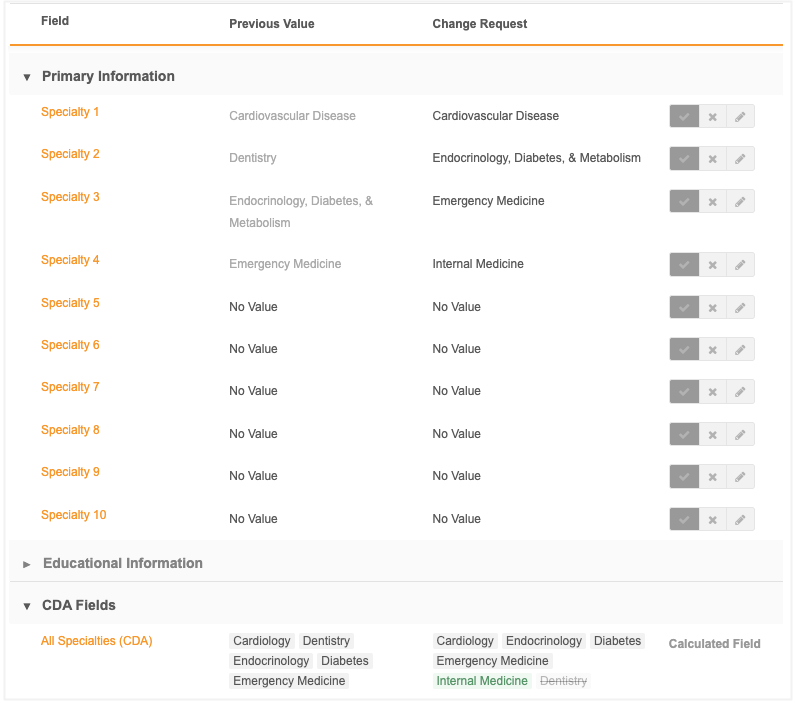
When DCRs are submitted for multivalued fields, data stewards will verify and process the associated individual fields on the inbox task. The values on the multivalued field are distributed to the individual fields based on the order in the field.
For example, if Cardiology is listed first for the All Specialties (CDA) field, then the Specialty 1 field is populated with Cardiology. Data stewards will process Specialty 1 on the task.
Order of values
Downstream systems like Vault CRM typically sort multivalued field values alphabetically. When a data change request is processed, Network MDM preserves the original priority order of the values.
-
Values in the current list keep their existing order.
-
New values submitted on the DCR are appended to the end.
-
Values removed through the DCR are removed from the order and the subsequent values are moved up.
Discarding excess values
If DCRs submit more values than there are associated individual fields, the extra values are discarded. For example, if All Specialties (CDA) is changed to 12 values, the last two values are discarded because there are only 10 individual Specialty fields.