Data model
Cluster management
Customers can enrich addresses for additional providers and countries by adding cluster codes.
This release adds support for the following countries through the third party cluster provider, Signum™
-
Denmark
-
Finland
-
Norway
-
Sweden
Important: A third-party agreement (TPA) must be signed with the cluster provider before this data can be used in the Cluster Management feature.
For more information, see Managing clusters.
New fields for unmerged records
To make record history clearer and easily to track, three new fields are added to unmerged records to provide the following information:
-
Record that the new (unmerged) record was unmerged from.
-
Original record that the data is being restored from.
-
Date of the unmerge.
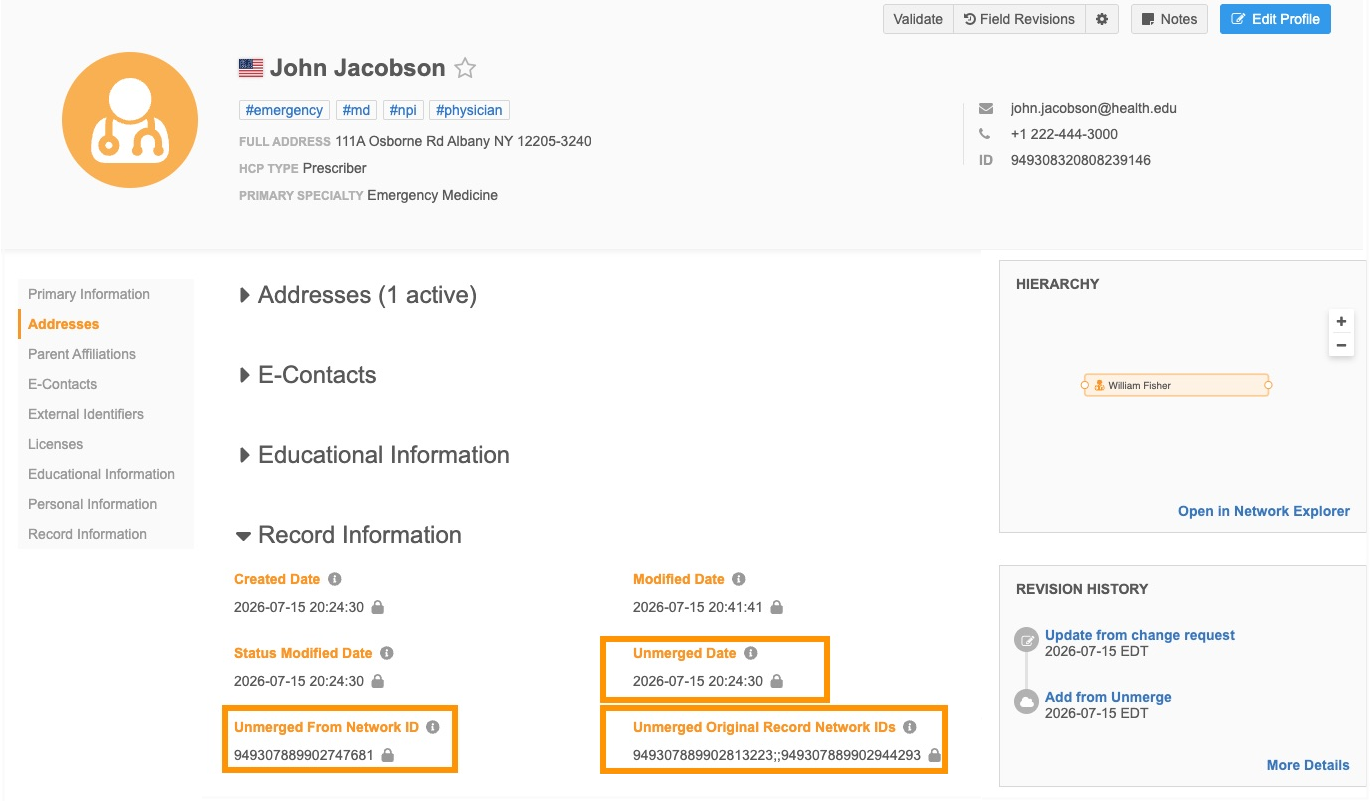
This enhancement is enabled by default. The fields are enabled by default in all instances.
Benefits
-
Easily cleanup bad merges - Bad merges can occur from broad matching rules, bad source files, data stewardship, and overmatching in jobs. These fields provide the exact pre-merge IDs you need to understand the record's history.
-
Track all unmerge activity: Automatically audits any unmerge action, whether it was triggered by Veeva OpenData or local data stewards.
-
Simpler downstream data updates - Downstream systems can read these fields directly, removing the need to build custom code to detect when records are unmerged.
Note: Existing unmerged records will not be backfilled.
New fields
The following system fields are enabled by default and cannot be disabled. They are managed by Veeva OpenData by default.
| Field Name | Label | Description |
|---|---|---|
| record_unmerged_date__v | Unmerged Date | Date when the record was unmerged |
| record_unmerged_from_vid__v | Unmerged from Network ID | Network ID of record that this record was unmerged from |
| record_unmerged_original_vids__v | Original Record Network IDs |
The Network IDs of the records that existed before they were merged. It confirms which original record's data is now being restored into the new record.
Note: The Unmerged From Network ID field value will never be included in this field. |
About unmerged records
Unmerging records is an existing process in your Network MDM instance and in Veeva OpenData. Records are typically unmerged due to overmatching or to separate records that were manually matched in error. This enhancement adds details to an unmerged record, making it easy to instantly see the history of the original record and the record it was separated from.
Example scenario
-
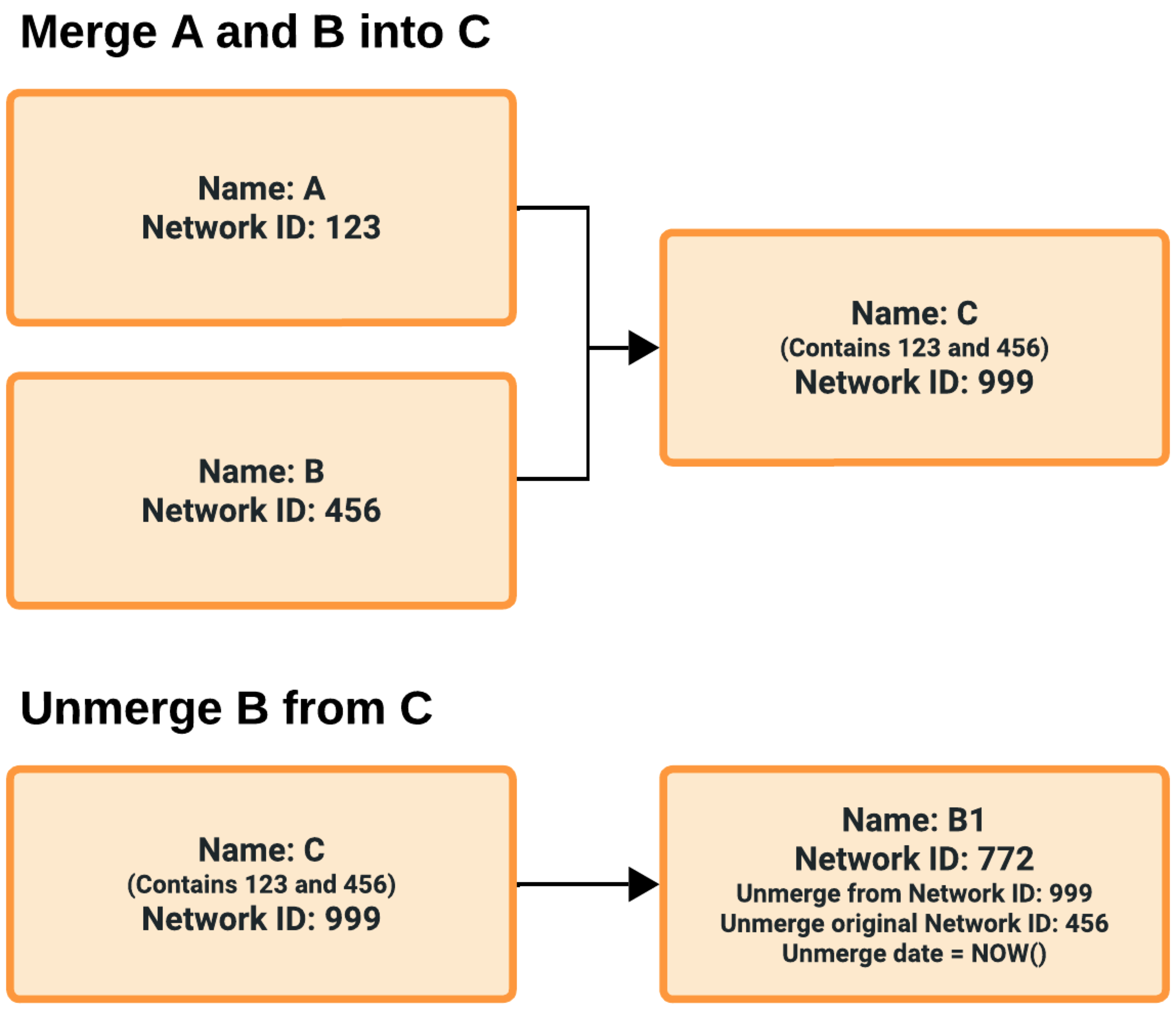
The Merge: Record A and B are merged into Record C. Record C now contains the combined data lineage of both original records.
-
The Unmerge: Record B is unmerged from C.
-
The Result: A new record, B1, is created.
The new fields are added to B1 to give you full visibility into the history of the record:
-
The Network ID of the merged record it came from (Record C).
-
The Network ID of the original record (Record B).
This tells you the source of the bad merge and identifies where the data for B1 originates. If there are multiple Network IDs, they are always sorted in ascending order and are separated by double-semi-colons (;;).
-
The unmerge date.
Supported records
The fields are available on main objects only.
-
HCP
-
HCO
-
custom main objects (including Payers and Plans)
View the fields on record profiles
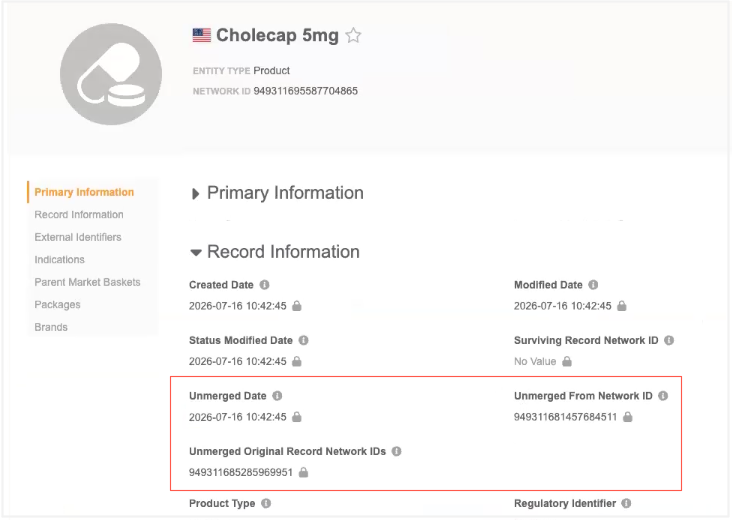
The fields are added to the Record Information section on standard profile layouts by default.
Add the fields to any custom profile layouts that you've created for HCPs, HCOs, and custom objects.
Unmerged fields on OpenData records
The new fields are available on OpenData records that are downloaded to your Network MDM instance. This gives you more transparency on unmerges that occur on OpenData records.
Note: The Network IDs of the original or unmerged from record might not be in your instance or be available to download.
Report on unmerges
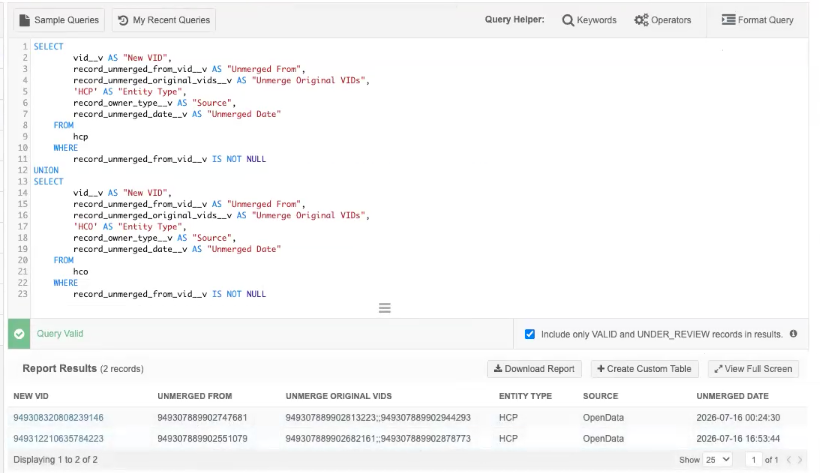
Advanced reporting users can report on unmerges using the sample queries available in the SQL Query Editor (Reports).
Example sample query - Unmerged HCPs
New unmerge queries
New sample queries are available which include the new unmerge fields. They report on unmerges in your Network MDM instance and in the OpenData instance.
-
Unmerged HCOs
-
Unmerged HCPs
-
Unmerged HCPs and HCOs
Existing unmerge queries
The names of the existing sample queries for unmerged HCPs and HCOs are updated to indicate that they are legacy reports. These queries report on unmerges that occurred in your Network MDM instance only.
-
Unmerged HCOs (Legacy)
-
Unmerged HCPs (Legacy)
-
Unmerged HCPs and HCOs (Legacy)
Cluster management
Updated cluster codes are available for the following country/third-party cluster provider combinations:
| Cluster Provider | Country | New Version |
|---|---|---|
| IQVIA | Spain | 6.0 |
| IQVIA | United Kingdom | 4.0 |
The new cluster version is available by default if you have the country/provider combination enabled in your Network MDM instance.
Update addresses
To update addresses with the latest cluster codes:
-
In the Admin console, click Data Model > Cluster Management.
-
Select the country / IQVIA cluster configuration.
-
In the Cluster Management Details section, expand the Cluster Version field and choose the latest version.
-
Save your changes.
-
Click Refresh Addresses to run a data maintenance job to ensure that all addresses for that country have the latest cluster codes.