Reports
Reporting on OpenData hierarchies
Advanced reporting users can use two new hierarchy tables to report on data in OpenData instances.
-
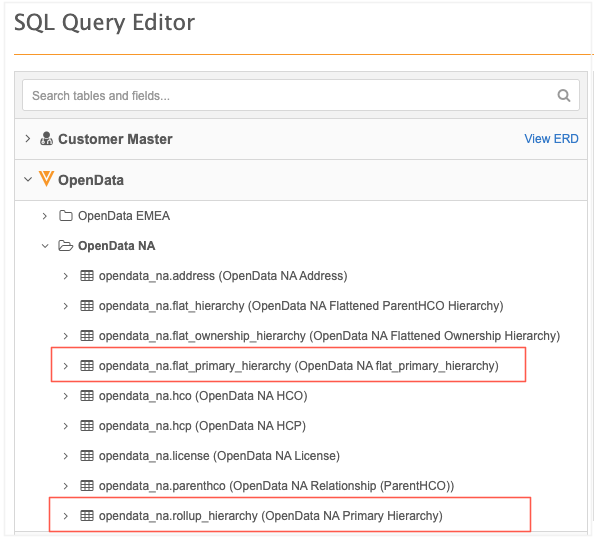
OpenData Flat Primary Hierarchy - Use to report on the records that Veeva OpenData considers as primary.
-
OpenData Rollup Hierarchy - Use to see how HCPs and HCOs roll up within all the levels within the Hierarchy. This is a way to denormalize the hierarchy structure.
The tables will be available in the SQL Query Editor in June 2026. They are enabled by default if Reporting on OpenData is enabled in your Network MDM instance.
For detailed information about the required permissions for reporting on data in the OpenData regional instances, see Reporting on OpenData.
Access the OpenData tables
OpenData reporting tables are available for countries where you subscribe to all records.
-
On the , click Reports > SQL Query Editor.
-
In the tree view, expand the OpenData category and the region folder, for example, OpenData NA.
The tables are supported for the following regions:
-
NA (US)
-
EMEA
-
AU
-
LatAm
-
OpenData Flat Primary Hierarchy
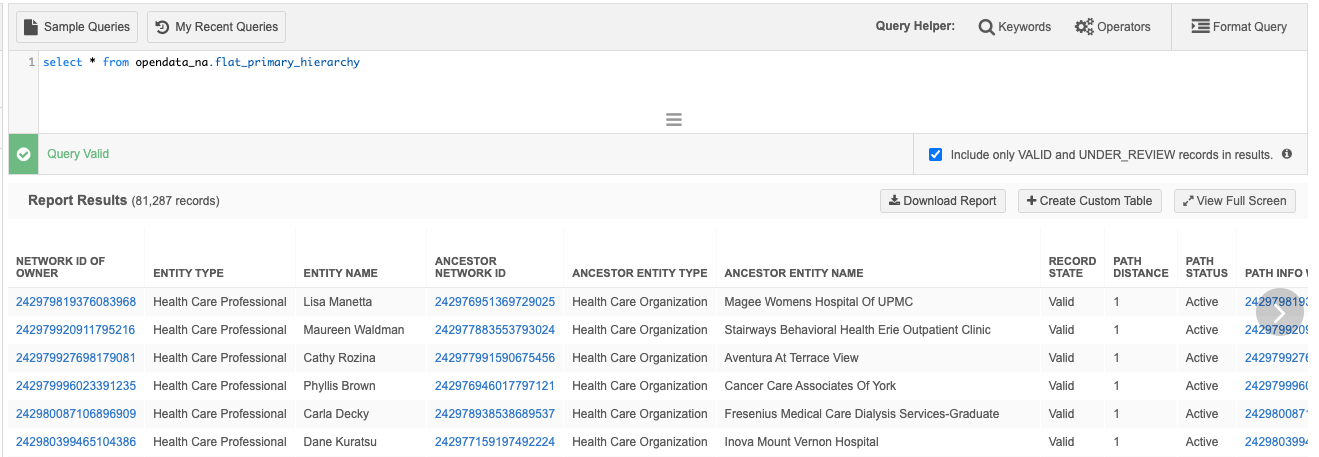
The opendata_<region>.flat_primary_hierarchy table stores the path of the primary relationship for each record.
The table follows the logic used for the existing flat hierarchy table. It identifies the source entity, it's primary ancestor, and provides the shortest path distance between the two entities. For details, Flat hierarchy in the Veeva Network MDM Online Help.
Table definition
The table definition is based on the Parent HCO object where the is_primary_relationship__v field is true.
The table contains the following default fields (columns). Additional columns can display depending on the region.
| Field Name | Field Label | Field Type | Description |
|---|---|---|---|
| ancestor__vid__v | Ancestor Network ID | Network ID | Network ID of the ancestor record. |
| entity_vid__v | Network ID of Owner | Network ID | Network ID of the entity record. |
| ancestor_name__v | Ancestor Entity Name | Network ID | Name of the ancestor record. |
| ancestor_type__v | Ancestor Entity Type | Reference | Type of the ancestor record. |
| entity_name__v | Entity Name | Text | Name of the entity record. |
| entity_type__v | Entity Type | Reference | Type of the child record. |
| hco_type__v_ancestor | HCO Type (Ancestor) | Reference | HCO type of the ancestor record. |
| hco_type__v_entity | HCO Type (Entity) | Reference | HCO type of the entity. |
| hcp_type__v_entity | HCP Type (Entity) | Reference | HCP type of the entity. |
| modified_date | Modified Date | Date Time | The last modified date of an entity or relationship in the path. |
| path_distance | Path Distance | Number | Distance of the entity to the ancestor. Direct relationships have 1 as the distance. A value of 2 means that there is another HCO between the entity and the parent HCO. |
| path_info | Path Info | Text | Full path from entity to ancestor using names. The names are separated by the pipe (|) character. |
| path_info_vid | Path Info with Network ID | Text | Full path from entity to the ancestor using Network IDs. The Network IDs are separated by the pipe (|) character. The Network ID of the entity displays first and then the parent HCO Network ID. |
| path_status | Path Status | Reference | Status of the path. The value is always Active. Paths that are inactive do not display in the reporting table. |
| primary_country__v_ancestor | Primary Country (Ancestor) | Reference | The primary country of the ancestor record. |
| primary_country__v_entity | Primary Country (Entity) | Reference | The primary country of the entity. |
| record_state__v | Record State | Reference | State of the path. The value is always Valid. Paths that are not valid do not display in the reporting table. |
| veevaid__v_ancestor | Veeva ID (Ancestor) | Text | The Veeva ID of the ancestor record. |
| veevaid__v_entity | Veeva ID (Entity) | Text | The Veeva ID of the entity. |
Example report
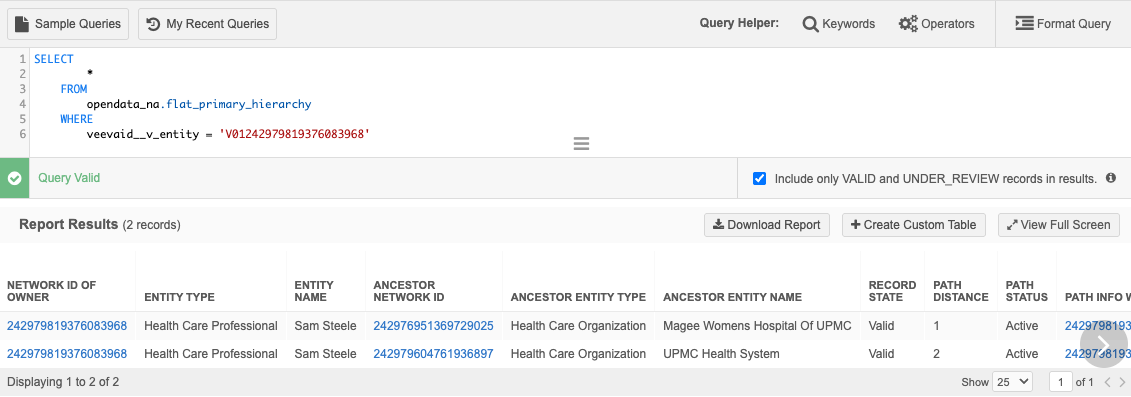
Query the table to display the flat primary hierarchy for a specific HCP.
SELECT *
    FROM
        opendata_na.flat_primary_hierarchy
    WHERE
        veevaid__v_entity = 'V01242979819376083968'
Results
Roll-up Hierarchy table
The opendata_<region>.rollup_hierarchy table is a new materialized view designed to resolve specific analytical challenges. It simplifies complex, variable hierarchies by flattening them into fixed levels, such as L1 through L4. This allows sales and incentive compensation teams to run reports without managing the underlying hierarchy depth.
Using this table will make it easier to report on hierarchies downstream, especially if you're looking for fixed levels.
Key details
-
The reporting table is available only for querying OpenData instances.
-
The roll-up hierarchy is not part of the data model in your Network MDM instance.
-
Changes to the hierarchy must be submitted on the HCP or HCO record.
-
The materialized view is calculated on a daily basis.
Table definition
The table is based on the Parent HCO object where the is_primary_relationship__v field is true.
The different hierarchy levels are represented as the following columns:
| Label | Name | Description |
|---|---|---|
| Entity Object Veeva ID | entity_veevaid__v | Veeva ID of the HCP or HCO that is the source of this rollup. |
| Entity Name | entity_name__v | Name of the HCP or HCO that is the source of this rollup. |
| Entity Object Type | entity_object_type__v | Either HCP or HCO. |
| Primary Affiliation Veeva ID | prim_affl_veevaid__v | Name of the primary parent this HCO or HCP rolls up to. |
| Primary Affiliation Name | prim_affl_name__v | Veeva ID of the primary parent of this HCO or HCP rollup. |
| Main Org Veeva ID | main_org_veevaid__v | Primary institution-level facility Veeva ID (e.g., hospital/clinic). Acts as an HCP's main workplace or the overarching institution for a smaller HCO. |
| Main Org Name | main_org_name__v | Primary institution-level facility name (e.g., hospital/clinic). Acts as an HCP's main workplace or the overarching institution for a smaller HCO. |
| Top Org Veeva ID | top_org_veevaid__v | The Veeva ID of the ultimate parent organization (e.g., Global Headquarters, Health System) of the HCP's primary affiliation. |
| Top Org Name | top_org_name__v | The name of the ultimate parent organization (e.g., Global Headquarters, Health System) of the HCP's primary affiliation. |
| Hospital Parent Veeva ID | hospital_parent_veevaid__v | Veeva ID of the hospital that this HCO or HCP rolls up to. |
| Hospital Parent Name | hospital_parent_name__v | Name of the hospital that this HCO or HCP rolls up to. |
| Regional Health System Veeva ID | regional_system_veevaid__v | The Veeva ID of the subsidiary system this HCO or HCP rolls up to. |
| Regional Health System Name | regional_system_name__v | Name of the subsidiary system this HCO or HCP rolls up to. |
Example
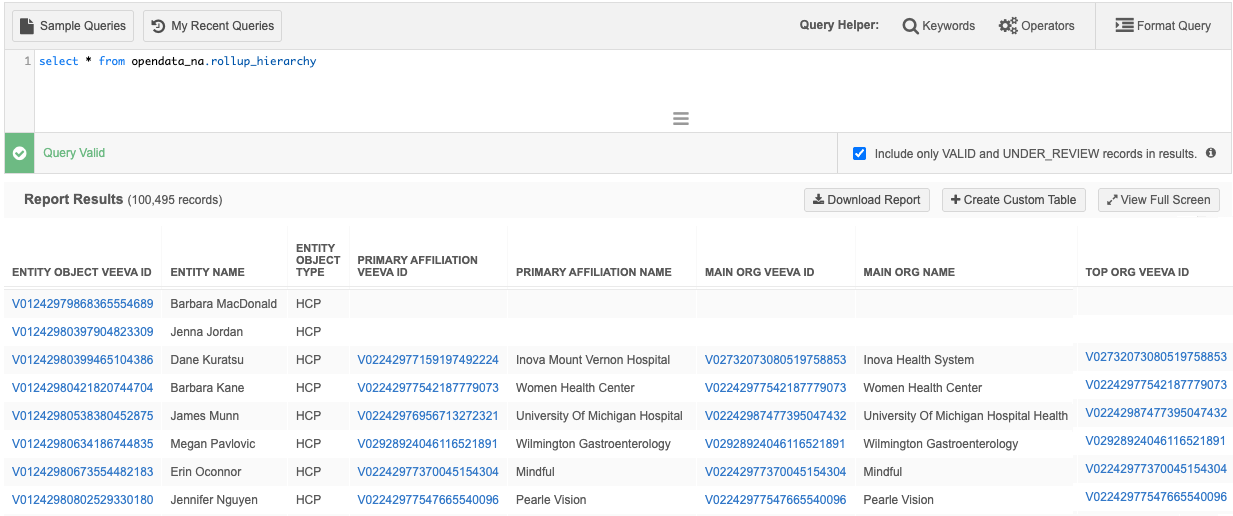
Table logic
Each table contains the following components:
-
Source - The starting point (bottom) of the hierarchy. Fields: Entity Object Veeva ID, Entity Name, Entity Object Type.
-
Roll-Up Levels - The fixed levels for each hierarchy. The Veeva ID and Name of the record is stored for each level.
Due to the varying health system layers globally, each OpenData region has their own rules to define the roll-up levels.
Regional rules to define roll-up levels
| US | EMEA | APAC | LatAm | |
|---|---|---|---|---|
| Primary Affiliation | Direct primary affiliation of the source entity. If there is no primary, the source record is repeated. |
|||
| Main Org | Direct primary of the primary affiliation.
If there is no primary, the primary affiliation record is repeated. |
Direct primary of the primary affiliation & the record must be a hospital or an Italian Outpatient Center.
If there is no primary, then the primary affiliation record is repeated. |
Direct primary of the primary affiliation & the record cannot be a department.
If there is no primary, then the primary affiliation record is repeated. |
Direct primary of the primary affiliation.
If there is no primary, the primary affiliation record is repeated. |
| Top Org | Highest level in the hierarchy. If there is no record above the Main Org, then the Main Org is displayed. |
Highest level in the hierarchy that meets the following criteria for these countries (primary_country__v): FranceHCO Local Type = Territorial Hospital Group (THGE) or HCO Ownership = Private (PRIV) OR Germany HCO Local Type = Health System (HSEY) OR Spain HCO Local Type = Health Care System Administration(HCSA) or Health Insurance Provider (HIPE) OR United Kingdom HCO Local Type = Health and Social Care Partnership (HASC), Integrated Care System (ICSN), or Health Board (HBEO)
Otherwise, the record Main Org will be used. |
Highest level in the hierarchy. If there is no record above the Main Org, then the Main Org is displayed. | Highest level in the hierarchy. If there is no record above the Main Org, then the Main Org is displayed. |
| Hospital Parent | First hospital in the hierarchy. | First hospital in the hierarchy. | Highest hospital in the hierarchy. | First hospital in the hierarchy. |
| Regional Health System | Second highest IDN in the hierarchy. | First health system in the hierarchy. | Highest health system in the hierarchy. | First health system administrative record in the hierarchy. |
Examples
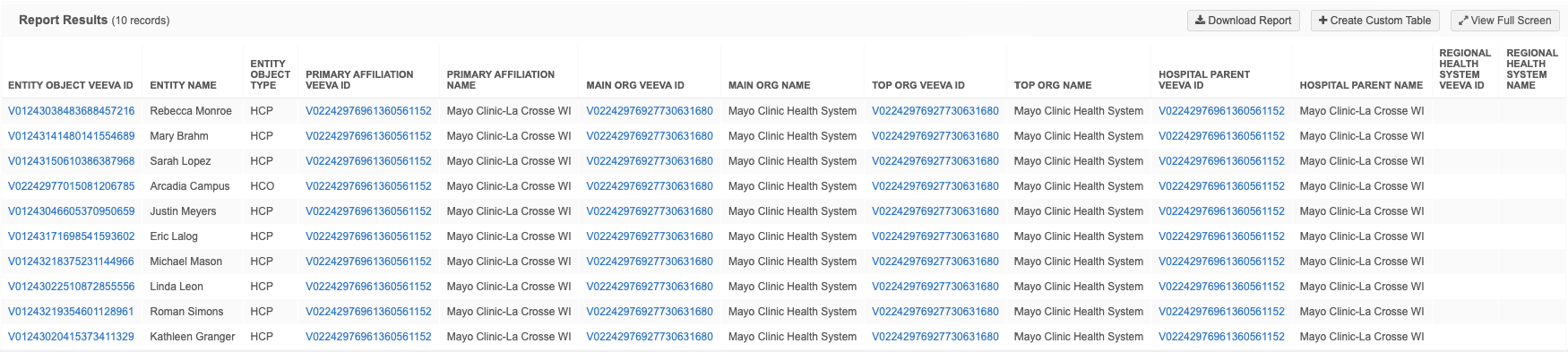
Example 1 - Roll-ups to a specific HCO in a health system
In this example, we'll report on the levels in the Mayo Clinic that roll-up to the Mayo Clinic-La Crosse WI hospital.
SELECT
        *
    FROM
        opendata_na.rollup_hierarchy
    WHERE
        top_org_veevaid__v = 'V02242976927730631680'
        AND hospital_parent_veevaid__v = 'V02242976961360561152'
Results
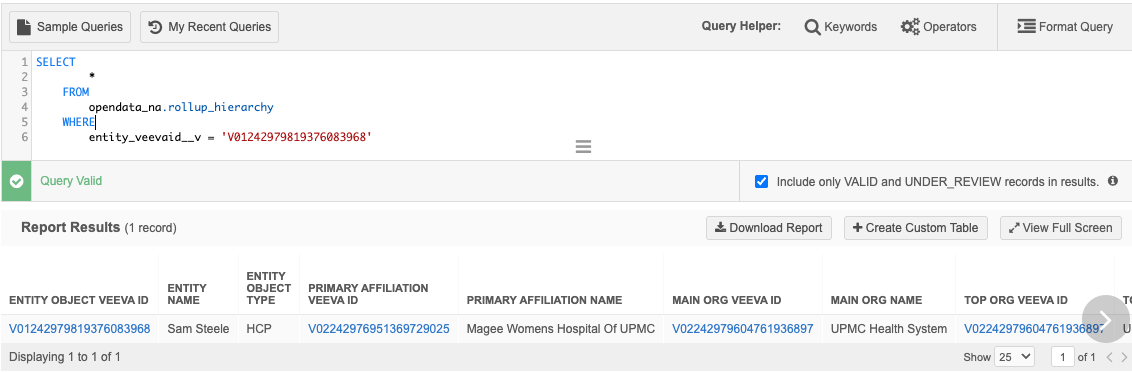
Example 2 - Roll-ups for an HCP
Report on the roll-up levels for a specific HCP.
SELECT
        *
    FROM
        opendata_na.rollup_hierarchy
    WHERE
        entity_veevaid__v = 'V01242979819376083968'
Results
Export to data warehouse
To integrate this data into your data warehouse, include the tables in your target subscription using transformation queries.
Since delta tracking is unavailable for the roll-up hierarchy and flat hierarchy, we recommend a truncate-and-load strategy (completely clear and reload the data) to push data to your data warehouse. This is the best way to ensure your data remains accurate and consistent.
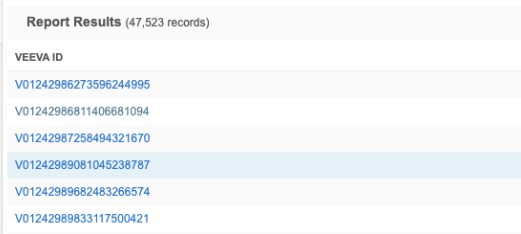
Veeva ID links in results
Report results that include the Veeva ID (veevaid__v) field display a link for each ID. Click the link to open the record profile in a new browser tab.
This enhancement is enabled by default.
Revision history reporting
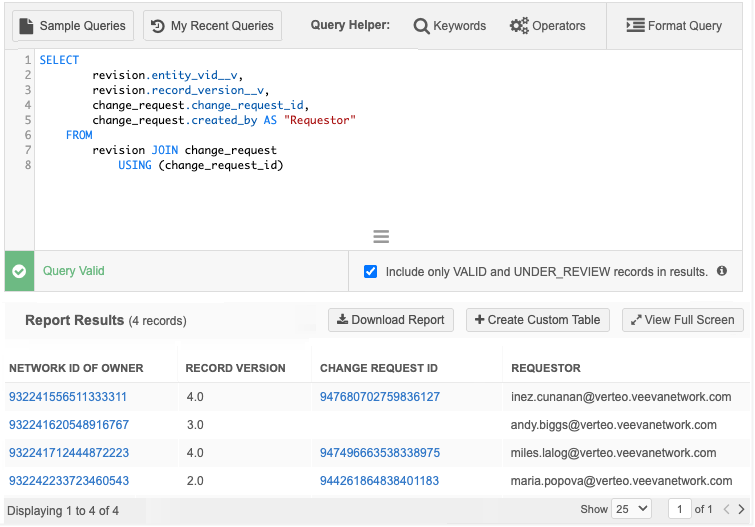
Advanced reporting users can now easily track the source of record changes by including DCR IDs in their revision history reports (SQL Query Editor > Revision History).
On a record's Revision History, each revision made from a change request includes the DCR ID. If the revision did not originate from a change request, this field is empty.
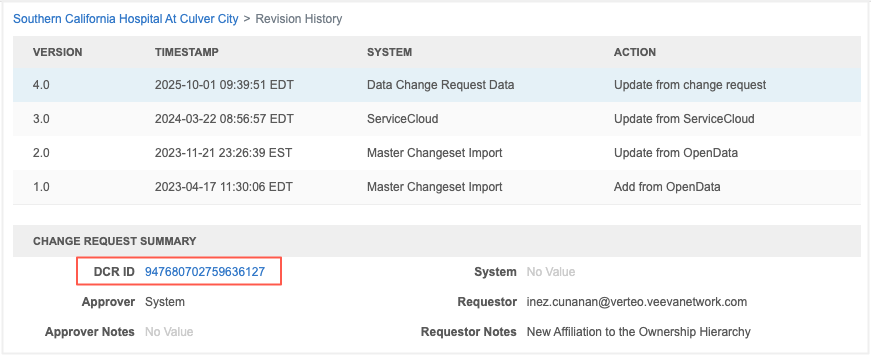
The DCR ID (change_request_id) is now available in the Revision History reporting table. Join the revision table to the change request table using the new column. The report results display the DCR ID which you can click to open the associated task.
This enhancement is enabled by default in your Network MDM instance.
Available data
Data will be populated for all new revisions created by change requests. Historical data will not be back-filled.
Example query
SELECT 	revision.entity_vid__v,
		revision.record_version__v,
		change_request.change_request_id,
		change_request.created_by AS "Requestor"
FROM revision
JOIN change_request USING (change_request_id)
Example results