Notes permission set
Use this permission set to provide or restrict access to notes on record profiles and on inbox tasks (add requests and change requests).
Supported users
By default, the following user types have all permissions for notes enabled for the profile page and for DCRs in the inbox:
-
Data Stewards
-
Data Managers
-
System Admins
-
System and Data Admins
Update permissions
To provide or restrict permissions for users or user groups:
-
Open the Notes Permission Set (Default).
-
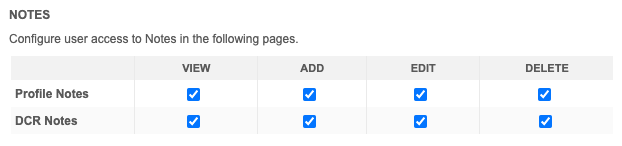
In the Notes section, there are two headings:
-
Profile Notes - Notes on the profile page.
-
DCR Notes - Notes on add and change requests.
-
-
For each heading, you can select the following permissions:
-
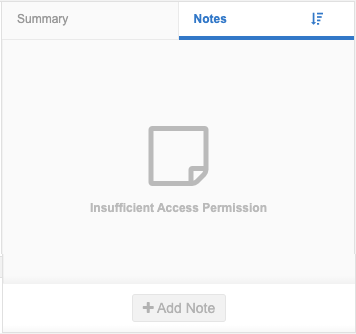
View - Allow users to view notes.
If this permission is not selected, users can access the Notes tab but they will the following message: Insufficient Access Permission.
-
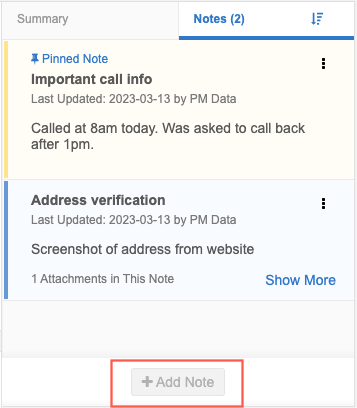
Add - Allow users to add notes. If users have Add access, they also have View access by default.
If this permission is not selected, users can view notes, but the option to add notes is dimmed.
-
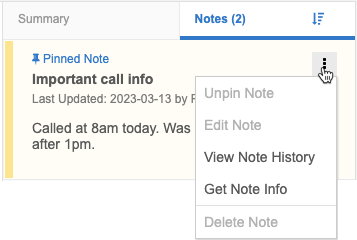
Edit - Allow users to edit notes and pin/unpin notes.
-
Delete - Allow users to delete their own notes and notes created by other users.
If the Edit permission or the Delete permission is not selected, they are dimmed in the Options menu.
-
Administrators can add user groups or individual users to this permission set to manage access to profile notes and DCR notes in their Network MDM instance.
Tip: Create a new permission set to manage note access for specific users or user groups.