OpenData subscriptions
Primary CDA address field
The Primary CDA field (primary_cda__v) for the Address object can now be managed by Veeva OpenData. Previously, the field could be locally managed only.
This change is available by default. Administrators can change the field ownership within their OpenData country subscriptions.
Data impact
Leave as locally managed (default behavior)
There is no data impact if the primary_cda__v field remains locally managed.
Change to OpenData managed
If you choose to make the field managed by OpenData for a country, the following behavior occurs:
-
Data change requests will be routed to OpenData data stewards for processing
-
Updates to the field will be provided through your OpenData country subscription.
-
Locally managed data in the field will be overwritten by OpenData data.
Tip: Backup existing data in the field before receiving updates from OpenData. See Tips for preserving local data in the Veeva Network MDM Online Help.
Update the field
To change the field to be mastered by Veeva OpenData:
-
In the Admin console, click System Interfaces > Veeva OpenData Subscriptions.
-
Open a country subscription.
-
In the Veeva OpenData Fields section, expand the Address section in the Available Fields pane.
-
Select the Primary (CDA) (
primary_cda__v) field and use the Right-Arrow icon to move it to the Selected Fields pane.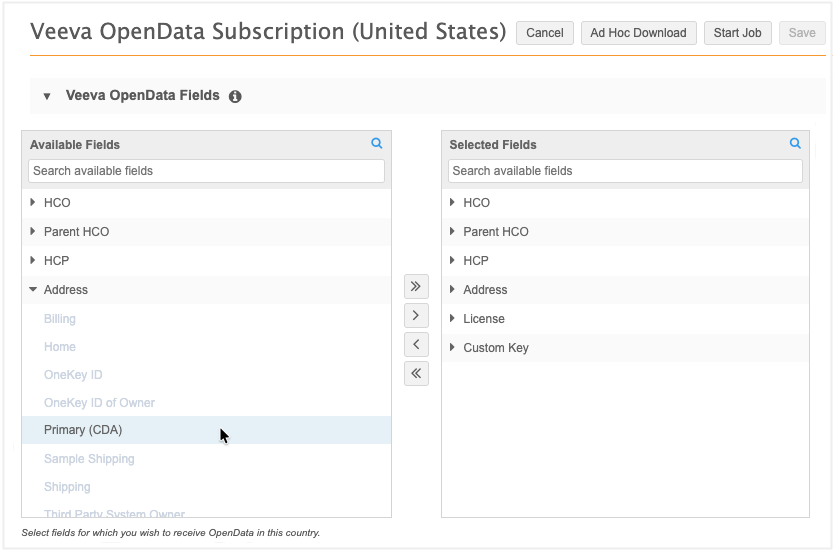
-
Save your changes.
The field will now be managed by OpenData for that country.
-
Repeat these steps for each country where OpenData will manage the field.