Reports
Revision history reporting
Advanced reporting users can now easily track the source of record changes by including DCR IDs in their revision history reports (SQL Query Editor > Revision History).
On a record's Revision History, each revision made from a change request includes the DCR ID. If the revision did not original from a change request, this field is empty.
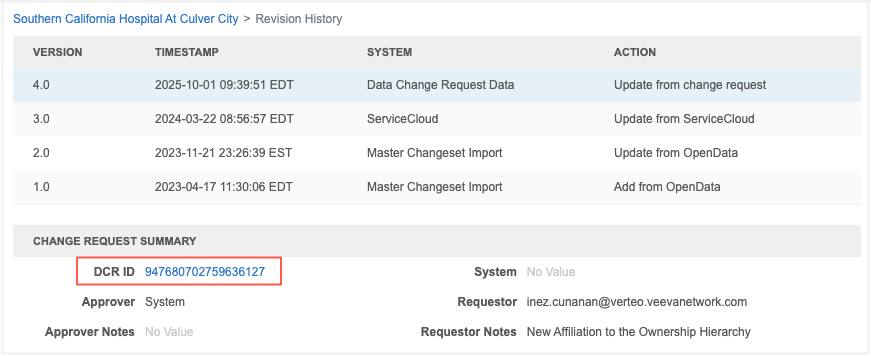
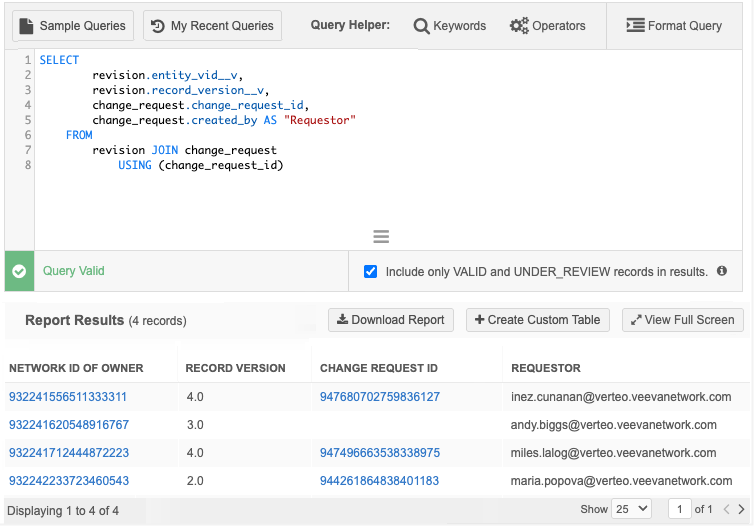
The DCR ID (change_request_id) is now available in the Revision History reporting table. Join the revision table to the change request table using the new column. The report results display the DCR ID which you can click to open the associated task.
This enhancement is enabled by default in your Network MDM instance.
Available data
Data will be populated for all new revisions created by change requests. Historical data will not be back-filled.
Example query
SELECT 	revision.entity_vid__v,
		revision.record_version__v,
		change_request.change_request_id,
		change_request.created_by AS "Requestor"
FROM revision
JOIN change_request USING (change_request_id)
Example results