Security
Single sign-on mappings
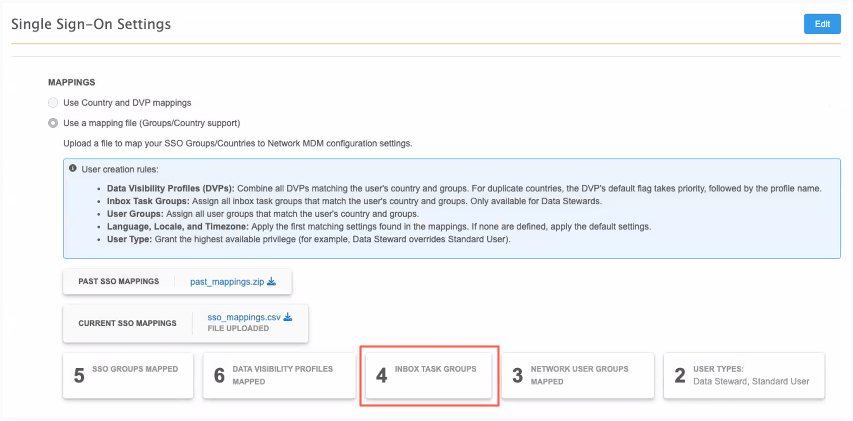
In version 26R2.0, single sign-on was enhanced to enable Administrators to use a mapping file to dynamically provision new users. This release expands those mappings to include Inbox Task Groups for Data Steward users.
Administrators no longer need to manually assign inbox task groups to each new data steward user. When data stewards log in for the first time, they can immediately access tasks assigned to the inbox task group.
This enhancement is enabled by default.
Supported user types
-
Data Stewards
Inbox task groups cannot be assigned to Standard Users or Portal Users.
Mappings file
The sso_mapping.csv file is updated to include a column for Inbox Task Groups.
When the user type is Data Steward, add the required Inbox Task Groups using the inbox task group ID found in the network_configurations.xlsx file that is downloaded with the sso_mappings.csv file.
Multiple inbox task groups can be added as comma separated values.
Example

Important: The user must have access to data for the Inbox Task Group country. Ensure that the data visibility profile (DVP) for that country is also assigned to the user type in the NETWORK_DVPS column.
Validating the mapping file
When you upload the file, the Inbox Task Group configurations are validated. Errors will occur for the following issues:
-
Inbox task groups are assigned to Standard users or Portal users. Those user types do not have access to the Network MDM inbox.
-
An unknown inbox task group was included.
-
The Data Loading inbox task group was included. This inbox task group applies to Administrator and Data Manager users only. It cannot be assigned to Data Steward users.
Creating the user
When the file is successfully uploaded and the SSO configuration is saved, users logging in as Data stewards will be automatically created and assigned to the Inbox Task Group.
When they access your Network MDM instance for the first time, the Inbox page displays and includes the tasks for their assigned Inbox Task Group.
Updates to Transport Security Layer ciphers
To ensure the highest security standards, the following TLS cipher will be removed from publicly accessible Network FTP servers.
-
TLS_DHE_RSA_WITH_AES_256_CCM_8
While Network MDM already enforces TLS 1.2, retiring these ciphers eliminates known vulnerabilities and strengthens your data protection.
This change will be made by default.
Impact to existing customers
No disruption is expected. Standard FTP clients will automatically negotiate stronger, supported ciphers with no action required.
If you connect using older FTP clients or custom automation scripts, you might need to update your software to maintain connectivity.