Profiles
Display hidden relationships in the Revision History
A record's revision history lists all changes to the record, but when an update involves a hidden relationship, no details display for that version. These empty updates are now flagged as hidden relationships and you can choose to view the details.
This enhancement is available by default. Users can enable the option to display hidden relationships on applicable records.
What are hidden relationships?
For completeness, each change creates a version in the record's revision history. This includes changes that OpenData makes to a record's relationships.
A hidden relationship occurs in the following situations:
-
The parent HCO is not downloaded to your Network MDM instance.
-
In 2-tier and 3-tier hierarchies for China, the relationship is dropped because it is not valid for the hierarchy structure.
When OpenData adds a relationship that is hidden to you for one of the reasons above, a new version is created, but only the modified date displays.
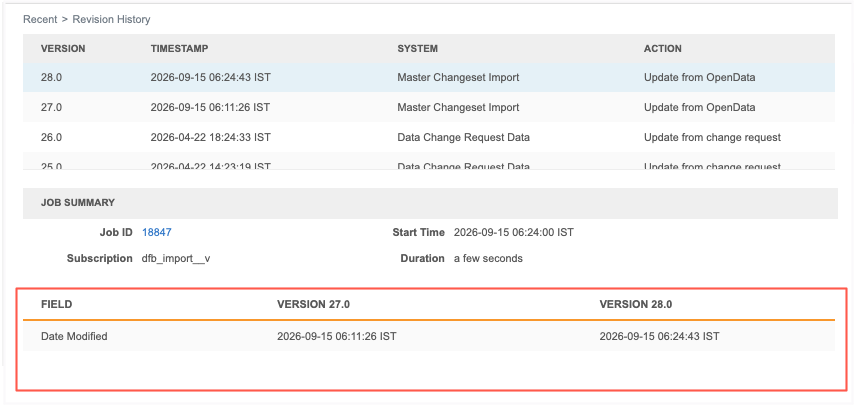
You can now view the details of the changes.
Show hidden relationships
When the revision involves a change to a hidden relationship, the Job Summary section now displays the Show hidden relationships option. The option is off by default.
Select the option to display the details made to the parent affiliation in the OpenData master instance.
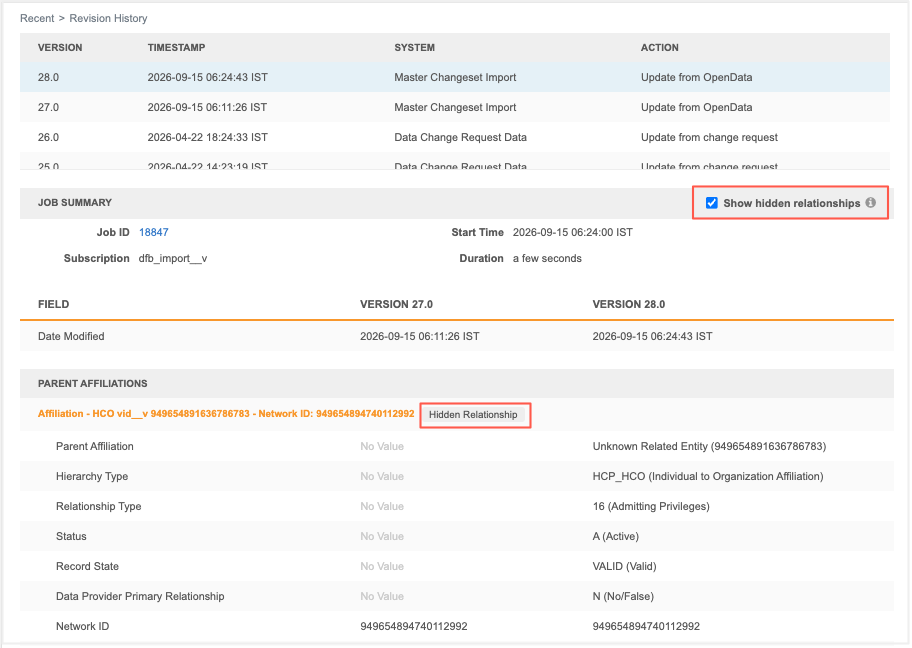
When the Show hidden relationship option is on, hidden relationships are tagged so you can quickly identify those relationships.
Impact to other Network MDM features
Hidden relationships display only in the record's revision history.
They do not display in other features, including field revisions and revision history reporting.