IQVIA OneKey Connector
The Connector is a bi-directional connection with IQVIA® OneKey that seamlessly integrates OneKey as your third-party data provider for HCOs and HCPs within Network MDM.
The following enhancements have been added in this release. All enhancements are enabled by default.
Important: A third-party agreement (TPA) must be in place before OneKey data can be loaded into Veeva Network MDM.
IQVIA OneKey system support for country groups
Third-party master systems, including your IQVIA OneKey system, now support multiple country-specific configurations. Using country groups, administrators can define record management and field ownership rules for different countries within a single system.
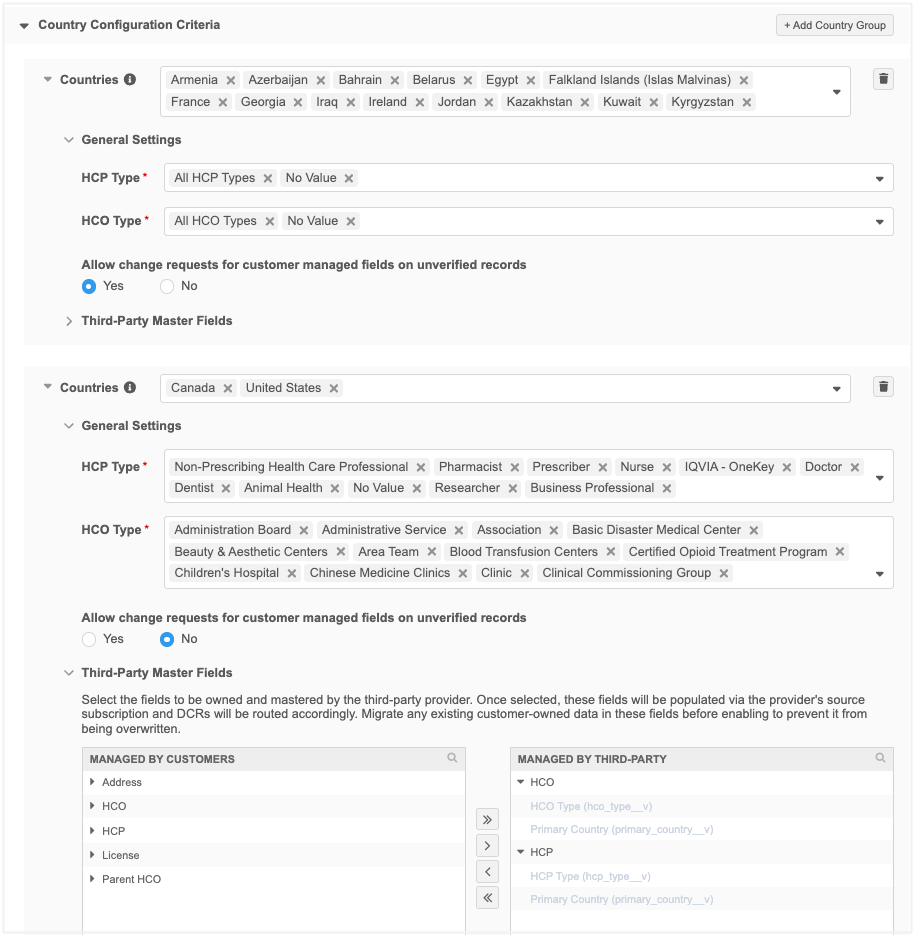
Important: All countries mastered by IQVIA OneKey must be included in the system configuration. Data loading and API access now validates that the country is managed by IQVIA using this system. For details, see the Validate countries during data load and Record access in the Search and Retrieve APIs topics below.
Supported systems
Country groups are supported for the following system types:
-
IQVIA OneKey
-
Custom systems defined as third-party master
Create a country group
Use a country group to define the records and fields that will be managed for specific countries.
-
In the IQVIA One-Key system, click Add Country Group.
Define the following settings:
-
Countries - Select one or more countries to add to the group.
A country can belong to only one group within the same third-party system. Countries that are managed by Veeva OpenData cannot be added.
-
General Settings - Choose the HCPs and HCOs by type that will be managed by IQVIA for these countries.
-
Allow change requests for customer managed fields on unverified records - Route DCRs for customer managed fields on unverified IQVIA records to be sent to local data stewards.
This is helpful when users want to add information to a new record but the record is still pending approval from IQVIA.
-
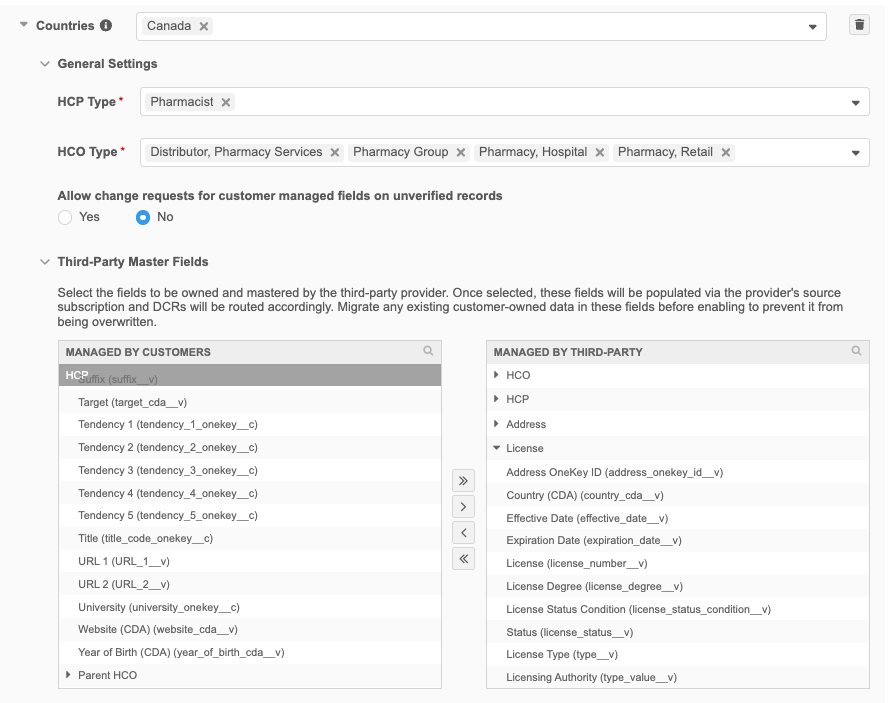
Third-Party Master Fields - Define the fields that will be managed by IQVIA for the countries in the group. Changes to fields in the Managed by Third-Party pane will be routed to IQVIA to process.
To define the fields as IQVIA-managed, move the fields from the Managed by Customer pane to the Managed by Third-Party pane.
Some fields are automatically moved to the Managed by Third-Party pane when the objects are defined as IQVIA-managed.
-
Save your changes or click Add Country Group to create another group.
Example
Existing IQVIA OneKey systems
If you have a system configured, a country group is created for the existing countries, HCP, HCO, and field settings.
Validate countries during data load
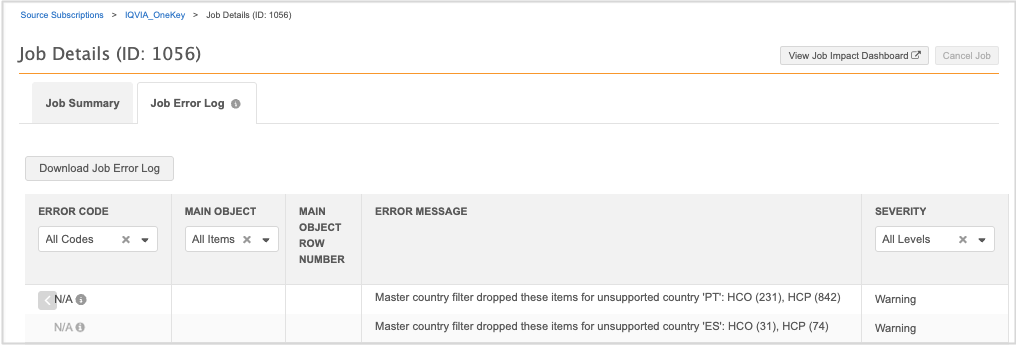
Records that are loaded for the IQVIA-OneKey system are now validated to ensure that the country is managed by IQVIA. If a country is not included in the IQVIA-OneKey system configuration, the record is not loaded. The Job Error Log displays a warning for each country with skipped records.
Supported systems
The country validation applies to IQVIA OneKey systems only.
Job warnings
When a record is loaded for the IQVIA OneKey system and the country is not managed by IQVIA, it could be for one of the following reasons:
-
The country field (
country_cda__v) is not defined for the record in the source file. -
The country is not included in the IQVIA OneKey system configuration.
If the country cannot be validated, the record is not loaded into your Network MDM instance.
The Job Error Log displays the following warning for each country with skipped records.
| Error Code | Explanation | How to Resolve |
|---|---|---|
| N/A | Master country filter dropped these items for unsupported country <'country_code'> : HCO <total_count> , HCO <total_count> | Assign the country to a country group in the IQVIA OneKey system configuration or remove these records from the source file. |
One warning occurs for each country.
The warning does not fail the job. The job can complete. Review the warning details and add the country to your IQVIA system configuration if required.
Record access in the Search and Retrieve APIs
Integration users searching for and retrieving records using the IQVIA OneKey system will only see the records from countries included in the IQVIA OneKey system configuration.
By automatically filtering API results to match your IQVIA OneKey system configuration, integration users receive cleaner, more focused responses containing only the exact country data they need. This built-in safeguard also protects data integrity by ensuring non-IQVIA records are never unintentionally exposed.
Supported APIs
OneKey records are filtered for the following APIs:
-
Search
-
Retrieve
(Retrieve Entity, Retrieve Child Entity, Batch Retrieve Entities, Batch Retrieve Child Entities, Retrieve HCO, Retrieve HCP)
Supported systems
Filtering is supported for all third-party master systems, including your IQVIA-OneKey system.
For all other systems, records and fields are not filtered from the API response.
Important: If the Integration User has API access to all systems through their user profile, no record filtering is applied.
Required permissions to access records
To access IQVIA-managed records and fields for a country, the following configurations are required:
Integration User
The user profile must have the following settings defined:
-
Data visibility profile (DVP) - Must be assigned to the DVP for that country
-
API access - Must have access to the IQVIA-OneKey system
IQVIA OneKey system
-
Must have the country defined in a country group
Example access scenarios
In this example, the Integration User needs to search for and retrieve IQVIA-managed records for France. The required configurations must be defined to access those records in the API.
| Scenario | Integration User's User Profile | IQVIA OneKey System | Access to Country Records in the API? | |
|---|---|---|---|---|
| API access to IQVIA OneKey system? | Assigned to France DVP? | Country Group Contains France? | ||
| 1 | Yes | Yes | Yes | Yes |
| 2 | Yes | Yes | No | No access |
| 3 | Yes | No | Yes or No | No access |
| 4 | No | Yes or No | Yes or No | No access |
Result
Only Scenario 1 provides access to the IQVIA-managed records for France.
If users search for a record they don't have access to, the API response contains only the Network ID for Search or an Insufficient Access error for Retrieve.