OpenData 2.0 data model
The OpenData 2.0 data model was released in June 2026. It supported the HCO, HCP, Address, and Parent HCO objects.
The following enhancements have been added in this release.
License support
The OpenData 2.0 data model now supports the License sub-object. In addition, the Licenses can now manage and store multiple IDs from the same issuer using the new dedicated Identifier category. Identifiers are IDs like HIN, NPI, and Tax IDs.
The OpenData 2.0 data model, including License support, is enabled by default for new customers. Existing customers can enable the fields for the OpenData 2.0 data model.
Enable License fields for OpenData 2.0
Administrators can enable the fields for their Network MDM instance. The method depends on whether the OpenData 2.0 data model is currently enabled.
OpenData 2.0 not yet enabled
If you have not yet enabled the OpenData 2.0 data model for your Network MDM instance, enabling it will enable all OpenData 2.0 fields for HCPs, HCOs, Addresses, ParentHCOs, and Licenses (including fields for Identifiers).
-
In the Admin console, click Settings > General Settings.
-
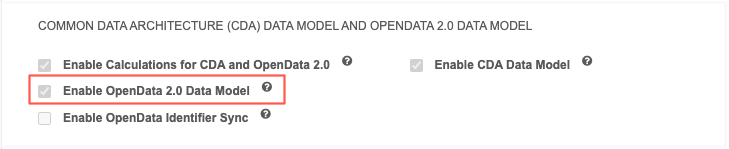
In the Common Data Architecture (CDA) and OpenData 2.0 Data Model section, select Enable OpenData 2.0 Data Model.
-
Save your changes.
OpenData 2.0 data model is already enabled
If you are already using OpenData 2.0, enable the individual License fields.
-
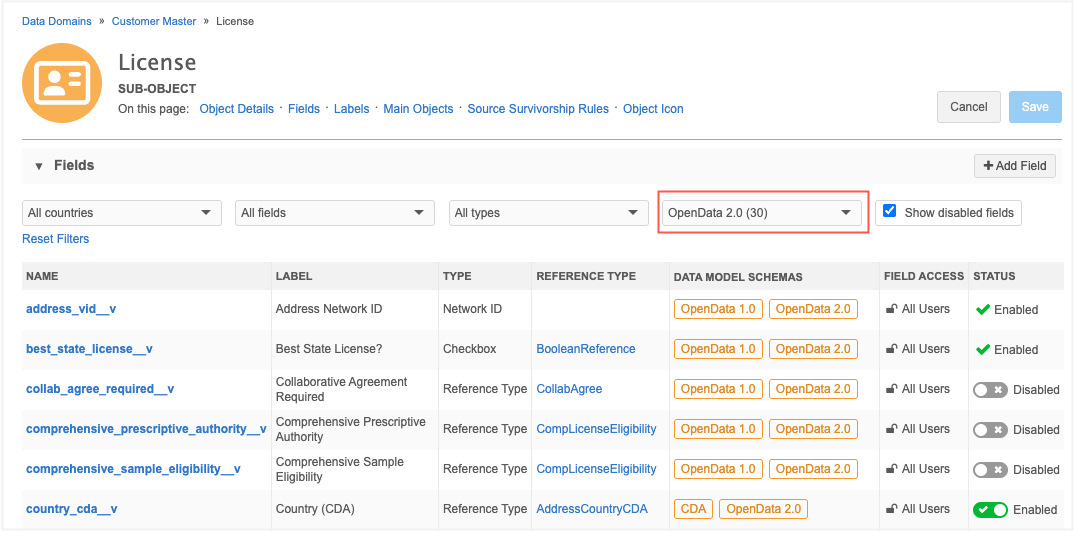
In the Admin console, click Data Model > Data Domains > Customer Master > Licenses.
-
In the Fields section, expand the Data Schema filter and select OpenData 2.0.
All OpenData 2.0 fields display.
-
For any disabled fields, toggle the Status icon to Enabled.
-
Save your changes.
Receive License and Identifier data from OpenData
To learn when License and Identifier data will be available, follow the OpenData communities on Veeva Connect.
-
OpenData - APAC (available by invitation only)
License data
License fields are managed by OpenData by default. Field values are pushed to your Network MDM instance through your OpenData subscriptions or ad hoc downloads as usual.
Identifier data
Important: Veeva OpenData Identifier data is not downloaded to customer instances by default. You must choose to download and sync OpenData Identifier data for your Network MDM instance.
To receive Identifier data from OpenData:
-
In the Admin console, click Settings > General Settings.
-
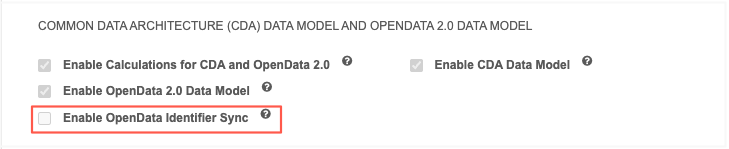
In the Common Data Architecture (CDA) and OpenData 2.0 Data Model section, select Enable OpenData Identifier Sync.
-
Save your changes.
This will set the fields to be OpenData-managed. If this setting is not enabled, Identifiers remain locally managed.
Populate field values
After the fields are enabled, follow these steps to populate field values:
-
Enable at least one OpenData 2.0 License field in your Network MDM instance.
-
Run a full OpenData country subscription to update all records that are downloaded in your Network MDM instance.
-
Open an OpenData country subscription (System Interfaces > OpenData Subscriptions).
-
In the Updates to OpenData records section, select Update all records.
-
Save your changes.
-
The next time the subscription runs, you will receive updates for all the Veeva-managed OpenData 2.0 fields that you have enabled.
License fields
The OpenData 2.0 data model is updated to include the following items for Licenses.
| Object | Fields | Reference Types |
|---|---|---|
| License | 30 | 20 |
All fields
To view the complete list of fields that are included, open the License object in the Data Model and filter the Fields section for all fields that display the OpenData 2.0 data model tag.
New fields
The following new fields are added to the License object. These fields can apply to Licenses and /or Identifiers.
| Field Name | Field Label | Field Type | Description | License or Identifier |
|---|---|---|---|---|
| id_priority__v | Identifier Priority | Reference Type (IdentifierPriority) |
Indicates whether the identifier for the HCP or HCO is the primary identifier or an additional (secondary) identifier. | Identifier |
| issuer_name__v | Issuer Name | Reference Type (IssuerName) |
The official name of the regulatory body, government agency, or professional council that issued the specific license, or the standardized designation of the identifier type assigned to the Health Care Professional or Organization in a certain country. | License Identifier |
| license_id_number__v | License/ID Number | Text | Unique identifier or license number issued to the HCP/HCO. | License Identifier |
| license_name__v | License Name | Reference Type (LicenseNameLocal) |
License name. Describes what the license is for; for example, Nurse Practitioner. | License |
| object_cat_type__v | Object Category Type | Reference Type (ObjectCategoryType) |
This is an important field that determines if the record is a License or an Identifier. Possible values include LICENSE, ID, or no value. Existing Licenses will not have a value. When a record is updated for any reason, the value will be set to LICENSE. Existing Licenses cannot be set to ID. This field is enabled by default for all Network MDM instances. |
License Identifier |
Existing fields added to Licenses and Identifiers
The following fields have been added to the License object for OpenData 2.0. They apply to Licenses and Identifiers.
| Field Name | Field Label | Field Type | Description |
|---|---|---|---|
| country_cda__v | Country (CDA) | Reference Type (AddressCountryCDA) |
Name of country. |
| entity_object_type__v | Entity Object Type | Reference Type (ObjectEntityType) |
Type of the source entity (HCO or HCP). |
| entity_veevaid__v | Entity Object Veeva ID | Text | Veeva ID of the HCP or HCO associated with this address or license. |
| state_cda__v | State/Province (CDA) | Reference Type (AddressStateCDA) |
Name of state, province, or regional area. |
Existing fields added to Identifiers
The following fields now apply to Identifiers.
| Field Name | Field Label | Field Type | Description |
|---|---|---|---|
| license_status__v | License Status | Reference Type (LicenseStatusItems) |
License status. |
| vid__v | Network ID | Text | Network ID |
New reference types
These reference types added for OpenData 2.0 are restricted (read-only); reference codes cannot be added, updated, or removed.
| Reference Type | Used by Field | License or Identifier | Details |
|---|---|---|---|
| IdentifierPriority | id_priority__v | Identifier | Two possible values: Primary and Secondary. |
| IssuerName | issuer_name__v | License Identifier |
|
| LicenseNameLocal | license_name__v | License | |
| ObjectCateogryType | object_cat_type__v | License Identifier |
Two possible values: License and Identifier |
To review the reference codes for each new type, go to Data Model > Reference Data.
Updates to existing reference types
All reference types for the License sub-object have been updated to be restricted (read-only). Reference codes can no longer be added, updated, or removed from these reference types.
-
CollabAgree
-
CompLicenseEligibility
-
CTRLSubPrescriptive
-
CTRLSubSampling
-
LicenseCertificiation
-
LicenseDEACode
-
LicenseDEAPaymentIndicator
-
LicenseEligibility
-
LicenseStatusCondition
-
LicenseSubType
Identifiers
Identifier data is stored on the License sub-object. Identifiers are IDs like HIN and NPI in the US and Tax ID and VAT Number in Europe. Previously, these IDs were stored in record level fields which limited the ability to store more than one type of ID per record; for example, storing multiple NPI numbers on a single HCO record to ensure historical context is preserved during acquisition.
Storing IDs as a sub-object removes these limitations and gives you the flexibility to manage different business scenarios.
Support for Identifier data
Identifiers are introduced with the License sub-object for the OpenData 2.0 data model. They can be stored and managed even if OpenData 2.0 is not enabled for your Network MDM instance.
To use Identifiers:
-
Enable the data model fields for Identifiers. See the License fields section above.
-
(Optional) To receive Identifier data from Veeva OpenData, turn on the Enable OpenData Identifier Sync option (Settings > General Settings).
Defining Identifiers
A new field on the License sub-object, Object Category Type (object_category_type__v), determines if the record is a License or an Identifier.
The field is a reference type field that uses the ObjectCategoryType reference list.
ObjectCategoryType reference codes
| Network Code | Network Name | Definition | Details |
|---|---|---|---|
| (no value) | - |
- |
Existing licenses with no value in this field will remain licenses. They cannot be changed to Identifiers. New records with no value will be licenses by default. |
| ID | Identifier | A unique tracking number assigned to a professional or an organization for administrative or billing purposes, which identifies them but does not grant legal permission to practice. | Identifiers must be explicitly set. |
| LICENSE | License | A credential granted by a regulatory body that provides legal permission to practice a profession, often with an associated expiration date and status. | This is the default value for new records that do not specify a value for this field. |
Impact to existing license records
All existing License records will remain Licenses but they will have no value in the Object Category Type field.
When the record is updated for any reason, the (object_category_type__v) field will be set to LICENSE. You can also proactively update the field to add the LICENSE value through data loading.
Existing Licenses cannot be changed to Identifiers.
Updating the field
The (object_category_type__v) field cannot be edited after a value is set.
New records
To add an Identifier, the (object_category_type__v) field value must be set to ID.
Add Identifiers in the Network MDM user interface
The (object_category_type__v) field value is determined by the section the record is created in:
-
License section - The field is set to LICENSE.
-
Identifier section - The field is set to ID.
Add Identifiers through data loading or the Network API
The (object_category_type__v) field value must be included and set to ID.
If the field has no value or is not defined, the record will be added as a License.
Profile layouts
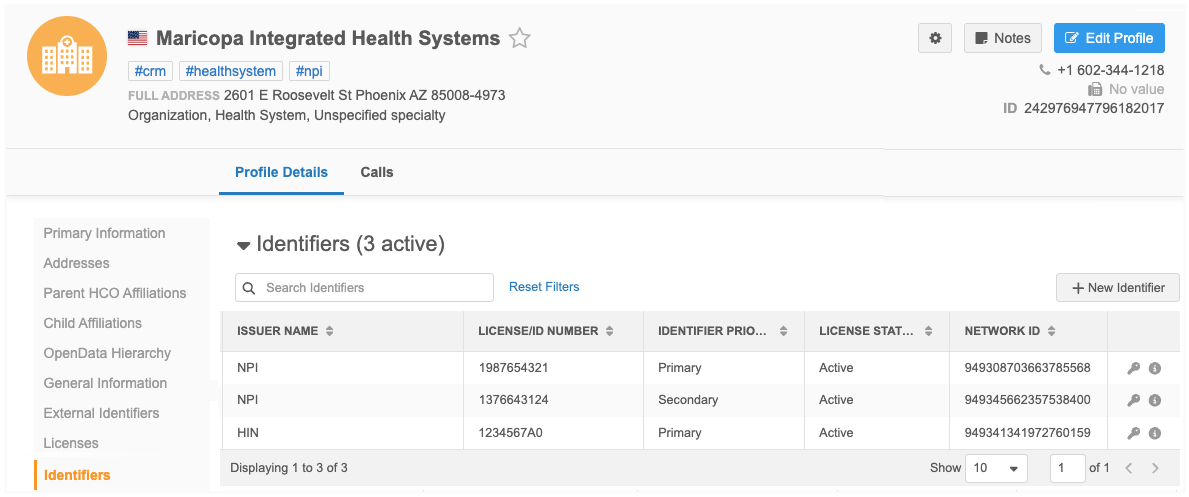
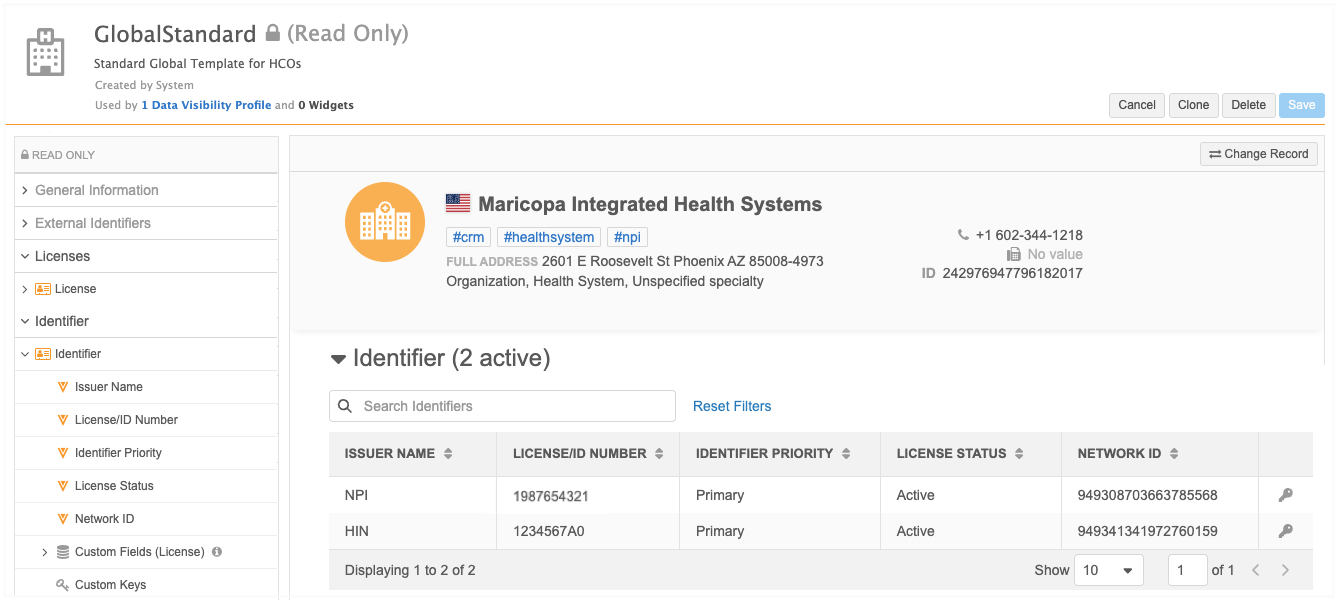
When the License fields associated with Identifiers are enabled, the Identifiers section displays on the GlobalStandard default profile layouts for HCOs and HCPs.
These are the layouts used by the OpenData 2.0 data model.
Fields
The Identifiers section includes the following fields:
-
Issuer Name
-
License/ID Number
-
Identifier Priority
-
License Status
-
Network ID
Add to custom layouts
The Identifiers section is not added to other standard layouts.
Standard layouts are read-only. Clone a standard layout or edit an existing custom layout to include the Identifiers section.
-
In the Admin console, click Data Model > Profile Layouts.
-
Choose a custom layout from the list.
-
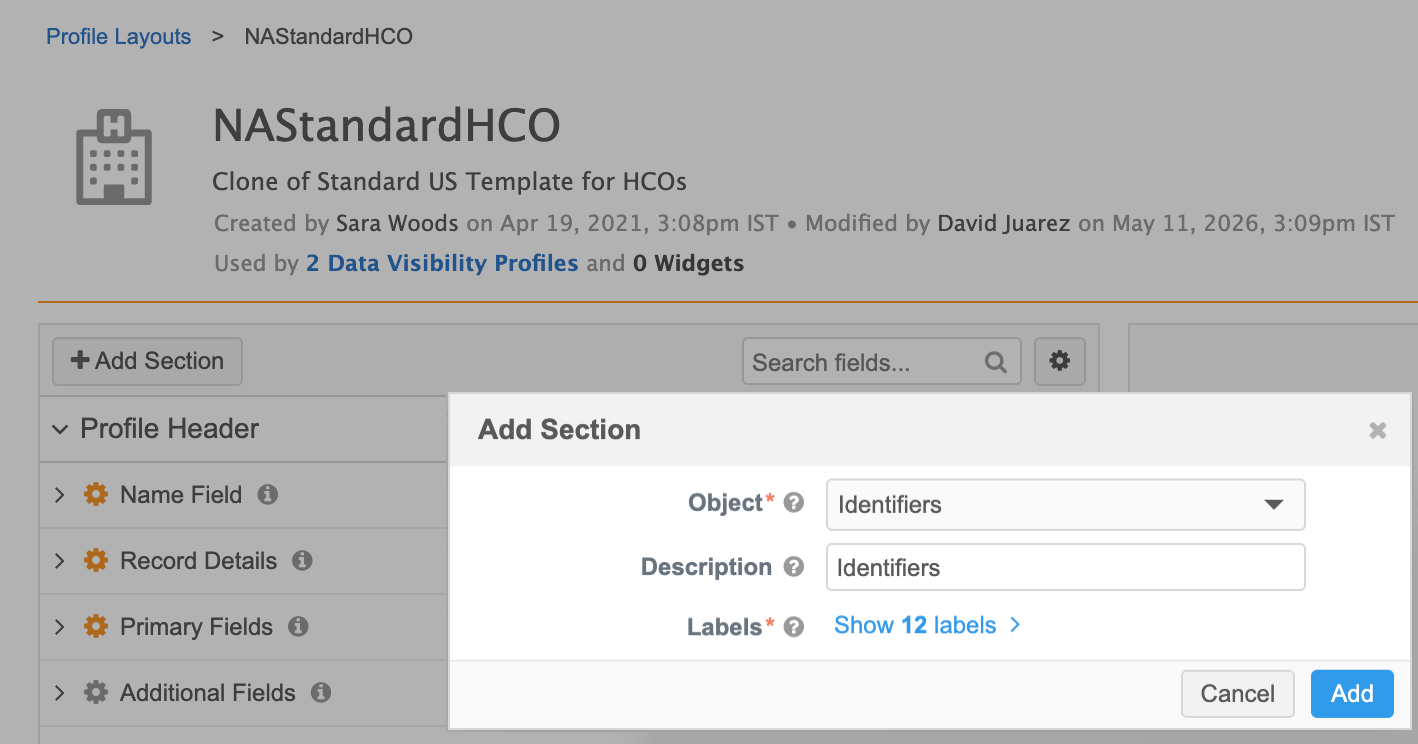
Click Add Section.
-
In the dialog, expand the Object field and choose Identifiers.
The Description and Labels fields are automatically populated.
-
Click Add.
-
The Identifiers section is added to the bottom of the list in the layout. All default fields are included in the section.
Use the Handle
 icon to move the section to a different location in the layout, for example, below the Licenses section.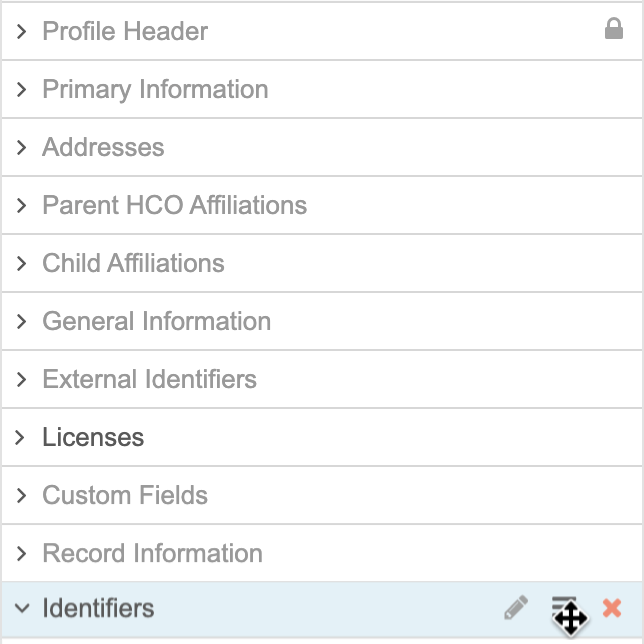
-
Save your changes.
-
If required, update any data visibility profiles (Users & Permissions) to use this layout so the Identifiers section displays on record profiles.
Identifiers on record profiles
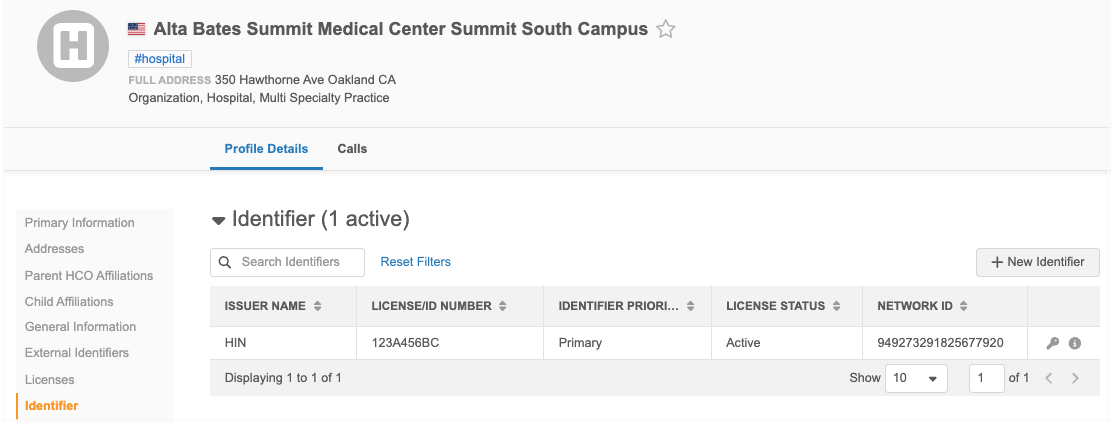
The Identifiers section displays on record profiles.
Supported records
Only License records where the Object Category Type field value is ID display in this section.
All other License records display in the Licenses section.
Identifier details
The table contains the following details by default:
| Column | Description |
|---|---|
| Issuer Name | The organization that issues the identifier. |
| License/ID Number | The number issued. |
| Identifier Priority | The importance of the identifier. Either Primary or Secondary. |
| License Status | Active or Inactive |
| Network ID | The 18-character unique ID assigned to the Identifier. |
| Actions |
|
 View custom keys
 View field details
Available actions
-
Search - Use the Search bar to find specific identifiers.
-
Sort - Re-order each column by ascending/descending order.
By default, the table is filtered by the Issuer Name of the Identifier country. If the Country (CDA) field is not included in the profile layout, the Issuer Name is filtered by the primary country of the HCP/HCO record.
-
Reset Filters - Update the table to the default sorting order.
-
Edit - Hover over a column value to display the Edit icon. Click Edit to set the profile page to edit mode.
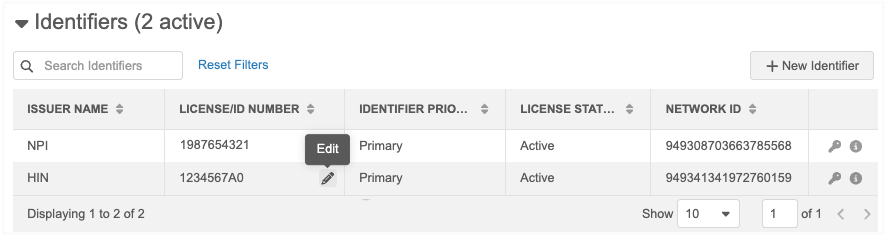
All Identifier values can be edited except the Network ID.
Adding and updating identifiers
As with all other sub-objects, Identifiers can be updated or added through the Network UI, data loading, and the Network MDM API.
Network UI
Identifiers can be added when you create an HCO or HCP record, or when you edit a record profile.
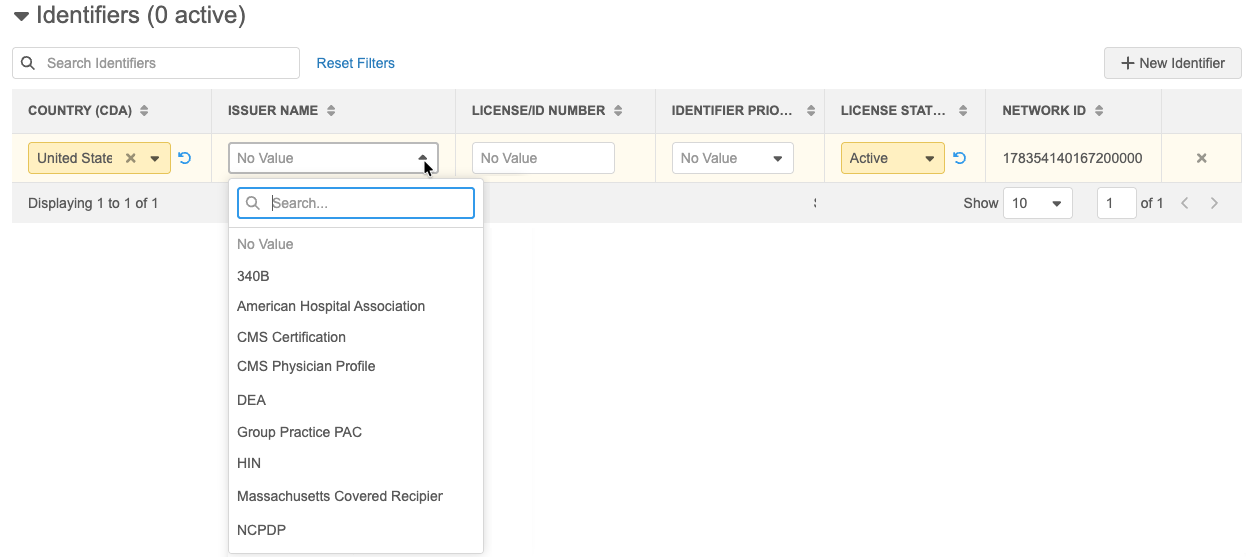
To add an identifier:
-
In the Identifiers section, click New Identifier.
A row is added to the table.
-
Define the following details:
-
Country (CDA) - The primary country. The primary country of the record profile displays by default.
-
Issuer Name - The organization that issues the ID.
-
License/ID Number - The number associated with the ID.
-
Identifier Priority - The importance of the Identifier: Primary or Secondary.
-
License Status - Active (default) or Inactive.
-
Network ID - This is assigned to the Identifier by default.
-
-
Apply your changes.
The identifier displays in the table.
Note: The Object Category Type field value is automatically set to ID for objects created in the Identifiers section.
Data Loading
Add or update Identifiers using source subscriptions.
Important: Include the Object Category Type field with a value of ID when loading Identifier data. If the field is not included in the source file, the value is set to LICENSE by default. The field value cannot be changed on existing records.
Network MDM API
Submit add requests for Identifiers using the Change Request API.
The Object Category Type (object_category_type__v) field must be included in the API call with a value of ID to create an Identifier.
There is no impact to existing integrations for creating Licenses; the field does not need to be included because a License is created by default.
Data change requests
When users add or edit an Identifier, a change request is submitted.
DCR routing
The Enable OpenData Identifier Sync setting determines where the data change request is routed.
-
On - Identifiers are managed by OpenData; DCRs are routed to OpenData.
-
Off - Identifiers are managed locally; DCRs are routed to your local data stewards.
Processing Identifiers on DCRs
An Identifiers section is added to add requests and change requests so data stewards can easily process the changes.
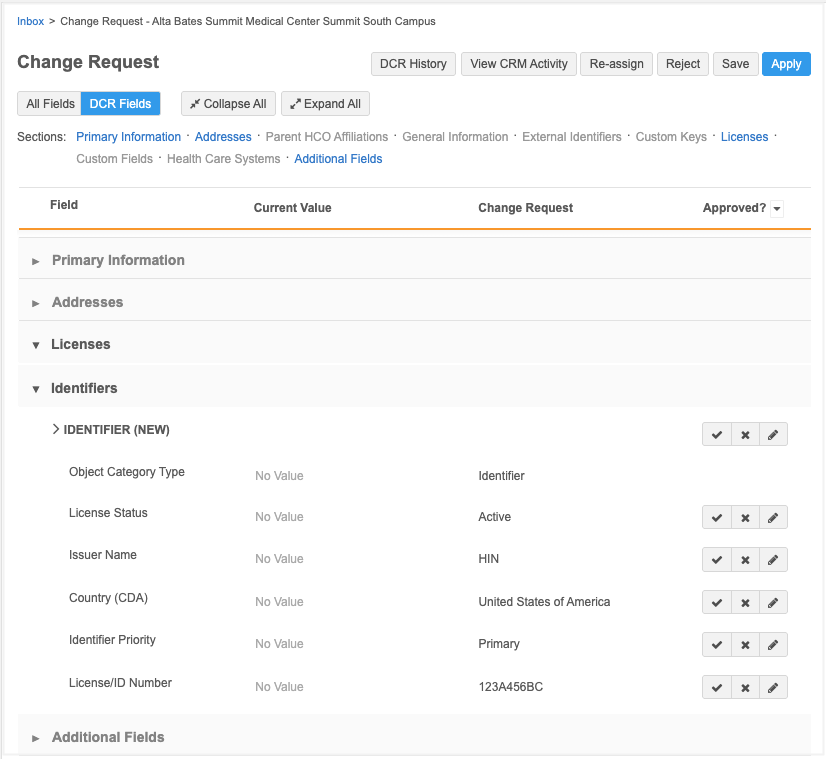
Changes to the Object Category Type field
The Object Category Type field cannot be changed after it has been set to LICENSE or ID. The change will be rejected automatically.
Existing Licenses will have no value for this field. When a record is updated in any way, the field will be set to LICENSE by default. Existing Licenses cannot be set to ID.
Considerations for other features
Sub-object match rules
Network MDM applies internal sub-object match rules to any merge comparison. The rules use specific fields to compare sub-object records to find duplicates.
To ensure that Licenses and Identifiers are not compared with each other, different fields will be used for each type.
| Licenses | Identifiers |
|---|---|
| license_number__v type_value__v license_degree__v |
id__v issuer_name__v |
Match configurations
The default match configurations in the Network MDM UI are not updated for Identifiers.
Review your source data to determine if your existing match rules should be updated to prevent over-matching.
Validation rules
Licenses and Identifiers share the same sub-object, so existing validation rules might trigger for both record types.
Review your rules and update them to include the Object Category Type field to differentiate between License and Identifier records.
Network Expression (NEX) rules
Review any configured rules and update them to include the Object Category Type field to differentiate between License and Identifier records.
Reports
Review your saved reports and update them to include the Object Category Type field to differentiate between License and Identifier records.