IQVIA OneKey Connector
The IQVIA OneKey Connector was introduced in Network MDM 26R1.0. The bi-directional connection with IQVIA® OneKey enables you to seamlessly integrate OneKey as your third-party data provider for HCOs and HCPs.
Important: A third-party agreement (TPA) must be in place before OneKey data can be loaded into Veeva Network MDM.
The following enhancements are added in this release.
Processing IQVIA reference data
Network MDM now dynamically manages reference data updates from IQVIA to prevent HCP and HCO record rejections during data loads.
When the IQVIA OneKey source subscription runs, the OneKey custom reference field values in Network MDM (for example, types and specialty) are updated with the list of values from the IQVIA data model. These updates are applied before the data files are processed, eliminating data loading errors caused by missing reference codes.
This enhancement is enabled by default.
OneKey reference data file
As part of the IQVIA OneKey Connector, IQVIA publishes source files to your Network MDM FTP on a regular schedule as delta feeds. One of the files, codetable.csv, contains updates to IQVIA reference data.
The file is formatted so it can be consumed by Network MDM and be processed during the source subscription job.
Example file
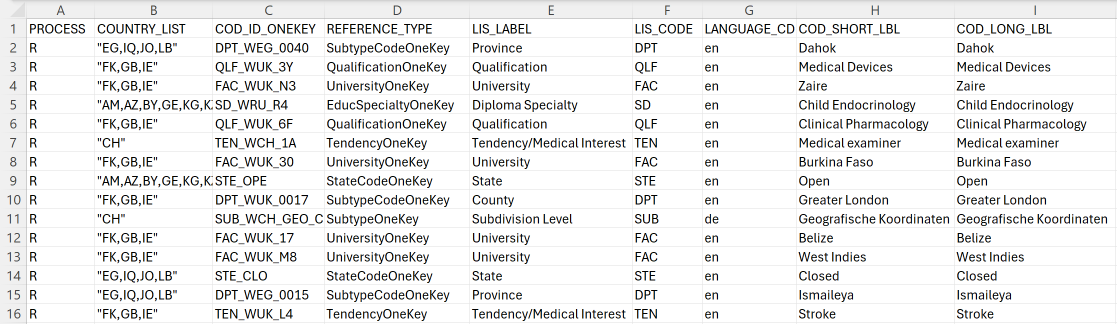
Network MDM uses the following columns to process the IQVIA reference data.
| Column | Details |
|---|---|
| PROCESS | The action. R (Upsert) or D (Delete). |
| COUNTRY_LIST | The "Active Country" list. The countries listed here determine if the code is added or removed from a country. |
| COD_ID_ONEKEY | The OneKey reference code. |
| REFERENCE_TYPE | The custom OneKey reference types used by the IQVIA OneKey connector. |
|
LANGUAGE_CD |
The Network MDM language code. IQVIA sends one row for each language. For example, an update for "en" is one row, and an update for "fr" is another row. |
| COD_LONG_LBL | The translation label for the code description. |
| COD_END_VAL_DATE | The date the code is valid until on the OneKey side.
Typically, the date is defined as 9999-12-31. This date column can be used to inactivate a reference code. Codes are also inactivated using D in the Process column. |
The other columns in the file are not considered during the reference data updates.
Supported actions
Changes to the Network MDM reference field values will be made using the following details in the codetable.csv file.
| Action | Process | Condition |
|---|---|---|
| Add reference code for an existing reference type | R | COD_ID_ONEKEY does not exist for the REFERENCE_TYPE. |
| Add reference codes for active countries | R | COD_ID_ONEKEY exists for the REFERENCE_TYPE and a new country is in the COUNTRY_LIST. |
| Remove reference codes from active countries | R | COD_ID_ONEKEY exists for the REFERENCE_TYPE and existing country is not in the COUNTRY_LIST. |
| Create or update reference code translation | R | COD_ID_ONEKEY exists or does not exist, language code is defined in LANGUAGE_CD, and COD_LONG_LBL is populated. |
| Inactivate reference codes | D | COD_ID_ONEKEY exists for the REFERENCE_TYPE. |
| Inactivate reference codes | R | COD_ID_ONEKEY exists and COD_END_VAL_DATE is different from 999-12-31. |
Reference update job
When your IQVIA OneKey source subscription runs, the reference data job runs first as a separate job. The codetable.csv file is loaded and processed before the data files (hcp.csv, hco.csv) are loaded.
The job displays in the Job History section.
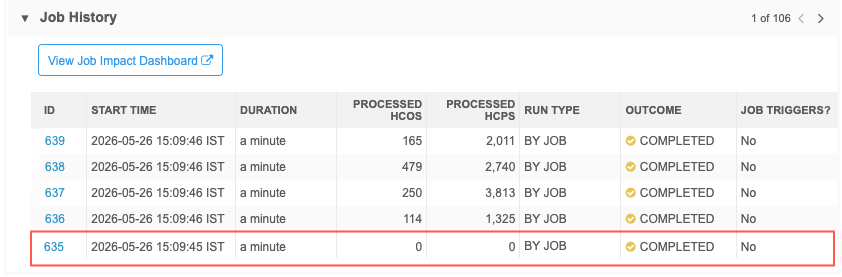
Click the Job ID to open the Job Details page.
On the page, you can see that the codetable.csv file was processed. Job statistics are not currently available for the reference data updates.
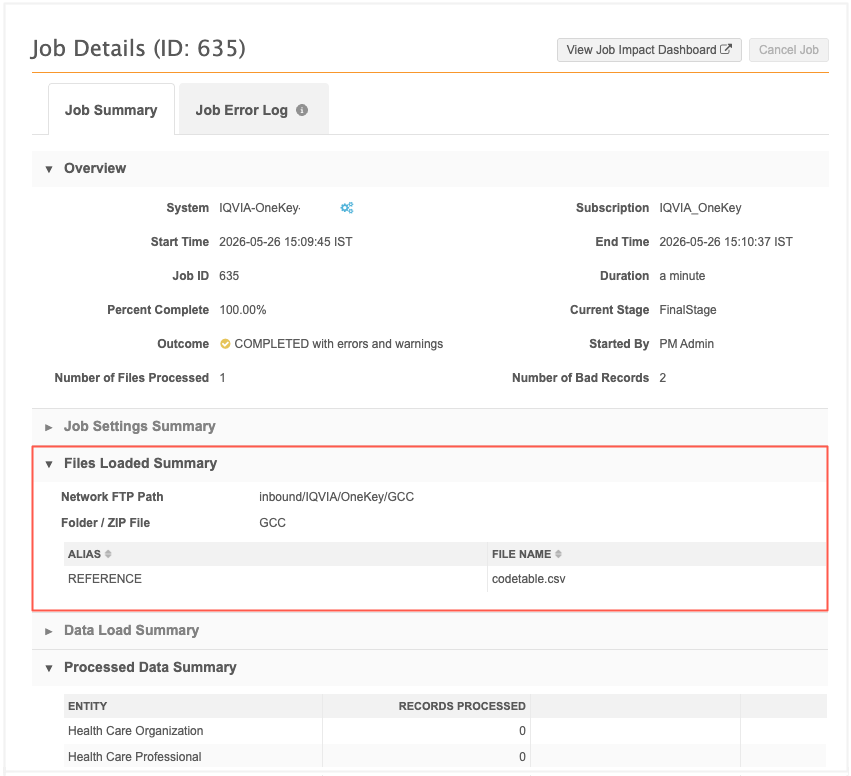
The relevant fields in the codetable.csv file are validated. If any required field is empty, the invalid row is dropped and a warning displays on the Job Error Log tab.
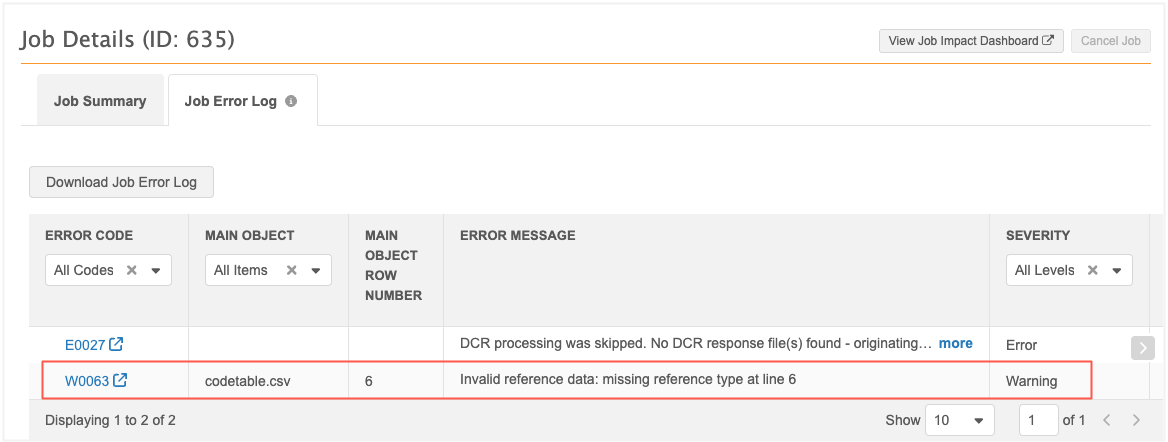
The job continues so the OneKey HCP and HCO data updates can be processed.
Warnings
The following warnings are created for IQVIA reference data issues.
| Code | Details | Action |
|---|---|---|
| W0063 | A row is missing a value for the mandatory REFERENCE_TYPE column, making it impossible to categorize the record. | Populate the REFERENCE_TYPE field for the specified line in your source file to ensure the code is mapped to the correct category. |
| W0064 | The unique identifier for a reference code (COD_ID_ONEKEY) is missing for the specified reference type. | Provide the missing code value in the source file. Every reference entry must have a unique ID to be processed by Network MDM. |
| W0065 | The mandatory PROCESS column (instruction) is empty, so the system does not know whether to add/update or delete the code. | Add the appropriate instruction to the PROCESS column (for example, R for Replace/Update or D for Delete). |
| W0066 | The value provided in the PROCESS column is not supported. Only R (Replace) and D (Delete) are recognized. | Correct the instruction value in the source file to either R or Das required. |
| W0067 | The reference code entry is missing a language code (LANGUAGE_CD) for its label. | Ensure a valid ISO language code (for example, "en", "fr") is provided in the LANGUAGE_CD column for the specified line. |
| W0068 | The language code provided in the LANGUAGE_CD column is not supported or recognized by the system. | Verify and correct the language code to a supported standard format. Ensure the language is supported in Network MDM. |
| W0069 | The mandatory start date for the reference code's validity (COD_BEG_VAL_DATE) is missing. | Populate the COD_BEG_VAL_DATE column in your source file with a valid start date. |
| W0070 | The value provided for the begin-valid date is not a recognized date format (YYYY-MM-DD). | Correct the date in the COD_BEG_VAL_DATE column to match the expected format (YYYY-MM-DD). |
| W0071 | The reference code entry is missing an end-valid date (COD_END_VAL_DATE). | Provide a valid end date in the source file. For codes that do not expire, use a far-future date or the standard system default. |
| W0072 | The value provided for the end-valid date is incorrectly formatted or contains invalid characters. | Verify and correct the date format in the COD_END_VAL_DATE column of your source file. |
| W0073 | The descriptive label for the reference code (COD_LONG_LBL) is missing. | Provide a descriptive label in the COD_LONG_LBL column to ensure the reference code is identifiable in the UI. |
| W0074 | Multiple rows for the same reference code were found with contradictory instructions (for example, one row says Delete, another says Replace). | Review the source file for duplicate entries of the same reference code. Ensure the PROCESS instruction is consistent across all rows for that code. |
| W0076 | The mandatory country list for the reference code's validity (COUNTRY_LIST) is missing. | Populate the COUNTRY_LIST column in your source file with a valid list of countries. |
Simulation mode
If the source subscription job is run in Simulation Mode, the reference data updates in the codetable.csv file will be processed. The data updates will remain simulated as usual.
Unmerge OneKey records
Network MDM can now process unmerges that are sent from IQVIA in a source file. When your IQVIA OneKey source subscription runs, the OneKey records are unmerged. Previously, source subscription jobs processed the merged records only.
This enhancement is enabled by default.
Unmerged records file
IQVIA publishes OneKey source files to your Network MDM FTP as scheduled delta feeds. One of the files, merge_unmerge_events.csv, contains merges and unmerges that need to be actioned in your instance.
The records IQVIA has merged and unmerged are identified by the OneKey ID value. When the source subscription runs, Network MDM will now unmerge the records in your instance.
Example merge_unmerge_events file
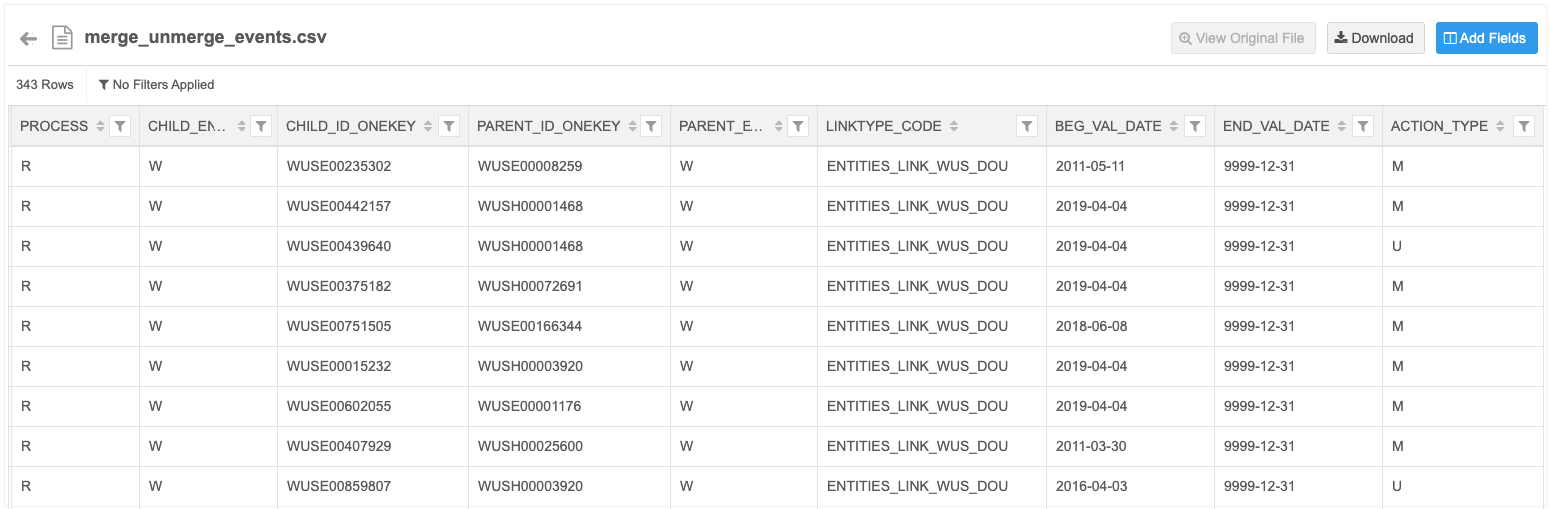
The file contains the following important fields:
| Column | Details |
|---|---|
| PROCESS | Instructions on how to handle the data: R (Upsert) or D (Delete) |
| CHILD_ENTITY_TYPE | The object type of the losing record: W (Workplace (HCO)) or I (Individual (HCP)). |
| CHILD_ID_ONEKEY | The OneKey ID of the losing record (the new unmerged record). |
| PARENT_ID_TYPE | The OneKey ID of the of the winning record. |
| PARENT_ENTITY_TYPE | The object type of the winning record: W (Workplace (HCO)) or I (Individual (HCP)). |
| ACTION_TYPE | The action taken: M (Merge) or U (Unmerge). |
The other columns in the file are not considered during the unmerge action.
About the unmerge job process
Source subscriptions will unmerge the records identified by IQVIA before processing the updates in the data files. This ensures merged records are successfully split and isolated first, preventing the incoming data feed updates from updating the winning merge record with data from the losing record.
Unmerged records
When the records are unmerged, the following actions are taken for each record.
Winning record
-
Any active custom keys belonging to the split record are inactivated.
Split record (new unmerged record)
-
A new Network ID is assigned.
-
IQVIA custom keys originally associated with the record before it was merged are returned to the record.
Important Customer-owned sub-objects and fields cannot be moved to the new record. You must add them back to the new unmerged record. Use reporting to help identify the sub-objects and fields to bring back.
Integration Dashboard
The IQVIA - OneKey Connector is now included in the high-level system summary on the Integration Dashboard. Administrators can click the IQVIA system to view the specific configuration details.
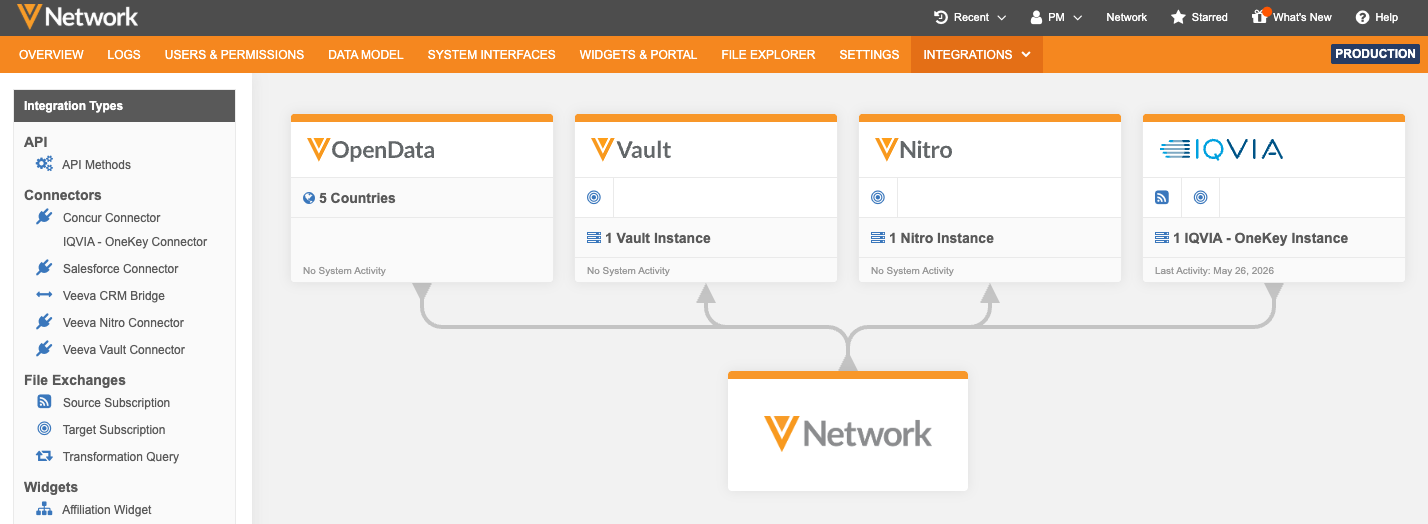
This enhancement is enabled by default if you have an IQVIA OneKey system configured in your Network MDM instance.
IQVIA OneKey configurations
From the dashboard, click the system to open the configuration pop-up.
System Details
The Details tab displays by default. It contains the IQVIA-OneKey system configuration
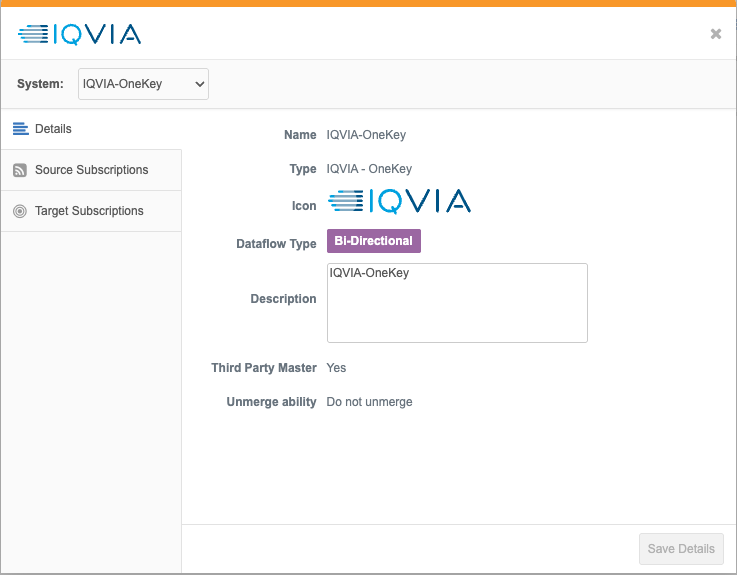
Integration details
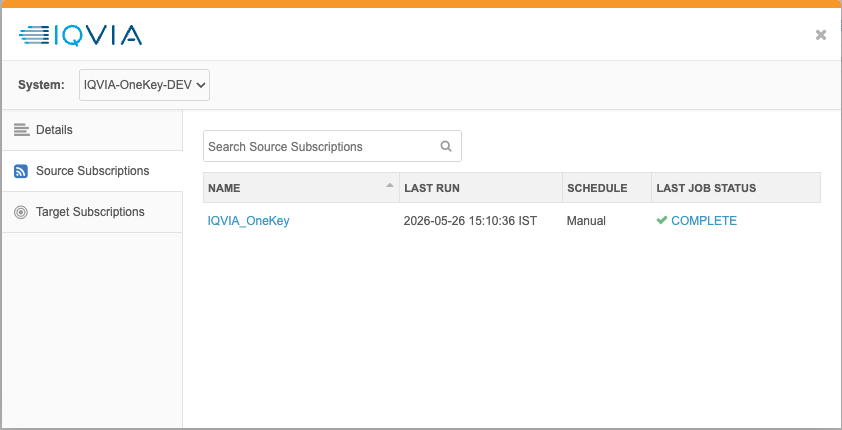
Click on an integration to view more details. For example, click Source Subscriptions to see details about the job that loads the IQVIA OneKey data. The time of the last job displays in your timezone.
-
Click the subscription name to navigate to that subscription configuration.
-
Click the link in the Last Job Status column to open the job details for the latest job.