Configuring null matching in features
DM
Use the Null value options setting to determine the match outcome when null values exist.
By default, the setting is Neutral for new features. This means that comparisons between fields when one or both do not have a value don't positively or negatively impact a match outcome.
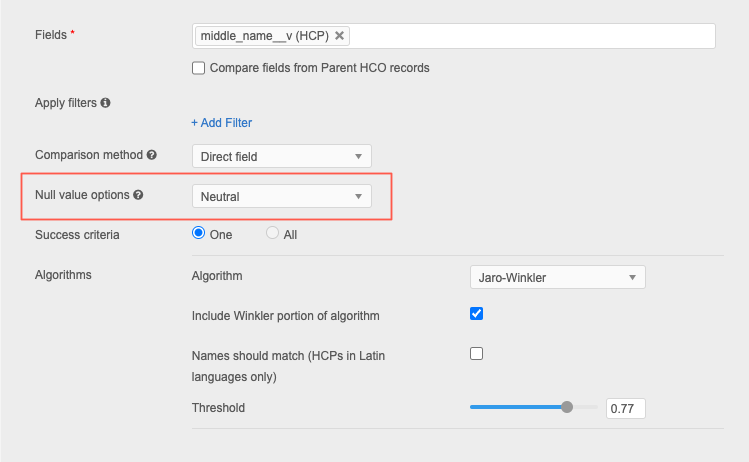
This option is important since null values can exist in a field in either or both of the records being compared. Making the correct choice of how to treat null values will improve overall match outcomes.
A field you choose to match on may be an important field, like first_name__v. If the data in the incoming data for that field is empty, you do not want a comparison on the first_name__v field to be considered a match. Change the default Null value options setting to Do not match so any comparison that includes an empty field will not be considered a match.
Configure null options
The Null value options setting is available on features for all objects (Match Rules tab on match configurations).
Options
Feature configurations can use any of these Null value options to define the behavior when records are compared:
-
Do not match - If the field is empty in one or both records, the records do not match.
-
Neutral (default) - If the field is empty in one or both records, abstain from determining a match. These records are not considered to match or not match.
-
Match - If the field is empty in one or both records, they match.
-
Match only if both are null - If the field is empty in both records, they match. If the field is empty in only one record, they do not match.
Review these scenarios between Field 1 and Field 2 to understand the vote for the feature.
| Field 1 | Field 2 | Do not match | Neutral | Match | Match only if both are null |
| null | null | REFUTE | ABSTAIN | SUPPORT | SUPPORT |
| null | value | REFUTE | ABSTAIN | SUPPORT |
REFUTE |
| value | null | REFUTE | ABSTAIN | SUPPORT |
REFUTE |
| value | value | compare | compare | compare | compare |
Votes
The following votes are assigned to the field pairing based on the value set for the Null value options setting.
- SUPPORT - Field pairings match.
- REFUTE - Field pairings do not match.
-
ABSTAIN - The comparison will not affect the outcome of other comparisons within the feature.
However, if all outcomes of individual match rules in a feature return a value of ABSTAIN, then the rule is rejected.
This is important to remember if there is only one feature in the feature set (for example, NPI). If that match comparison returns a value of ABSTAIN, the feature set will be rejected because there's only one outcome.
-
compare - The fields contain values so the Null value options setting is ignored.
To learn how these votes can impact the match outcome for records, see Evaluating field pairs in features.
Considerations for choosing options
The Middle Name field is not always populated for HCP records. Using the Middle Name field as an example, consider the outcome for the following null value options:
-
Do not match - The Middle Name matching rule will fail if one record had a middle name and the other did not.
-
Neutral - Allows the rule to compare middle names only if they exist in both records.
By using the Neutral option, if this field is empty on either record, the Middle Name portion of the feature would return a value of ABSTAIN and won’t make the match process fail. This is a good option if there are multiple features in the feature set.
 Example Feature configuration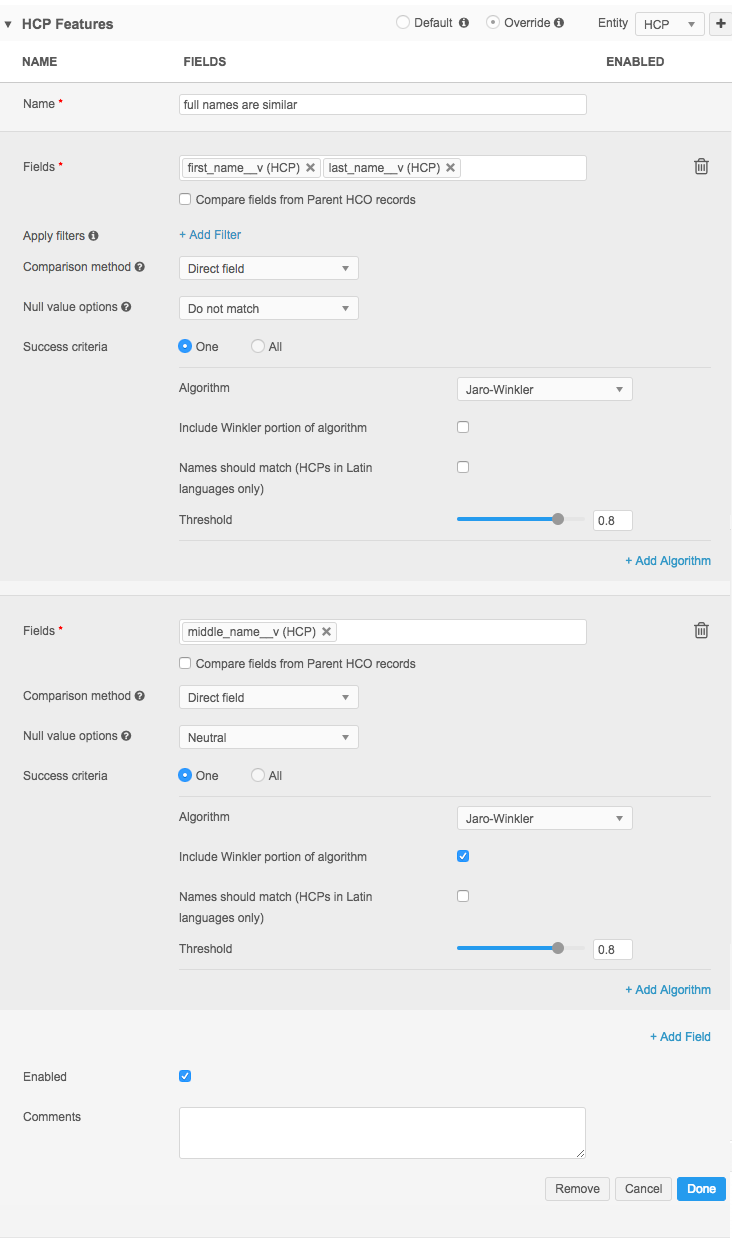
Advanced mode
The Null value options values are different between the Match UI and Advanced Mode.
| Match UI | Advanced Mode |
|---|---|
| Do not match | STRICT |
| Neutral | IGNORE |
| Match | WILDCARD |
| Match only if both are null | VALUE |
Advanced Mode
This definition looks like this in Advanced Mode.
<feature>
    <name>full names are similar</name>
    <enabled>true</enabled>
    <comments></comments>
    <collate>
        <direct>
            <field>first_name__v</field>
            <field>last_name__v</field>
            <nullMatching>STRICT</nullMatching>
            <jaroWinklerComparison>
                <usingWinklerExtention>false</usingWinklerExtention>
                <usingLargeStringTolerance>false</usingLargeStringTolerance>
                <threshold>0.80</threshold>
            </jaroWinklerComparison>
        </direct>
        <!-- look at middle name separately so its absence doesn't throw off the results -->
        <direct>
            <field>middle_name__v</field>
            <nullMatching>IGNORE</nullMatching>
            <jaroWinklerComparison>
                <usingWinklerExtention>true</usingWinklerExtention>
                <usingLargeStringTolerance>false</usingLargeStringTolerance>
                <threshold>0.80</threshold>
            </jaroWinklerComparison>
        </direct>
    </collate>
</feature>
Null matching outcomes
The following table illustrates matching options and outcomes between fields where at least one value is null.
Checkmarks and Xs are used to further illustrate the match outcomes.
Supported outcomes:
- Match (SUPPORT) - "Yes" vote within the feature (denoted by a checkmark)
- No match (REFUTE) - "No" vote within the feature (denoted by an x)
- No impact on the final match outcome for the complete feature (denoted by a -) (ABSTAIN).
| Record 1 | Record 2 | Match (wildcard) |
Do not match (strict) |
Neutral (ignore) |
Only match if both are null (value) |
| Null | Null |
|
|
- |
|
| Value | Null |
|
|
- |
|
| Null | Value |
|
|
- |
|
The following examples illustrate various null matching outcomes for a match feature that includes a First name, Middle name, and Last name.
Example 1: Match rule is too restrictive
In this example, the complete feature fails the match rules because at least one component of the feature did not match. In this case, the Middle Name did not match.
| Field name | Record 1 | Record 2 | Null value option | Result | Outcome by field |
| First Name | John | Null | Neutral |
- |
The match rule used by the first name field will not have a vote in the overall outcome of this feature |
| Middle Name | Michael | Null |
Do not Match
or Only match if both are null |
|
The match rule used by the middle name field will vote "No," meaning the middle name fields for these records do not match. |
| Last Name | Null | Smith | Match |
|
The match rule used by the last name field will vote "Yes," meaning the last name fields for these records match. |
Explanation
This is not a good feature configuration because it is too restrictive. Records won't match if the Middle Name field values don't match. Basing a match configuration on the middle name does not follow best practice; a less weighted field like this should use Match or Neutral as the Null value option.
Recommendation
For Middle Name, in particular, Match should be used when the match rule also matches only on first initial, using the Substring algorithm.
Example 2: Match rule causes overmatching
In this example, the complete feature passes the match rules because none of the components have a result of REFUTE. They are considered a match.
| Field name | Record 1 | Record 2 | Null value selection | Result | Outcome by field |
| First Name | John | Null | Match |
|
The match rule used by the First Name field will vote "Yes," meaning the First Name fields for these records match. |
| Middle Name | Michael | Null | Neutral |
- |
The match rule used by the Middle Name field will not have a vote in the overall outcome of this feature. |
| Last Name | Null | Smith | Match |
|
The match rule used by the Last Name field will vote "Yes," meaning the Last Name fields for these records match. |
Explanation
In this example, record "John Michael <no last name>" is being considered a match to "<no first name> Michael Smith." Classifying these records as a match does not follow best practices and should not be used as a match configuration. This type of feature configuration will result in overmatching.
Recommendation
The Last Name and, to a lesser degree, the First Name fields should both have values to be considered a match.
Name fields are very important and should always contain values for records to be considered a match.
Example 3: Match rule should make confident matches
In this example, the complete feature fails the match rules because at least one component of the feature did not match.
| Field name | Record 1 | Record 2 | Null value option | Result | Outcome by field |
| First Name | John | Null | Match |
|
The match rule for First Name will vote "Yes," meaning the First Name fields for these records match. |
| Middle Name | Michael | Null | Neutral |
- |
The match rule for middle name will not have a vote in the overall outcome of this feature. |
| Last Name | Null | Smith | Do not Match
or Only match if both are null |
|
The match rule for Last Name will vote "No," meaning the Last Name fields for these records do not match. |
Explanation
Failing a match because the Last Name did not match while the other name fields did match is reasonable.
However, be aware that another pair of records could have the Last Name field populated but these settings would consider "John Michael Smith" a confident match to "<no first name> Michael Smith."
Recommendation
First Name and Last Name fields should contain values to be considered a confident match.
Example 4: Match rule best practice for Name fields
As illustrated in the examples above, the value that you choose for the Null value option setting for Name fields is important.
In this example, see the recommended Null value option values to use for First Name and Last Name fields.
| Field name | Record 1 | Record 2 | Null value selection | Result | Outcome by field |
| First Name | John | Null | Do not Match
or Only match if both are null |
|
The match rule for First Name will vote "No," meaning the First Name fields for these records do not match. |
| Middle Name | Michael | Null | Neutral |
- |
The match rule for Middle Name field will not have a vote in the overall outcome of this feature. |
| Last Name | Null | Smith | Do not Match
or Only match if both are null |
|
The match rule for Last Name will vote "No," meaning the Last Name fields for these records do not match. |
Explanation
The complete feature fails the match rules because at least one component of the feature did not match. Failing a match because First Name and Last Name did not match due to null values is the recommended method to configure a feature.
Recommendation
First Name and Last Name are important fields that should always have values to be considered a confident match.
Impact to field comparison outcomes
This topic reviews how to configure features for matching fields with null values. To learn more about how null values impact field comparison outcomes, see Evaluating field pairs in a feature.